

Cloud AI: How It Works, Benefits, Uses, and Challenges

Cloud AI empowers businesses to leverage advanced artificial intelligence without the burden of maintaining expensive local infrastructure. By accessing models, development tools, and massive computing power through remote platforms, organizations can innovate faster and scale efficiently. This guide explores how these systems operate, the primary benefits for modern workflows, and the critical challenges you must navigate to build reliable, cost-effective solutions for your specific needs.
This approach makes technologies such as machine learning, generative AI, image recognition, and natural language processing more accessible. A small business can use an AI-powered customer support system, while a developer can connect a large language model to an application through an API. Both can do so without purchasing their own AI servers.
However, cloud AI is more than simply running a chatbot online. It includes the infrastructure, software, models, data pipelines, and security controls needed to develop and operate AI applications. Understanding how these components work together helps individuals and organizations choose suitable services, control costs, protect sensitive information, and build reliable AI solutions.
What Is Cloud AI?
Cloud AI refers to artificial intelligence services and computing resources delivered through cloud platforms over a network, usually the internet. These services allow users to build, train, deploy, and operate AI systems without managing all the underlying hardware themselves.
Traditional AI development may require powerful processors, substantial memory, specialized software, and technical expertise. Cloud AI providers make many of these resources available on demand. Depending on the service, users can access ready-made AI models, managed machine learning environments, GPU-based computing, or application programming interfaces (APIs).
For example, an online retailer could use a cloud AI service to classify customer support messages, recommend relevant products, or summarize customer feedback. The retailer can integrate these capabilities into its existing software instead of developing every model from scratch.
Cloud AI is not a single product or technology. It is an approach that combines cloud infrastructure with AI capabilities.
Cloud AI vs. Cloud Computing
Cloud computing provides remote access to computing resources, including servers, storage, databases, and networking where as Cloud AI uses these resources to perform tasks that require artificial intelligence.
The difference is the purpose of the workload. A cloud database might store customer orders and retrieve them when requested. A cloud AI system could analyze those orders to identify purchasing patterns or predict which products a customer may want.
The two technologies work together. AI applications depend on computing, storage, networking, and security services, while cloud platforms provide the environment in which those applications run.
Cloud AI vs. Traditional Artificial Intelligence
Traditional AI can operate on local computers, private data centers, or specialized hardware. Cloud AI moves some or all of the computing process to remotely managed infrastructure.
Local AI may offer greater control over data and predictable access without an internet connection. Cloud AI can provide access to larger models and scalable computing resources, depending on the provider and service.
Neither approach is automatically better. The right choice depends on the application’s performance requirements, data sensitivity, budget, and available infrastructure.
How Does Cloud AI Work?
Cloud AI typically follows a sequence of connected steps. The exact process depends on whether someone is using an existing AI application, developing a custom model, or training a model from the beginning.
1. Data Collection and Preparation
AI systems need information to perform useful tasks. This information might include text documents, images, audio recordings, transaction records, or sensor readings.
Before using the data, organizations may need to remove duplicates, correct errors, standardize formats, and address privacy concerns. Poor-quality data can lead to unreliable predictions, regardless of how powerful the cloud infrastructure is.
For example, a company building an AI document-processing system might first organize invoices into consistent fields, such as invoice number, supplier, date, and total amount.
2. AI Model Selection or Training
Users can select an existing model or train a model for a particular task. Ready-made models are often suitable for common requirements, such as text summarization, translation, image classification, and speech recognition.
Custom training becomes useful when an organization needs behavior tailored to a specialized task or dataset. Training may require significant computing power, particularly for large deep learning models.
Cloud platforms can provide CPUs, GPUs, and other specialized accelerators. These resources can be selected according to the workload rather than purchased and maintained permanently.
3. Model Deployment and Inference
After a model is ready, it must be made available to an application or user. This process is called deployment.
When the deployed model receives new input and generates a prediction or response, the process is called inference.
Consider a customer service chatbot. A customer submits a question, the application sends the relevant input to an AI service, and the model generates a response. The application then displays that response to the customer.
Inference can happen on shared infrastructure, dedicated servers, or other supported environments. Response speed depends on factors such as model size, network latency, input length, computing capacity, and service configuration.
4. Monitoring and Improvement
Deploying an AI model is not the end of the process. Developers must monitor its accuracy, response times, operating costs, and failure patterns.
For generative AI, monitoring may include checking whether answers are relevant, whether the model invents facts, and whether it follows instructions. For predictive systems, teams may track accuracy and detect changes in incoming data.
Organizations can then adjust prompts, improve data quality, change models, or retrain systems when appropriate.
Understanding the Cloud AI Architecture
At its core, the cloud ai architecture relies on a seamless interaction between client-side applications and remote, high-performance computing clusters. When a user or application initiates a request, it travels via an API call to the provider’s infrastructure. This request is routed to specialized servers equipped with high-end GPU acceleration, which are essential for processing the complex mathematical operations required by modern deep learning models.
Once the request reaches the server, the model performs inference—the process of generating predictions or content based on the input data. To ensure efficiency, providers often use load balancers to distribute traffic, minimizing latency and ensuring that the system remains responsive even under heavy load. The final output is then returned to the client, completing the cycle. This entire process happens in milliseconds, abstracting the immense complexity of distributed computing away from the end user. By leveraging this architecture, developers can focus on building features rather than managing the underlying hardware clusters required to run sophisticated models.
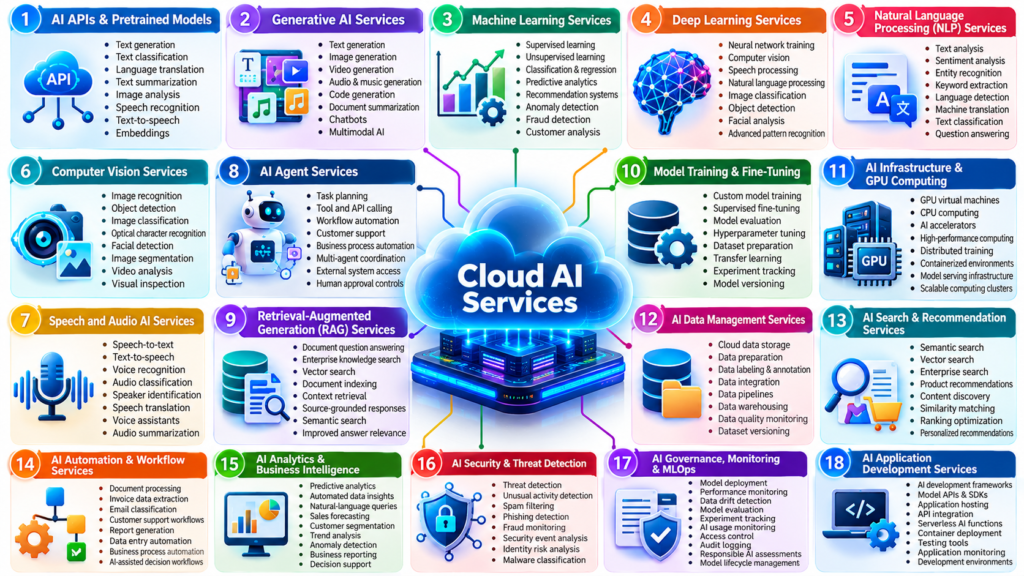
Main Types of Cloud AI Services
Cloud AI covers several categories of services. Understanding them makes it easier to identify the right solution for a particular project.
AI APIs and Ready-Made Models
AI APIs allow applications to use existing models through defined requests and responses. Developers can integrate capabilities such as text generation, speech transcription, translation, image analysis, and embeddings without building the underlying models themselves.
This option is useful when a business needs a specific AI capability quickly. However, available functions, data handling practices, usage limits, and costs depend on the service.
Managed Machine Learning Platforms
Managed machine learning platforms support tasks such as preparing datasets, experimenting with algorithms, training models, deploying endpoints, and monitoring performance.
They are useful for data science teams developing predictive systems, fraud detection models, demand forecasts, or classification tools.
Managed platforms reduce infrastructure management, but they do not eliminate the need for data scientists, model evaluation, or responsible deployment practices.
Generative AI Platforms
Generative AI services provide access to models that can create text, code, images, audio, or other supported outputs. Large language models (LLMs) are particularly useful for language-based tasks, including summarization, question answering, and document analysis.
Some platforms also support multimodal models that can process more than one type of input, such as text and images.
Businesses can use these models directly or combine them with company information, application logic, and other software systems. The quality of the result still depends on the model, the input, and the surrounding application.
Cloud AI Infrastructure
Some projects require direct access to computing resources rather than a ready-made AI service. Cloud infrastructure can provide virtual machines, GPUs, storage, networking, and container-based environments.
This approach offers greater control over software, model deployment, and system configuration. It also requires more technical work because developers remain responsible for many operational decisions.
Major Cloud AI Providers and Platforms
Several technology companies provide cloud infrastructure and AI services. Their offerings overlap, but the best choice depends on existing systems, model requirements, regional availability, security needs, and budget.
| Platform | Main AI and cloud capabilities | Suitable use cases |
|---|---|---|
| Amazon Web Services (AWS) | Cloud infrastructure, managed machine learning, and generative AI services | Enterprise applications, custom ML, scalable AI workloads |
| Microsoft Azure | Cloud infrastructure, AI services, and machine learning tools | Business applications, Microsoft ecosystem integration, model development |
| Google Cloud | Machine learning infrastructure, generative AI services, and model development tools | Data analytics, model development, generative AI applications |
| IBM Cloud | Enterprise cloud services and AI capabilities | Governed enterprise AI and selected hybrid environments |
| Oracle Cloud Infrastructure (OCI) | Cloud infrastructure, GPU computing, and AI-related services | Enterprise workloads and compute-intensive AI applications |
These are broad platform descriptions, not a ranking. Individual features, supported models, service names, and availability can change over time.
How to Choose a Cloud AI Platform
Before selecting a provider, compare the following factors:
- Model availability: Confirm that the required model and capabilities are supported.
- Data protection: Review retention policies, access controls, encryption, and data-processing terms.
- Integration: Check compatibility with your databases, applications, identity systems, and development tools.
- Performance: Test response times and throughput with realistic workloads.
- Pricing: Estimate both development and production costs, including supporting infrastructure.
- Portability: Determine how difficult it would be to move models, data, and applications to another provider.
A platform with the most features is not necessarily the best choice. A simpler managed service may be more practical if it satisfies the actual requirements.
Real-World Applications of Cloud AI
Cloud AI is useful when organizations need to analyze large amounts of information, automate repetitive tasks, or add intelligent features to existing applications. Its value depends on the problem being solved, not simply on whether a company uses an advanced model.
Customer Support and Business Automation
Businesses can connect AI models to customer support platforms to classify incoming messages, draft responses, summarize conversations, and help agents find relevant information.
For example, an online store could use a cloud-based AI assistant to answer questions about delivery policies and product specifications. The assistant could retrieve information from approved company documents before responding.
More advanced systems can connect to business software through APIs. However, actions such as issuing refunds or changing customer records should use permission controls, validation rules, and appropriate human approval.
Healthcare, Finance, and Data Analysis
Cloud AI can support specialized tasks across several industries:
- Healthcare: Medical organizations may use AI to organize documents, summarize administrative records, or assist with approved image-analysis workflows. Clinical use requires appropriate validation and professional oversight.
- Finance: Financial institutions can apply machine learning to transaction monitoring, fraud detection, forecasting, and risk analysis.
- Retail: Retailers can analyze sales patterns, forecast demand, and personalize product recommendations.
- Manufacturing: Companies can analyze equipment sensor data to identify unusual patterns and support predictive maintenance.
- Education: Students and teachers can use AI applications for explanations, language practice, research assistance, and feedback.
These are established categories of AI application, but results vary by implementation. An AI system should not be assumed to deliver accurate predictions or measurable savings simply because it runs in the cloud.
Content Creation and Software Development
Cloud AI makes generative tools accessible through websites, applications, and developer APIs. Writers can generate outlines, summarize research, or improve drafts. Developers can request code suggestions, explain unfamiliar code, and create software tests.
For instance, a developer building an online booking system could use an AI coding assistant to generate an initial API example. The developer would still need to test the code, check security, and confirm that it works with the existing application.
The same principle applies to content creation: AI can speed up parts of the workflow, but factual verification, originality, and editorial judgment remain important.
Real-World Examples of Cloud AI Success
Major technology platforms demonstrate the transformative power of cloud ai in daily operations. For instance, streaming services like Netflix and Spotify utilize cloud-based machine learning models to process massive amounts of user interaction data in real-time. By analyzing listening or viewing habits against millions of other users, these platforms deliver highly personalized recommendations that keep users engaged.
Beyond entertainment, these technologies are vital for business growth. Companies often integrate these AI-driven analytics to optimize supply chains, predict market trends, and automate customer service interactions. For organizations looking to scale, leveraging these tools is often more efficient than building proprietary systems from scratch. To learn more about how businesses leverage these insights, explore our guide on Best Data Analytics Companies for Business Growth. These examples highlight that the primary benefit is not just the technology itself, but the ability to derive actionable intelligence from vast, distributed data sources.
Benefits of Cloud AI
Cloud AI offers several practical advantages, particularly for teams that do not want to manage specialized computing infrastructure themselves.
Scalability and Access to Computing Power
AI workloads can require substantial computing resources, especially when training large models or processing many requests simultaneously. Cloud platforms allow organizations to select computing capacity according to their needs.
A company might start with a small deployment and increase capacity as demand grows. Some services also support automatic scaling, although configuration and usage limits vary.
This flexibility can reduce the need to purchase hardware before the actual workload is understood.
Faster Development and Easier Integration
Managed AI services provide existing models, APIs, deployment tools, and monitoring capabilities. Developers can focus on application logic rather than building every component from the ground up.
Cloud AI can also connect with databases, document stores, analytics systems, and business applications. This makes it possible to add AI to an existing workflow without replacing the entire technology stack.
Access to Advanced AI Models
Cloud platforms can provide access to models that would be difficult or expensive to operate on ordinary computers. Depending on the service, these may include large language models, multimodal models, image-generation systems, and specialized machine learning models.
Users can often experiment with different models and select one that balances accuracy, latency, and cost.
Reduced Infrastructure Management
Managed services shift some responsibilities, such as hardware maintenance and parts of deployment operations, to the provider. This can be particularly useful for small businesses and development teams.
However, managed infrastructure does not remove responsibility for application security, data governance, model evaluation, or business continuity.
Limitations and Risks of Cloud AI
Cloud AI is not automatically cheaper, safer, or more accurate than every alternative. Organizations should evaluate its disadvantages before committing to a platform.
Privacy and Data Security
When an application sends information to a cloud AI service, that information may pass through infrastructure operated by an external provider. The precise handling depends on the service, configuration, contractual terms, and applicable laws.
Before submitting confidential information, review:
- Whether inputs and outputs are retained.
- Whether data may be used to improve or train models.
- Available encryption and access controls.
- Data residency and deletion requirements.
- Compliance obligations relevant to your industry.
Avoid sending passwords, unnecessary personal information, confidential business records, or regulated data to services that have not been approved for that use.
Organizations can use established AI risk-management frameworks to structure risk assessment and ongoing oversight.
AI Hallucinations and Incorrect Results
Generative AI models can produce convincing but incorrect answers. This problem is commonly called hallucination.
For example, a business chatbot might incorrectly describe a return policy if it relies only on its model’s general knowledge. Connecting the chatbot to current, approved policy documents can improve grounding, but it does not guarantee that every answer will be correct.
Retrieval-augmented generation (RAG) is one way to address this problem. It retrieves relevant information from a knowledge source and supplies that information to the model when generating a response.
Important safeguards include source checking, structured evaluations, confidence thresholds where appropriate, and human review for consequential decisions.
Internet Dependence and Latency
Cloud AI applications usually require a working network connection. Network delays, provider outages, regional service limitations, and rate limits can affect availability and response times.
Applications that need predictable low latency or must continue operating without connectivity may benefit from edge AI or local inference.
Vendor Lock-In
An application built around one provider’s proprietary models, APIs, data formats, and deployment tools may be difficult to move elsewhere.
Teams can reduce this risk by separating application logic from provider-specific code, documenting dependencies, and testing alternative models where practical. However, switching providers may still require changes to prompts, evaluations, infrastructure, and security controls.
Optimizing Performance and Latency
Achieving peak performance in cloud ai environments often requires strategic optimization of data flow and model interaction. Latency, the delay between sending a request and receiving a response, can be a critical bottleneck for real-time applications. To mitigate this, developers should prioritize proximity by deploying resources in cloud regions closest to their primary user base. Additionally, utilizing techniques like Retrieval-Augmented Generation (RAG) can significantly improve response times by fetching relevant context from a vector database before the model generates an answer, reducing the need for the model to process excessive, unnecessary information.
Furthermore, optimizing the payload size is crucial. Sending massive, uncompressed datasets can saturate network bandwidth and increase costs. By compressing inputs and utilizing efficient serialization formats, teams can ensure smoother data transmission. It is also important to implement caching strategies for frequently requested data or common queries, which allows the system to serve responses instantly without re-running the entire inference pipeline. Balancing these technical optimizations with a clear understanding of your specific workload requirements is the key to building high-performance, cost-effective AI solutions.
Cloud AI Security Best Practices for Enterprises
Securing cloud ai deployments requires a multi-layered approach that goes beyond standard network protection. Organizations must prioritize data residency, ensuring that sensitive information remains within legally compliant geographic boundaries. Encryption is mandatory both in transit and at rest, particularly when dealing with proprietary datasets used for fine-tuning models.
Implementing robust MLOps (Machine Learning Operations) practices is essential for maintaining security. This includes strict API rate limiting to prevent unauthorized access or denial-of-service attacks, as well as comprehensive logging to audit every interaction with the model. Furthermore, companies should adopt the principle of least privilege, ensuring that only authorized services can access specific AI endpoints. For detailed guidance on configuring these environments, consult the official AWS machine learning security documentation.
Cloud AI Pricing: What Does It Cost?
There is no single price for cloud AI. Costs depend on the service, model, region, usage volume, computing resources, and commercial terms.
Some platforms charge for each API request or the number of input and output tokens processed by a language model. Others charge for computing time, storage, managed endpoints, or dedicated infrastructure.
A project may also incur costs for data transfer, logging, monitoring, database access, and supporting application services.
Main Cloud AI Cost Factors
| Cost factor | What affects the cost |
|---|---|
| Model usage | Number of requests and input or output tokens |
| Computing | GPU or CPU type, runtime, and capacity |
| Data storage | Amount of data stored and storage configuration |
| Network usage | Data transfer and connectivity requirements |
| Deployment | Managed endpoints, availability, and scaling configuration |
| Development | Engineering, testing, monitoring, and maintenance |
How to Control Cloud AI Spending
Start by estimating the expected workload rather than choosing the largest available model.
Practical ways to manage costs include:
- Choose the smallest suitable model. Test whether a less expensive model can meet your accuracy requirements.
- Reduce unnecessary input. Send relevant information rather than entire documents when only a few sections are needed.
- Limit output length. Clear instructions can prevent unnecessarily long responses.
- Cache suitable results. Reuse responses for repeated, identical requests when doing so is safe and appropriate.
- Set budgets and alerts. Monitor usage and configure spending controls where available.
- Measure total operating cost. Include infrastructure, engineering, monitoring, and ongoing maintenance.
For a production application, benchmark actual requests before forecasting monthly spending. Published API rates alone do not reveal the complete cost of running an AI product.
Cloud AI vs. Edge AI vs. On-Premises AI
Cloud AI is one of several ways to deploy artificial intelligence. Edge AI and on-premises AI can be better choices when local processing, connectivity, or data control is a priority.
| Factor | Cloud AI | Edge AI | On-premises AI |
|---|---|---|---|
| Processing location | Remote cloud infrastructure | Device or nearby edge hardware | Organization’s own data center |
| Internet requirement | Usually needed for remote services | Can operate locally | Depends on system design |
| Infrastructure management | Shared with provider | Device and edge infrastructure | Primarily the organization |
| Scaling | Often flexible | Limited by deployed hardware | Depends on installed capacity |
| Data control | Depends on provider and configuration | Data can remain local | Strong direct infrastructure control |
| Typical use | Online assistants and scalable analytics | Cameras, sensors, connected devices | Sensitive workloads and customized environments |
Hybrid AI combines these approaches. For example, a factory might use an edge model to detect unusual machine behavior immediately, then send selected information to the cloud for deeper analysis.
The most appropriate architecture depends on performance, privacy, cost, and operational requirements rather than a universal preference for one deployment method.
How to Get Started With Cloud AI
You do not need to train a large AI model to begin using cloud AI. A small, clearly defined project is often the most practical starting point.
Step 1: Identify a Specific Problem
Choose a task with a measurable goal. Examples include categorizing customer emails, summarizing documents, extracting information from invoices, or answering questions about an approved knowledge base.
Avoid starting with a vague objective such as making the entire business AI-powered.
Step 2: Select an Appropriate Service
Determine whether you need a ready-made model, a managed machine learning platform, or access to cloud computing infrastructure.
A developer building a document summarizer may need only a model API. A team forecasting product demand from historical sales data may need a machine learning workflow instead.
Step 3: Prepare the Data
Check whether the data is accurate, relevant, legally usable, and appropriately protected. Remove unnecessary sensitive information and establish access permissions.
If you are building a system that answers questions using company documents, organize the documents and define how the application should retrieve relevant material.
Step 4: Build a Small Prototype
Test the service with realistic examples. Evaluate whether it solves the problem, how long responses take, and how much each task costs.
For generative AI, test both ordinary questions and difficult cases, including ambiguous requests and questions the model should decline to answer.
Step 5: Add Security and Monitoring
Before launching, establish authentication, access controls, logging, error handling, and spending limits. Decide when a human must review an AI-generated result.
Continue monitoring performance after deployment because real-world usage can differ from initial testing.
Step 6: Expand Only After Evaluation
Increase usage when the prototype demonstrates acceptable quality, reliability, and cost. Document limitations and create a process for handling failures.
This measured approach reduces the risk of investing heavily in a system that does not solve the intended problem.
The Future of Cloud AI
Cloud AI is likely to continue developing through improvements in model efficiency, multimodal processing, AI agents, and the integration of AI into business software.
Smaller models may make some tasks less expensive, while more capable models may support complex workflows involving text, images, audio, and structured data. AI agents may also become more useful for completing multi-step tasks by connecting models to approved tools and systems.
These developments do not eliminate the need for careful evaluation. An agent that can access company software, for example, needs stronger permission controls than a chatbot that only answers general questions.
Another important direction is the combination of cloud and edge computing. Organizations may increasingly choose where each part of an AI workload should run based on latency, privacy, cost, and availability.
The pace of change will vary across industries, and announced capabilities should not be confused with proven performance in production.
Understanding Cloud AI Architecture and Workflow
The architecture of cloud ai typically follows a streamlined request-response cycle designed to minimize latency. When a client application initiates a task—such as an image recognition request or a text generation prompt—it sends data via an API to the cloud provider’s infrastructure. This infrastructure, often powered by high-performance GPU clusters, processes the input using pre-trained models or custom-trained algorithms. The results are then transmitted back to the user in real-time.
Latency optimization is critical in this workflow. Developers often use edge locations or content delivery networks (CDNs) to reduce the physical distance between the user and the server. Furthermore, modern pipelines utilize Retrieval-Augmented Generation (RAG) to ensure that the model retrieves accurate, context-specific data from secure databases before generating a response, significantly improving the reliability of the output.
TL;DR: Cloud AI Essentials
Cloud ai represents the delivery of artificial intelligence services over the internet, allowing organizations to access powerful models and computing resources without building local infrastructure. It is ideal for businesses looking to scale quickly, integrate advanced features like natural language processing, and reduce the burden of hardware maintenance. However, success depends on careful planning regarding data privacy, cost management, and model selection.
Key takeaways for decision-makers include:
- Scalability: Easily adjust computing power based on real-time demand.
- Accessibility: Use pre-trained models via APIs to accelerate development cycles.
- Security: Always implement encryption and strict access controls for sensitive data.
- Cost Control: Monitor usage tokens and infrastructure runtime to avoid budget overruns.
Whether you are implementing a simple chatbot or a complex predictive analytics engine, understanding these core principles ensures that your organization can leverage the full potential of remote AI services while maintaining operational control.
Frequently Asked Questions About Cloud AI
1. What is cloud AI in simple terms?
Cloud AI is artificial intelligence accessed through cloud services. It lets users run AI applications, use existing models, or develop machine learning systems without managing all the underlying hardware.
2. Is cloud AI free to use?
Some providers offer free tiers, trials, or limited usage allowances. More extensive workloads may incur charges for model requests, computing, storage, and other services.
3. What are examples of cloud AI?
Examples include AI chatbots, document summarization tools, fraud detection systems, speech recognition, product recommendations, and cloud-hosted machine learning applications.
4. Is cloud AI better than local AI?
Not always. Cloud AI can provide flexible computing resources and access to larger models, while local AI can offer offline operation and greater control over where data is processed.
5. Is cloud AI safe for business data?
It can be used securely when appropriate safeguards are in place, but security depends on the provider, service configuration, data policies, and application design. Sensitive information requires careful assessment before use.
6. Do I need coding skills to use cloud AI?
No. Many cloud AI products offer ready-made interfaces for everyday tasks. Coding is generally needed when building custom applications, integrating APIs, or developing specialized machine learning workflows.
7. What is the difference between cloud AI and generative AI?
Cloud AI describes how AI capabilities are delivered and operated using cloud infrastructure. Generative AI describes AI systems that create content, such as text, images, audio, or code. Generative AI can run through cloud services, but it can also run locally.
Conclusion
Cloud AI gives individuals and organizations access to artificial intelligence without requiring them to own and operate all the necessary computing infrastructure. It supports everything from simple AI-powered applications to custom machine learning systems and complex generative AI workflows.
Its main advantages include flexible computing capacity, faster development, managed services, and access to advanced models. However, successful adoption requires more than selecting a provider. Data privacy, security, model accuracy, latency, and ongoing costs must all be considered.
For beginners and businesses alike, the best approach is to start with a clearly defined problem, test a suitable service, and measure its performance using realistic data. Cloud AI is most valuable when it improves a genuine workflow and produces results that can be evaluated, rather than when it is adopted simply because the technology is available.
Add an audience-focused key takeawayShorten the article for faster reading
[…] Best AI Models in 2026: A Practical Comparison Guide Cloud AI: How It Works, Benefits, Uses, and Challenges AI Trends in 2026: The Technologies Shaping the Future LLM Leaderboard: Compare the Best […]