

Wan2.2 Animate: Complete Guide to AI Video Animation

Wan2.2 Animate is an advanced AI video model designed for character animation and character replacement. It can take a character image and use movement, body poses, and facial expressions from a reference video. The result is a new video where the selected character follows the performer’s actions. This makes the tool useful for creators who want animated characters without recording every movement manually. Wan2.2 Animate is part of the Wan2.2 video generation family and focuses specifically on transferring human performance to digital characters. Its two main workflows are animation and replacement, giving creators more flexibility when producing AI-generated videos.
The main idea is simple: provide a character and a suitable motion reference, then let the model transfer the performance into a generated video. In animation mode, a still character image follows the movements and expressions from the reference performer. In replacement mode, the original person or character in a video can be replaced while maintaining the surrounding scene. This approach gives creators more control than ordinary text-to-video generation. It is especially useful for digital characters, creative videos, visual experiments, virtual performers, and other projects requiring consistent movement. Wan2.2 Animate is therefore better understood as a specialized video animation system rather than a basic image-to-video tool.
How Wan2.2 Animate Works
Wan2.2 Animate uses different visual signals to understand what happens inside a reference video. The preprocessing workflow can extract body movement through pose information and facial behavior through face-related information. The generated result then uses those signals to guide the selected character. This separation is important because body movement and facial expressions require different types of control. By combining these signals, the model can reproduce a performer’s actions while keeping the target character visually recognizable. It also gives users a more structured workflow than simply describing movement with a text prompt. The result can be more useful for character-focused video creation and controlled animation projects.
The process normally begins with a suitable character image and a reference performance video. The reference material is processed before generation, producing information that the animation model can use. For replacement projects, additional background and mask information may be required because the system must decide which parts of the original scene should remain untouched. Pose retargeting can also help when the source performer and target character have different body proportions. However, retargeting is not guaranteed to produce perfect results in every situation. Careful preprocessing can therefore make a noticeable difference in the final video quality, especially when movements are complex or the source footage is difficult.
Wan2.2 Animate Animation Mode
Animation mode is designed for turning a still character image into a moving video. A performer’s reference video provides the movement and facial performance, while the selected image provides the character identity and appearance. The model then creates a video where the target character attempts to follow the performer. This can be useful when a creator has a character design but does not want to film that character directly. For example, an illustrated character, digital avatar, or suitable portrait can become part of a moving scene. The basic workflow allows creators to reuse real movement while giving it to another visual character.
The quality of animation depends heavily on the input materials. A clear character image makes the target appearance easier to maintain, while a stable reference video gives the system cleaner movement information. Complicated poses, rapid motion, poor lighting, or significant differences in body proportions can make generation harder. For that reason, beginners should start with simple movements such as walking, turning, waving, or basic gestures. A front-facing character image and a well-recorded performer can also make early tests easier to evaluate. Once the workflow becomes familiar, creators can experiment with more complicated movements, camera changes, expressive performances, and different character designs.
Wan2.2 Animate Replacement Mode
Replacement mode solves a different problem. Instead of simply animating a character image, it replaces a character inside an existing video. The surrounding environment can remain part of the generated result, allowing the replacement character to interact with the original scene. This makes the feature interesting for visual effects, virtual characters, creative filmmaking, demonstrations, and other video projects. However, replacement requires more preparation because the system needs additional information about the original background and the area that should be regenerated. A carefully prepared mask can help define the character region and reduce unwanted changes to the surrounding environment.
Replacement mode can be especially useful when the original performance is already good but the visible character needs to change. For example, a creator could record a performer completing a movement and later use a different digital character for the visual result. The background, lighting, and scene structure remain important parts of the composition. Replacement also differs from animation because the model must understand the relationship between the character and its environment. Objects, shadows, camera movement, and surrounding scenery can affect the final result. Therefore, simple scenes are generally easier to work with than crowded or highly complicated video footage.
Key Features of Wan2.2 Animate
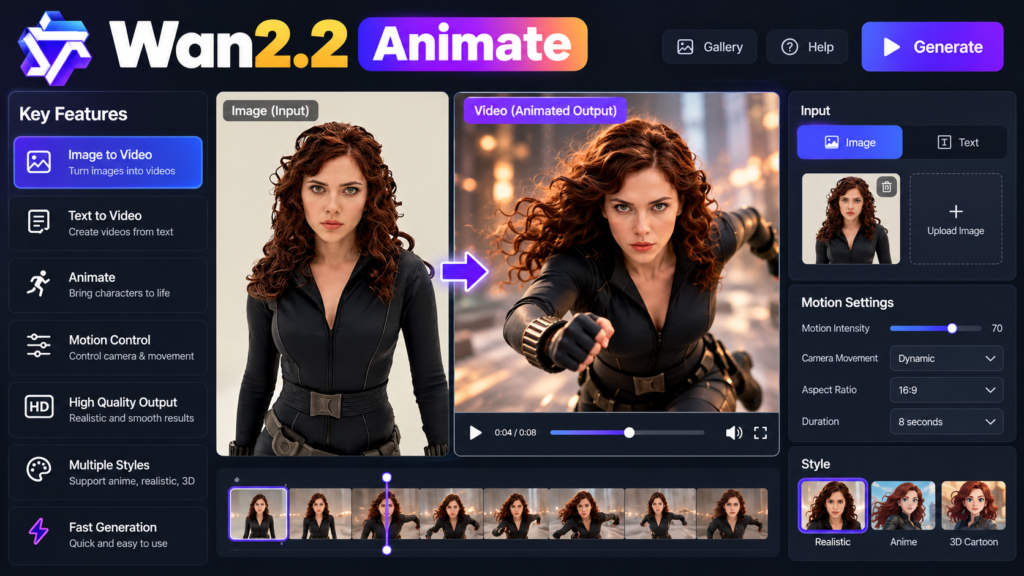
Wan2.2 Animate combines several controls that make it more specialized than ordinary AI video generators. Its central features include character animation, character replacement, motion guidance, facial-expression control, and scene-aware replacement workflows. The system uses a large Animate model designed specifically for transferring human performance to characters. This helps explain why Wan2.2 Animate can focus strongly on movement and expression rather than relying only on written prompts. Creators can use reference footage to provide the performance while the target image controls the appearance. This combination creates a more practical workflow for character-focused video production and experimentation.
Another important feature is its open development ecosystem. Wan2.2 Animate can be used through different technical workflows, including model-based development environments and visual node-based interfaces. This gives developers and experienced creators more freedom when building custom pipelines. Users can experiment with settings, preprocessing methods, reference videos, and different generation workflows. The model is therefore not limited to a single type of project. It can support research, creative experiments, digital characters, virtual performers, and AI video production. However, its advanced capabilities also mean that beginners may need some time to understand the workflow and hardware requirements.
Wan2.2 Animate Requirements and Setup
Running Wan2.2 Animate locally requires a capable computer because the model is large and video generation is computationally demanding. Users need suitable graphics hardware, enough system memory, storage space, and the required software environment. The exact requirements can change depending on the implementation and model version. Because video generation involves processing many frames, it usually requires significantly more computing power than generating a single image. Users with limited hardware may therefore prefer a hosted environment. Those with powerful computers can explore local installation and gain greater control over models, settings, files, and generated results.
For beginners, testing the workflow through an available online or visual interface can be easier than immediately installing the complete system. Advanced users can instead install the necessary packages and model files locally. A typical technical workflow involves a Python environment, deep-learning libraries, model weights, and a compatible graphics processor. Before installation, users should check the current requirements for their selected version. A good starting point is an [AI video generation guide], followed by a [ComfyUI workflow guide] if you prefer a visual node-based setup. These internal resources can help beginners understand the broader AI video workflow before working with larger models.
Wan2.2 Animate Workflow: From Image to Video
A practical Wan2.2 Animate workflow usually starts by selecting a clean character image and a suitable reference video. The reference performer should have movements that match the intended character. The preprocessing stage then prepares the video information required by the model. In animation mode, this can include pose and face information. In replacement mode, users may also need a background video and mask information. After preprocessing, the model generates the animation according to the selected mode and settings. The basic concept remains straightforward: character image plus performance information becomes a new character video. Good preparation is one of the most important factors in achieving useful results.
For better results, choose inputs that are easy for the model to understand. Avoid extremely dark footage, heavy motion blur, crowded backgrounds, or performances where the subject frequently leaves the frame. A reference performer with clear body movement can provide cleaner pose information. Similarly, a character image with a visible face and body can make identity preservation easier. If body proportions differ greatly, pose retargeting may help in animation mode. It is also worth testing short clips before attempting long projects. Short tests allow creators to identify problems with face consistency, hand movement, body alignment, or scene interaction before spending additional computing resources.
Wan2.2 Animate Performance Chart and Comparison
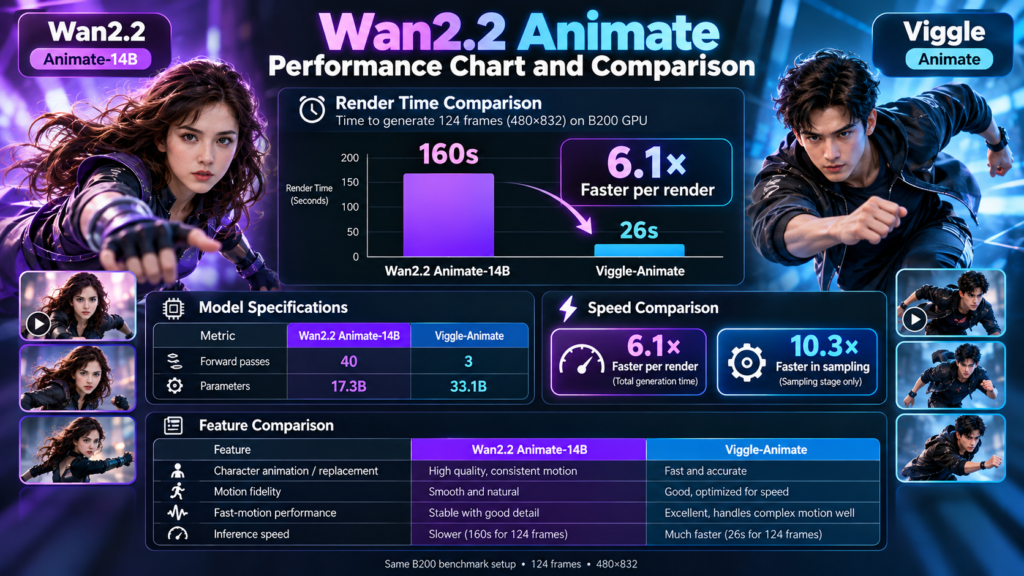
The following chart summarizes the main differences between the two core Wan2.2 Animate workflows. It is not a benchmark score. Instead, it shows what each mode is designed to accomplish. Animation mode begins with a character image and transfers a performer’s actions to that character. Replacement mode starts with an existing scene and changes the character inside it. Both approaches use movement and expression information, but their preprocessing needs differ. Understanding this distinction can prevent beginners from selecting the wrong workflow. Choosing the correct mode from the beginning can also save time and reduce unnecessary generation attempts.
| Feature | Animation Mode | Replacement Mode |
|---|---|---|
| Main purpose | Animate a character image | Replace a character in video |
| Character image | Required | Required |
| Pose information | Used | Used |
| Face information | Used | Used |
| Background video | Not central | Important |
| Mask information | Not central | Important |
| Pose retargeting | Useful when proportions differ | Usually not the main approach |
| Best use | Digital characters and avatars | Character replacement and visual effects |
| Main challenge | Motion and identity consistency | Scene integration and masking |
For practical performance, users should focus on input quality rather than expecting one setting to solve every problem. Generation settings can influence motion quality, detail, consistency, and processing time. Higher-quality settings can require more computing resources, so testing is important. The best strategy is to generate short clips first and compare different settings. Rather than immediately choosing the most demanding configuration, creators should find a balance between visual quality, consistency, memory use, and generation speed. This approach is especially helpful when working with limited hardware. It also makes troubleshooting easier because users can change one setting at a time.
Latest Wan2.2 Animate Updates
Wan2.2 Animate has continued developing since its original release. The Animate model was introduced as part of the Wan2.2 family and later became available through broader AI development ecosystems. Support through popular model frameworks has made the technology easier for developers to integrate into custom applications and workflows. Visual node-based tools have also helped creators experiment without writing every generation command manually. These developments are important because they give users more options for working with the model. Instead of relying on one interface, creators can choose a workflow that matches their technical skills and hardware.
The latest development trend is broader deployment and continued improvement of AI character animation. Newer implementations focus on motion quality, identity consistency, workflow convenience, and easier model deployment. This means users should expect the Wan2.2 Animate ecosystem to continue changing as developers release updates and integrations. When starting a new project, always check the model version, supported workflow, hardware requirements, and licensing information. This is particularly important for commercial projects because model licenses and usage conditions can differ. Keeping the software environment updated can also help users access improved workflows and compatibility with newer AI video tools.
Wan2.2 Animate Benefits and Limitations
One major benefit of Wan2.2 Animate is performance transfer. Instead of manually creating every movement, creators can record or use an existing performance as the motion source. This can reduce the work required to create character videos and gives creators a practical way to reuse movement. Another advantage is the combination of body and facial controls. The system is designed specifically around animation and replacement rather than treating every request as generic video generation. Open development options can also attract developers who want greater control. These qualities make Wan2.2 Animate useful for experimentation, content creation, digital characters, and technical research.
However, Wan2.2 Animate is not a magic solution for perfect video generation. Complex movements can still create artifacts, and results depend strongly on source quality and preprocessing. Body proportions, camera movement, occlusion, hands, facial details, and interactions with objects can all affect consistency. Large AI video models can also require powerful hardware and significant storage when running locally. Users should therefore treat the system as a sophisticated creative tool rather than a guaranteed one-click production solution. Careful inputs, testing, editing, and post-production remain important for professional results. Beginners should expect some experimentation before achieving consistent output.
Who Should Use Wan2.2 Animate?
Wan2.2 Animate is particularly suitable for creators who want to experiment with character-driven video. Digital artists can use it to bring still characters into motion, while filmmakers can explore replacement effects using recorded performances. Developers can build custom applications around the model and supported AI frameworks. Content creators can also experiment with virtual presenters, character demonstrations, social videos, and animated storytelling. Because the system supports both animation and replacement, it can fit different creative workflows. Users who already understand AI models, Python, ComfyUI, or video generation will likely find the technical workflow easier than complete beginners.
Beginners can still explore Wan2.2 Animate, but starting small is important. A short, clear reference video is easier to troubleshoot than a complicated cinematic sequence. Choose one character, one simple movement, and a clean background for the first experiment. Once the output becomes consistent, gradually introduce more complex actions. Users should also respect the rights of people whose images or videos are used as inputs. Permission is especially important when creating replacement videos involving real people, copyrighted material, or commercial projects. Responsible use helps creators avoid privacy, copyright, and consent problems while experimenting with powerful AI video technology.
Frequently Asked Questions About Wan2.2 Animate
What is Wan2.2 Animate used for?
Wan2.2 Animate is mainly used for AI character animation and character replacement. It can transfer body movement and facial expressions from a reference performance to a target character. It can also replace a character inside an existing video while maintaining the surrounding scene. This makes it useful for creative video production and digital character projects.
Is Wan2.2 Animate free and open source?
The Wan2.2 Animate ecosystem provides publicly available model resources and development tools. However, running the model locally still requires suitable computer hardware and storage. Cloud platforms or third-party services may also charge fees. Users should always check the current license and usage terms before using generated content for commercial projects.
Can Wan2.2 Animate replace a person in a video?
Yes. Replacement mode is designed to replace a character within an existing video. It uses movement and facial information while working with scene information to produce the new character. The quality depends on the original footage, masking, preprocessing, camera movement, and scene complexity. Simple and clear videos usually provide easier starting points.
Does Wan2.2 Animate work with ComfyUI?
Yes. Wan2.2 Animate can be used through ComfyUI-based workflows. This can make experimentation easier for users who prefer visual node systems instead of writing commands. However, users still need appropriate model files, hardware, and workflow settings. The exact installation process may change as new versions and custom nodes become available.
Is Wan2.2 Animate available through Diffusers?
Yes. Wan2.2 Animate has been integrated into the Diffusers ecosystem. Developers can use supported pipelines to build customized animation and replacement workflows. This makes the model more accessible to users who already work with Python and modern AI development tools. Correct preprocessing and suitable hardware remain important for successful generation.
Conclusion: Is Wan2.2 Animate Worth Trying?
Wan2.2 Animate is a powerful AI video system focused on character animation and replacement. Its biggest strength is performance transfer, allowing creators to use reference movements and expressions instead of manually animating every action. The two main modes serve different purposes: animation turns a character image into a moving performance, while replacement changes a character inside an existing video. Its growing ecosystem also gives developers and creators more ways to experiment. Still, users should expect technical requirements and occasional visual imperfections. For anyone interested in AI character video, Wan2.2 Animate is worth exploring, especially through short tests before larger projects.