

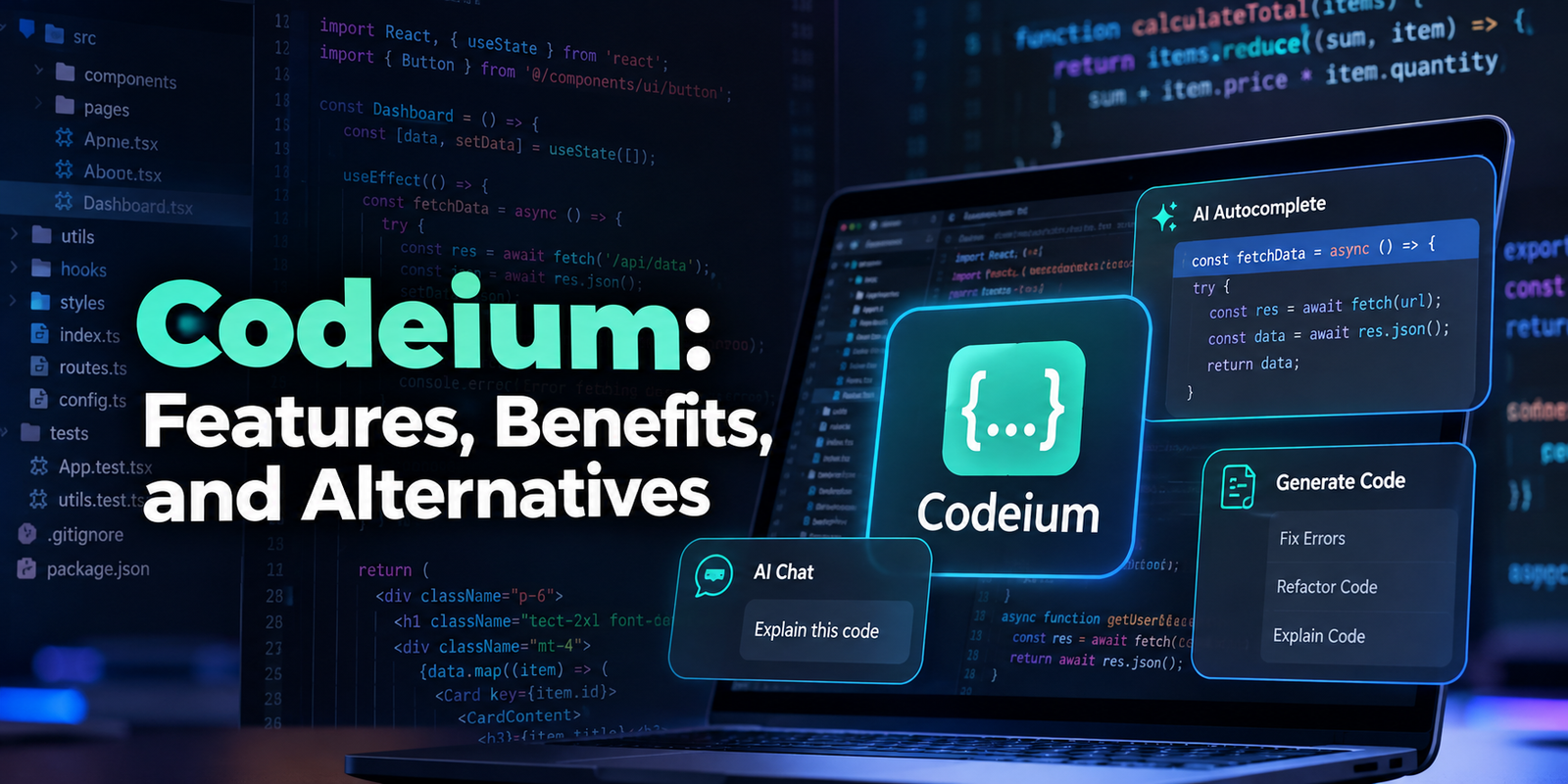
Codeium: Features, Benefits, Uses, and Alternatives

Codeium was an AI-powered coding assistant designed to help developers write code faster, understand unfamiliar projects, fix errors, and reduce repetitive programming work. It became popular for its code autocomplete, in-editor chat, and integrations with development environments such as Visual Studio Code and JetBrains IDEs.
However, there is an important update for anyone researching Codeium today: the product and company branding have changed. Codeium rebranded to Windsurf in April 2025, and the Windsurf product subsequently became part of Cognition’s Devin product family in 2026. Developers looking for the original Codeium tool should understand its history and the current product landscape.
This guide explains what Codeium was, how its AI coding technology worked, which features made it useful, its main advantages and limitations, and what developers should consider when choosing a modern AI programming assistant.
What Is Codeium?
Codeium was an AI coding assistant that used machine learning to provide context-aware code suggestions, autocomplete, and conversational programming help. Instead of requiring developers to write every line manually, it could suggest code as they typed and help them understand or modify existing programs.
The original product was particularly attractive to developers who wanted AI assistance inside their existing coding environment rather than having to switch constantly between an editor and a separate chatbot.
Its main capabilities included:
- AI code completion: Suggested code while a developer typed.
- Code generation: Helped create functions, loops, classes, and other programming structures.
- AI chat: Answered programming questions and explained code.
- Code editing assistance: Helped developers modify existing code and explore possible solutions.
- IDE integration: Brought AI assistance into supported development environments.
- Context awareness: Used surrounding code to make suggestions more relevant to the current task.
Codeium supported a range of programming languages and development workflows. Its usefulness depended on the language, project structure, available context, and complexity of the requested task.
Importantly, Codeium was not simply a chatbot that generated code from a prompt. Its integration with the editor allowed it to assist directly within the developer’s normal workflow.
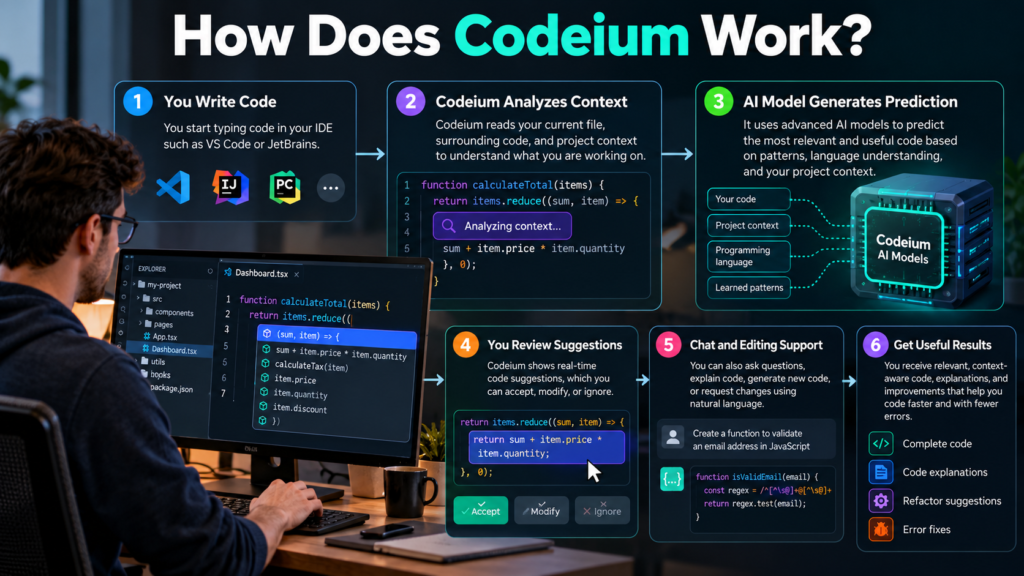
How Does Codeium Work?
Codeium used AI models trained to recognize patterns in programming languages and related code. These models could predict likely code based on the developer’s current input and the context available from the editor.
Although the underlying implementation was more complex, the basic process was straightforward.
1. It Analyzes the Code You Are Writing
When you type in a supported editor, the assistant considers the current file and relevant surrounding code. Depending on the feature, it may also use additional project context.
For example, if you begin writing a Python function to calculate the average of a list, the assistant may suggest the remaining function body instead of requiring you to write each line yourself.
2. It Generates a Prediction
The AI model estimates which code is likely to be useful next. This is a form of inference, meaning the model uses its learned patterns and available input to generate an output.
The suggestion might be a single line, a function, or several lines of code.
3. You Review and Accept the Suggestion
The developer remains responsible for deciding whether the generated code is appropriate. In the original autocomplete workflow, a suggestion could be accepted directly in the editor.
This approach keeps the developer in control rather than automatically treating every AI prediction as correct.
4. It Helps With Larger Programming Questions
Through its chat and editing features, Codeium could also explain existing code, suggest changes, or generate a new implementation from a natural-language instruction.
For instance, a developer could ask for a function that checks whether an email address has a valid basic format. The assistant might generate a regular expression or a simple validation function.
The developer would still need to test the result and decide whether it meets the application’s actual requirements.
Key Features of Codeium
Codeium’s appeal came from combining several useful programming features in one development workflow.
AI-Powered Code Autocomplete
Autocomplete was one of Codeium’s main attractions. Traditional autocomplete usually suggests known symbols, variable names, or functions based on programming language rules and editor indexing.
AI-powered autocomplete can go further by predicting what the developer is trying to implement.
For example, after writing a function declaration, a developer might receive suggestions for:
- The function’s implementation.
- Conditional statements and loops.
- Repeated patterns used in the current file.
- Appropriate variable assignments.
- Additional lines needed to complete a code block.
This can reduce repetitive typing, especially when implementing familiar programming patterns. However, the quality of a suggestion depends on the context and the task.
AI Chat for Programming Questions
Codeium Chat allowed developers to ask questions about code without leaving their development environment.
Common uses included:
- Explaining unfamiliar functions.
- Summarizing what a class does.
- Suggesting improvements to existing code.
- Generating examples in a particular language.
- Investigating possible causes of an error.
- Understanding unfamiliar programming concepts.
Consider a developer who inherits a project with a complicated JavaScript function. Instead of reading every line without guidance, the developer can ask for a plain-language explanation of the function’s inputs, outputs, and main operations.
The explanation is a starting point, not proof that the code behaves exactly as described.
Code Generation and Editing
Codeium also provided ways to generate or modify code from written instructions. Its Codeium Command feature, for example, allowed developers to request changes directly in the editor.
A developer might select a repetitive block of code and ask for a cleaner implementation. The assistant could suggest a refactor, generate a helper function, or reorganize the selected code.
This is particularly useful for small, well-defined tasks. Large changes involving several files, external services, and complicated dependencies require more careful review.
IDE Integration
Codeium was designed to fit into existing development workflows. Its integrations included popular editors and development environments, with availability varying by platform and version.
This mattered because developers did not necessarily need to abandon their preferred editor to benefit from AI assistance.
The product’s integration model also helped make it useful for people working in different programming languages and project types.
Context-Aware Suggestions
Code suggestions are generally more useful when the assistant understands what the surrounding code is doing.
For example, suppose a project contains a function called getCustomerById() that returns customer information. An AI assistant with access to the relevant code may produce a more suitable suggestion than a generic chatbot that has never seen the project.
However, context awareness has limits. The assistant may not see every relevant file, misunderstand a dependency, or overlook a project-specific rule.
What Can You Use Codeium For?
Codeium was useful across several stages of software development, from writing initial code to understanding and improving existing projects.
Building Websites and Web Applications
Web developers could use it to generate or complete HTML, CSS, JavaScript, and other supported code.
Practical examples include:
- Creating a basic navigation component.
- Writing CSS for a responsive layout.
- Generating form validation logic.
- Drafting reusable JavaScript functions.
- Explaining how an existing component works.
For example, a developer building a contact form could ask for client-side validation that checks whether required fields are filled in. The assistant could produce an initial implementation that the developer then tests on desktop and mobile devices.
Generated validation alone would not replace server-side checks, spam protection, or other necessary security controls.
Python Programming and Automation
Python developers could use AI assistance to create small scripts, manipulate data, or understand unfamiliar libraries.
Examples include:
- Renaming files in a directory.
- Reading and processing CSV data.
- Converting dates into a consistent format.
- Creating simple data-cleaning functions.
- Writing tests for existing functions.
For instance, a developer might ask for a Python script that reads a CSV file and removes rows with missing email addresses.
The assistant could generate the code, but the developer should verify the column names, encoding, file paths, and intended handling of incomplete records before running it.
Debugging and Understanding Errors
Codeium could help investigate errors by explaining error messages, identifying suspicious code, and suggesting possible fixes.
A useful debugging request includes the relevant code, the exact error message, and the conditions under which the problem occurs.
For example, if a Python program raises a KeyError, the assistant may explain that the program tried to access a dictionary key that was not present.
It can then suggest ways to check whether the key exists or handle missing data safely.
That does not guarantee that the first suggested fix will solve the underlying problem. Debugging still requires reproducing the issue and testing the proposed change.
Learning Programming
Beginners can use AI coding assistants to explore programming concepts and understand examples.
A student learning JavaScript, for instance, might ask why a loop executes five times or how a function receives an argument.
An assistant can explain the concept and provide a small example. However, students benefit more when they attempt the problem themselves, compare approaches, and verify the output instead of copying generated code without understanding it.
Advantages of Codeium
Codeium offered several practical benefits for individual developers and software teams.
Less repetitive typing: AI autocomplete can generate familiar code structures, reducing the time spent writing boilerplate.
Support inside the editor: Developers can receive suggestions without repeatedly switching between their IDE and a separate AI chat application.
Help with unfamiliar code: Conversational explanations can make it easier to understand existing functions, classes, and programming patterns.
Faster initial implementations: Developers can turn clear instructions into a first draft of a function or component and then refine it.
Support for different skill levels: Experienced programmers can use it to accelerate routine tasks, while beginners can use it to explore unfamiliar concepts.
Flexible workflow: Code completion, chat, and editing assistance address different needs. A developer can use autocomplete for a small task and conversational help for a more complicated question.
These benefits are most noticeable when the work involves predictable patterns and clearly defined requirements. They are less certain when a task requires extensive domain knowledge, complex architecture, or careful security decisions.
Limitations and Risks of AI Coding Assistants
AI-generated code can save time, but it can also introduce defects that are difficult to notice during a quick review.
Incorrect or Misleading Code
AI models can generate code that looks convincing but does not work as intended. This may happen because the model misunderstands the request, uses an unsuitable programming pattern, or invents a function or API.
Developers should compile or execute the code, review the logic, and test relevant edge cases.
Security Vulnerabilities
Generated code may contain unsafe input handling, weak authentication logic, insecure database queries, or inappropriate use of external libraries.
For example, an AI-generated database query might fail to use parameterized statements. Copying that code into a production application without review could introduce an injection vulnerability.
Security-sensitive code deserves particular attention, even when the generated implementation appears simple.
Limited Project Understanding
An AI assistant can only reason from the context and information available to it. It may miss requirements documented elsewhere, misunderstand dependencies, or suggest a change that breaks another part of the application.
This is why project-wide changes should be reviewed through version control, automated tests, and careful inspection of the affected files.
Privacy and Source-Code Handling
Developers should understand how their chosen product processes source code, prompts, telemetry, and other submitted information.
Before using an AI assistant with private repositories, check its current privacy policy, data-retention settings, training practices, and organizational controls.
Do not assume that every plan or integration offers identical protections. Organizations handling confidential customer information or proprietary code should evaluate these issues before deployment.
Overreliance on Generated Solutions
Accepting code without understanding it can create long-term maintenance problems. A developer may save time initially but struggle to debug the implementation later.
A better approach is to use AI for assistance while retaining responsibility for design decisions, testing, documentation, and production readiness.
Codeium vs. GitHub Copilot, Cursor, and Other Alternatives
Codeium helped popularize AI assistance directly inside code editors. Developers researching it now should compare current products rather than assuming that the old Codeium name still represents a separate, actively marketed service.
| Tool | Main approach | Best suited for |
|---|---|---|
| Codeium (historical product) | AI autocomplete, chat, and code editing | Understanding the original Codeium offering |
| Windsurf / Devin Desktop | AI-focused development environment and agent workflows | Developers interested in the product’s evolution |
| GitHub Copilot | AI coding assistance across supported development environments | Developers seeking integrated coding help |
| Cursor | AI-focused code editor with codebase-aware assistance | Developers who prefer an AI-centered editing workflow |
| General-purpose AI assistants | Code generation and explanations through conversational interfaces | Learning, brainstorming, debugging, and broader technical questions |
The feature sets, supported models, integrations, and subscription terms of these products can change. This is a high-level comparison of their approaches, not a claim that every feature is available on every plan.
Codeium vs. GitHub Copilot
Both products have offered AI-powered code completion and conversational programming assistance.
The important differences are their current integrations, model availability, usage limits, administrative controls, and pricing. Developers already working extensively with GitHub may prefer Copilot’s integration with that ecosystem, while others may value a different editor or workflow.
The best choice depends on the actual development environment and the features needed rather than on autocomplete alone.
Codeium vs. Cursor
Cursor is an AI-focused code editor designed to make interaction with project code a central part of development.
Codeium’s original approach emphasized bringing AI assistance into existing editors, while its later Windsurf product developed a more integrated, agent-oriented editing experience.
Developers choosing between current tools should test how each handles their own repositories, particularly multi-file changes, context selection, code review, and debugging.
Should You Choose an Alternative?
Consider evaluating another tool if you need:
- A currently maintained product with clear support channels.
- Specific integrations for your editor or framework.
- Advanced assistance across multiple files.
- Team-level privacy and administrative controls.
- Usage limits and pricing that fit your workload.
If you already have a working Codeium installation, check its current extension listing and update path before removing it. Existing users may be able to continue through a renamed product, depending on the installation and account.
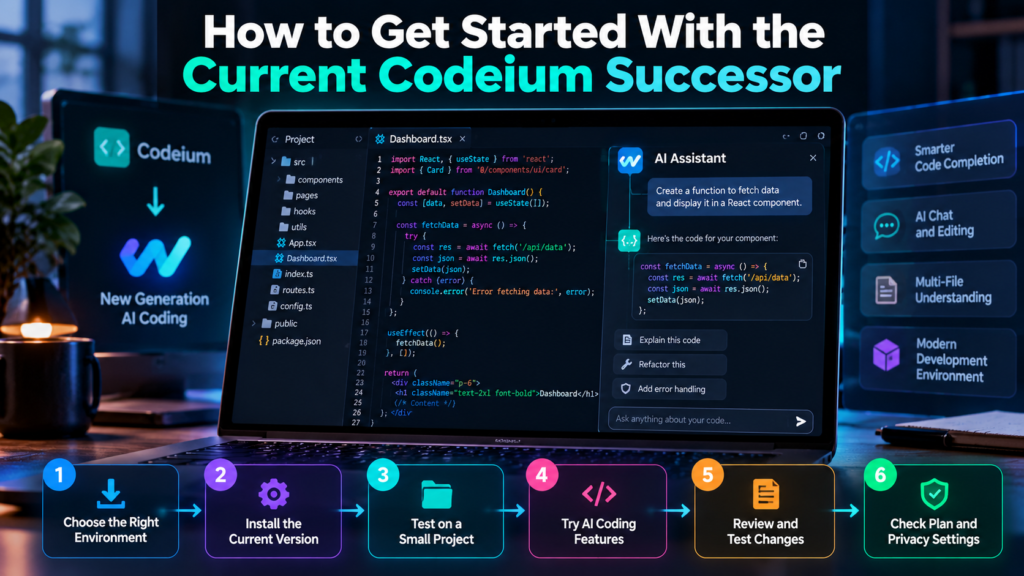
How to Get Started With the Current Codeium Successor
For new users, the practical starting point is the current product rather than an outdated download guide for the original Codeium brand.
The Windsurf product evolved into Devin Desktop, an environment associated with Cognition’s broader AI software development tools.
A sensible setup process looks like this:
Step 1: Choose the Appropriate Development Environment
Check whether you want a standalone AI-focused editor or an extension for an editor you already use.
If you work in VS Code or a JetBrains IDE, confirm that the current plugin supports your exact environment and workflow.
Step 2: Install the Current Version
Use the official product’s current download or extension listing. Avoid relying on old tutorials that refer to discontinued menus, outdated model names, or retired pricing plans.
Step 3: Test It on a Small Project
Start with a non-sensitive project or a separate branch of an existing repository.
Try a few basic tasks:
- Complete a simple function.
- Explain an unfamiliar section of code.
- Generate a unit test.
- Suggest a small refactor.
This provides a useful picture of the assistant’s strengths without putting important production code at risk.
Step 4: Review Every Generated Change
Run the relevant tests and inspect the differences before accepting a larger modification.
Keep version control enabled so you can identify and reverse unwanted changes. For production projects, automated tests and code review remain essential.
Step 5: Check the Current Plan and Privacy Settings
Review the available free and paid options, usage limits, supported models, data-retention controls, and any team-specific requirements.
Do not rely on historical Codeium pricing figures because the product and its commercial offering have changed.
Is Codeium Free?
The original Codeium service became known for offering free AI code completion and other coding assistance. However, its current successor products use their own plans and usage rules.
The availability of particular features and usage allowances depends on the current offering.
Before choosing a plan, check whether it includes the coding assistance you need, how usage is measured, and whether any advanced features require payment.
A free plan may be enough for occasional coding, learning, and small projects. Developers who use AI heavily or need advanced team controls should compare the paid options carefully.
Who Should Use an AI Coding Assistant?
AI coding assistants can benefit several types of developers, although the most suitable workflow varies by experience and project complexity.
Beginners: Use AI to understand programming concepts, generate small examples, and investigate error messages. Try to understand each solution rather than relying on copy-and-paste coding.
Freelancers: Use it to speed up routine tasks such as form validation, basic components, test generation, and documentation.
Professional developers: Use it to explore implementation options, complete repetitive code, understand unfamiliar modules, and draft tests.
Development teams: Evaluate AI assistance for consistency and productivity, while setting rules for code review, privacy, dependency management, and security.
Students: Use it as a learning aid for explanations and practice exercises, while following their institution’s rules on AI-assisted assignments.
AI assistance is generally most effective when a developer can describe the desired outcome clearly and evaluate whether the result is correct.
Frequently Asked Questions About Codeium
1. What Is Codeium Used For?
Codeium was an AI coding assistant used for code autocomplete, code generation, programming questions, and code editing inside supported development environments.
2. Is Codeium Still Available?
The Codeium brand was replaced by Windsurf in 2025, and Windsurf later became associated with Devin Desktop in 2026. The product has continued evolving through these changes.
3. Is Codeium Free to Use?
The original service offered free coding assistance. Current plans and usage limits belong to its successor products and should be checked before signing up.
4. Does Codeium Support Python?
Yes. Python was among the programming languages supported by the original Codeium coding assistant. Current support depends on the specific successor product and integration.
5. Is Codeium Better Than GitHub Copilot?
Neither is automatically better for every developer. Compare their current autocomplete, codebase context, integrations, usage limits, privacy controls, and pricing against your needs.
6. Can Codeium Write an Entire Application?
AI coding assistants can generate substantial amounts of code, but a complete application still requires architecture, testing, security checks, configuration, and ongoing maintenance.
7. Is AI-Generated Code Safe?
It can be useful, but it is not automatically safe or correct. Review the code, test it, and pay particular attention to authentication, data handling, dependencies, and security-sensitive operations.
Conclusion
Codeium played an important role in making AI coding assistance accessible within everyday development environments. Its combination of autocomplete, conversational help, and code editing showed how machine learning could support programmers without requiring them to abandon their existing workflows.
However, anyone searching for Codeium today should recognize that the product has evolved through the Windsurf and Devin Desktop names. Historical tutorials, feature descriptions, and pricing information may no longer reflect the current offering.
The most useful next step is to evaluate the current product based on your programming language, editor, project complexity, budget, and privacy requirements. AI can reduce repetitive work and help developers explore solutions more quickly, but it cannot replace sound engineering judgment. The strongest results come from treating generated code as a proposal that must be understood, tested, and reviewed before it becomes part of a real application.
[…] Dzine AI: Features, Pricing, Uses, and Limitations Codeium: Features, Benefits, Uses, and Alternatives GeoSpy: How AI Can Identify Where a Photo Was Taken How to Get Past Grok Moderation Safely […]