

Flint AI: Features, Uses, Pricing and Guide

Flint AI is a platform for discovering, using, and creating customized AI agents. Instead of starting every task with a blank chatbot, users can choose specialized agents designed around particular subjects, roles, or workflows. Flint also lets users build their own agents, called Meta Agents, without writing code.
That makes Flint AI different from a general-purpose chatbot. Its focus is not simply on generating answers; it is on creating AI assistants with a defined personality, purpose, knowledge base, memory focus, and voice.
The platform offers agents for areas such as education, business, writing, roleplay, psychology, productivity, and other interests. Users can also browse community-created agents, clone them, modify their configuration, or keep their own creations private.
This guide explains what Flint AI is, how it works, what you can actually do with it, how Meta Agents work, what Flint Tokens mean, its pricing, and the limitations worth understanding before using the platform.
What Is Flint AI?
Flint AI is a community platform for building, discovering, and chatting with customized AI agents.
The central idea is specialization. Rather than relying on one general AI assistant for everything, Flint gives users access to agents designed for particular purposes.
For example, the platform provides specialized agents covering areas such as:
- Education and tutoring
- Business and entrepreneurship
- Writing and creative work
- Productivity
- Psychology and wellness
- Roleplay
- Historical characters
- Marketing
- Professional development
- Health and medicine
- Worldbuilding
The platform combines AI chat, specialized agents, no-code customization, and community discovery.
How Does Flint AI Work?
At a basic level, Flint AI works by placing a layer of customization around AI conversations.
A general chatbot usually begins with a broad instruction such as:
“Help me study physics.”
A specialized Flint agent can instead be configured around a particular identity, objective, tone, knowledge base, and memory focus.
For example, someone could create a study assistant designed to:
- Explain difficult concepts in simple language.
- Ask the student questions rather than immediately giving answers.
- Focus on a particular subject.
- Remember important learning preferences within the supported memory scope.
- Use a specific response format.
This is essentially prompt and context engineering packaged into a visual agent-building experience.
The important distinction is that creating an agent does not necessarily mean training a new AI model from scratch. A customized agent generally provides instructions, context, knowledge, memory settings, and other configuration around an underlying AI system.
That makes Flint more accessible to people who want customized AI behavior without becoming machine-learning engineers.
What Are Flint Meta Agents?
Meta Agents are Flint’s term for custom AI agents created by users.
They are one of the platform’s most important features because they allow people to define an assistant around a specific purpose without coding.
A Meta Agent can be configured using several components:
- Name and description
- Avatar
- System message
- Memory focus
- Knowledge bases
- Voice
- Tags
- Community settings
The system message is particularly important because it establishes the agent’s role, objective, communication style, formatting preferences, and behavioral guidelines.
Example: Creating a Study Agent
Imagine a university student wants an AI assistant for biology.
Instead of repeatedly explaining what they need, the student could create a Meta Agent with instructions such as:
- Act as a biology tutor.
- Explain difficult ideas using everyday examples.
- Ask one practice question after each major topic.
- Avoid giving the final answer immediately when the student is practicing.
- Use Markdown headings and bullet points.
- Focus on undergraduate biology.
The result is a reusable assistant that starts with those instructions already established.
This is one of the practical advantages of agent customization: the user does not have to rebuild the same context every time.
Flint AI’s Knowledge Bases
Knowledge bases are another important part of Meta Agents.
A knowledge base provides additional information that an agent can use when responding.
For example, an educational agent could be configured with relevant subject knowledge, while a business assistant could be given information appropriate to its intended role.
This concept is related to retrieval-augmented generation (RAG).
In a RAG-style system, an AI does not have to rely only on what was encoded into its underlying model during training. Instead, relevant information can be retrieved from an external knowledge source and supplied as context when generating an answer.
That can be useful when the task depends on specialized information.
However, a knowledge base does not magically make an AI infallible. The quality, relevance, and completeness of the source material still matter.
Memory in Flint AI
Memory can make a specialized agent feel more consistent over time.
Flint provides a Memory Focus setting that lets creators tell an agent what information should receive particular attention when building its long-term conversational memory.
For example, a language-learning assistant might prioritize:
- The learner’s current level
- Vocabulary they struggle with
- Preferred correction style
- Learning goals
However, there is an important limitation: long-term memory is currently scoped to an individual chat. Starting a new chat with the same agent does not automatically carry over that conversation’s memory.
That distinction matters.
“Memory” does not necessarily mean permanent human-like memory across every conversation. Users should understand the exact scope of the feature rather than assuming the agent remembers everything indefinitely.
Voice Features
Flint also supports voice interactions with its agents.
Users can select voices for Meta Agents and initiate voice calls from the chat interface. Voice is still an evolving feature, so users should treat it as an additional interaction method rather than assuming it can replace every traditional voice assistant.
Voice interactions can also consume more Flint Tokens than ordinary text conversations because speech processing involves additional conversion steps.
What Can You Use Flint AI For?
The strongest use cases for Flint AI are situations where specialization is more useful than starting with a blank chatbot.
1. Education and Tutoring
Students can use specialized agents for subjects such as mathematics, physics, biology, chemistry, literature, history, economics, and other academic areas.
A student might use one agent to understand calculus and another to practice English writing.
The key benefit is consistency: each assistant can be configured around a particular learning purpose.
2. Business Assistance
Flint offers agents aimed at business and professional use.
Potential applications include:
- Brainstorming business ideas
- Preparing presentations
- Developing marketing concepts
- Practicing negotiations
- Improving leadership skills
- Planning strategies
- Reviewing communication
For a small business owner, a specialized strategy assistant could be configured to focus on a particular business model and communication style.
3. Writing and Worldbuilding
Writers can use specialized agents for:
- Character development
- Dialogue
- Story planning
- Worldbuilding
- Creative brainstorming
- Editing
- Genre-specific development
This can be particularly useful for long creative projects because a customized agent can start with established instructions instead of treating every conversation as a completely new assignment.
4. Roleplay and Historical Exploration
Flint also includes agents modeled around historical figures and fictional or roleplay-oriented concepts.
Users can interact with historical-character agents designed around particular personalities and areas of knowledge.
This should be treated as AI-generated simulation, not as an actual conversation with a historical person. The underlying system is still generating responses based on its configuration and available information.
5. Personal Productivity
A customized productivity agent could help with:
- Planning
- Brainstorming
- Organizing ideas
- Writing drafts
- Preparing checklists
- Thinking through decisions
The value comes from making the assistant behave consistently around a particular workflow.
Flint AI Pricing
Flint AI uses a token-based monthly subscription model.
Its listed plans include:
| Plan | Monthly Tokens | Price |
|---|---|---|
| Starter | 8 million | $7.99/month |
| Standard | 20 million | $14.99/month |
| Pro | 30 million | $19.99/month |
| Business | 50 million | $29.99/month |
| Captain’s | 64 million | $34.99/month |
The plans include unlimited stored chats and unlimited creations.
Flint also offers a free trial. The trial does not require a payment card and does not automatically renew.
What Are Flint Tokens?
Flint Tokens are essentially the platform’s usage currency.
They are consumed when interacting with agents through messages or audio. The amount used can vary depending on factors such as response length and complexity. Voice can consume more because it involves speech-to-text and text-to-speech processing.
This means the token allowance should not be interpreted as a simple number of conversations.
A short text exchange and a lengthy voice interaction can have very different resource requirements.
Flint AI Privacy
Privacy is an important consideration when using any AI platform, particularly when conversations involve personal, professional, academic, or sensitive information.
Flint states that users’ chats are private and that conversations are not used for model training. It also distinguishes between private creations and agents that users intentionally make public.
Users should still follow a sensible rule with any AI service: do not enter highly sensitive information unless you have reviewed the platform’s current privacy policy and are comfortable with how the information is handled.
Privacy policies can change, so they should be checked before using Flint for confidential business or personal material.
Advantages of Flint AI
Flint AI has several characteristics that make it appealing, especially for people who want customized AI without learning to program.
No-Code Agent Creation
You do not need to build an AI model or write software to create a Meta Agent.
The configuration interface handles much of the setup.
Specialized Assistants
Instead of one generic chatbot, users can select or build agents designed for specific purposes.
Community Discovery
Users can explore public agents created by other people, providing a way to discover ideas and configurations without starting from scratch.
Cloning
Users can clone community Meta Agents and modify the copy.
This creates a simple experimentation cycle:
Find → Clone → Modify → Test → Improve
Multiple Interaction Styles
Flint supports standard text conversations and also offers voice functionality.
Custom Knowledge
Knowledge bases allow creators to give agents access to specialized information relevant to their intended purpose.
Limitations and Things to Consider
Flint AI is useful, but it should not be mistaken for an unlimited or perfectly reliable AI system.
AI Agents Can Still Make Mistakes
Customization does not eliminate hallucinations.
An agent can produce information that sounds convincing but is incorrect, particularly when the requested information is outside its reliable knowledge.
For education, research, medicine, law, or financial decisions, important claims should be checked against authoritative sources.
Specialized Does Not Mean Expert
Calling an agent a “doctor,” “professor,” “lawyer,” or “psychologist” does not make it a licensed professional.
The label describes the intended role of the AI agent.
Health-related AI should therefore be used for general information and exploration rather than as a substitute for qualified professional care.
Token Usage Requires Attention
The subscription system is based on monthly token allowances rather than simply unlimited conversations.
Heavy users therefore need to consider how quickly they consume tokens.
Memory Has Boundaries
Flint’s memory system has defined boundaries. Users should not assume that an agent automatically remembers every previous conversation.
Community Content Varies
Public agents are created by different people.
That means quality can vary significantly. A polished description does not guarantee that an agent has accurate instructions, reliable knowledge, or appropriate safeguards.
Flint AI vs. a General AI Chatbot
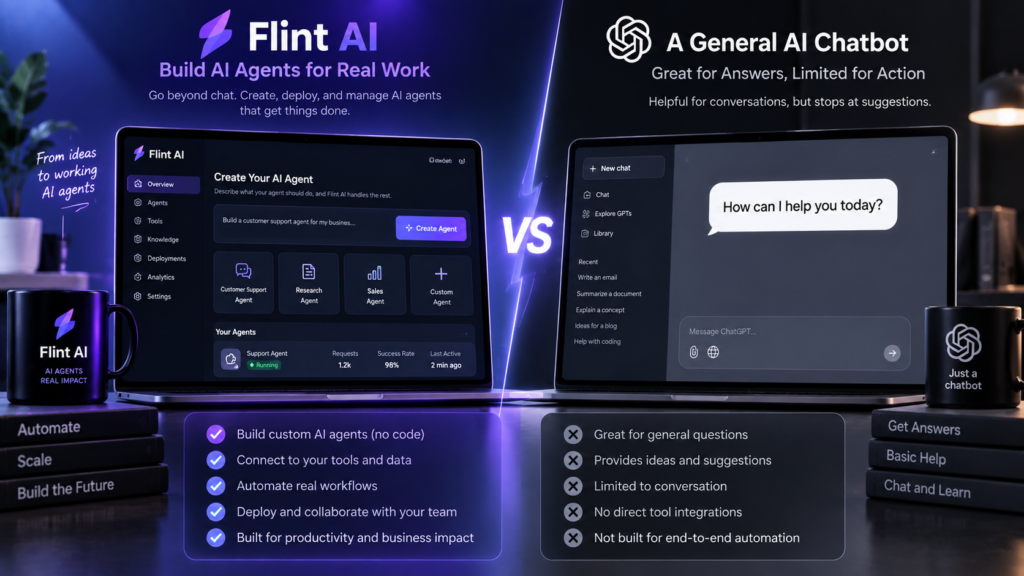
Flint AI and general-purpose AI assistants solve somewhat different problems.
| Aspect | Flint AI | General AI Chatbot |
|---|---|---|
| Main idea | Specialized agents | General-purpose assistance |
| Custom agents | Core feature | Varies by platform |
| Community agents | Yes | Depends on service |
| No-code customization | Yes | Often available, but implementation varies |
| Knowledge bases | Supported for Meta Agents | Depends on platform |
| Agent cloning | Supported | Depends on platform |
| Voice | Supported | Depends on platform |
| Best suited to | Reusable specialized assistants | Broad everyday AI tasks |
The distinction is not that one is universally better.
If you need a quick answer to a random question, a general chatbot may be simpler.
If you repeatedly perform a specific task and want an assistant configured around that task, Flint’s agent-oriented approach can be more useful.
How to Get Started With Flint AI
Getting started is relatively straightforward.
Step 1: Create an Account
Register and verify your account. Flint provides a free trial that supplies tokens for trying the platform.
Step 2: Explore Existing Agents
Browse the public agent library before building anything yourself.
Look for agents related to your actual goal rather than simply choosing the most interesting-looking one.
Step 3: Test an Agent
Have a real conversation with it.
Ask questions that represent the tasks you actually care about.
Step 4: Create a Meta Agent
If an existing agent is close to what you need, clone it and customize it.
Otherwise, create a new Meta Agent.
Define:
- Its purpose
- Its role
- Its tone
- Its response format
- Its memory focus
- Its knowledge sources
- Its voice, if needed
Step 5: Test and Refine
Do not expect the first configuration to be perfect.
Try several realistic prompts and look for:
- Incorrect assumptions
- Unwanted verbosity
- Wrong tone
- Missing context
- Repetitive answers
- Poor formatting
- Incorrect factual claims
Then revise the system message and other configuration settings.
This iterative process is one of the most important parts of building a useful AI agent.
Is Flint AI Worth Using?
Flint AI can be worth trying if you want specialized, reusable AI assistants rather than another general chatbot.
Its strongest appeal is the combination of an agent marketplace and a no-code builder. A beginner can start with an existing agent, while a more experienced user can create a customized Meta Agent with specific instructions, knowledge, memory settings, and voice.
The platform is less compelling if your only requirement is occasional general-purpose AI chat. In that situation, a traditional chatbot may be simpler.
The token-based pricing model is another factor to consider. Before subscribing, users should estimate how heavily they expect to use text and voice interactions and compare that expected usage with the available monthly allowance.
Ultimately, Flint’s value depends less on the number of agents available and more on whether a specialized agent actually improves the way you work, study, create, or solve problems.
Frequently Asked Questions
What is Flint AI used for?
Flint AI is used to discover, chat with, and create customized AI agents. Common applications include education, business, writing, productivity, roleplay, and specialized assistance.
Can I create my own AI agent on Flint?
Yes. Flint allows users to create customized Meta Agents without coding. You can define their personality, purpose, instructions, memory focus, knowledge bases, voice, and community visibility.
Does Flint AI require coding?
No. Flint’s Meta Agent system is designed for no-code creation. Users configure their agents through the platform rather than programming an AI model from scratch.
Is Flint AI free?
Flint offers a free trial, but its paid plans are subscription-based. The listed plans range from $7.99 per month for 8 million tokens to $34.99 per month for 64 million tokens.
What are Flint Tokens?
Flint Tokens are the platform’s usage currency. They are consumed when users interact with agents through text or audio, with usage depending on factors such as response length and voice processing.
Can I share an AI agent I create?
Yes. Meta Agents can be kept private or made public. Public agents can be discovered and cloned by members of the Flint community.
Is Flint AI the same as ChatGPT?
No. Flint AI is an agent-focused platform built around discovering and customizing specialized AI assistants. ChatGPT is a broader AI assistant and platform. The two can overlap in what they help users accomplish, but their product structures are different.
Conclusion
Flint AI takes a different approach to AI assistance by putting specialized agents at the center of the experience. Instead of repeatedly explaining what you want from a blank chatbot, you can use an existing agent or create a Meta Agent with a defined purpose, personality, knowledge, memory focus, and voice.
That makes Flint particularly interesting for students, writers, entrepreneurs, creators, and anyone who regularly performs the same type of task with AI.
At the same time, customization does not remove the fundamental limitations of generative AI. Agents can still make mistakes, community creations can vary in quality, memory has defined boundaries, and token consumption matters for paid users.
The best way to evaluate Flint AI is practical: choose a real problem you regularly face, build or find an agent for it, test the results, and decide whether the specialization genuinely improves your workflow.
[…] InnoCams: What It Is, How It Works, and What to Know Flint AI: Features, Uses, Pricing and Guide Hammer AI: Features, Privacy, Pricing, and How It Works HomePostsCategories […]