


FaceCheckID: Complete Guide to Face Search

FaceCheckID is a face-search tool designed to help users find public web pages where a particular face appears. Instead of searching with a person’s name, username, or keywords, users can submit a photograph and search for visually similar faces across indexed web pages. This makes face search different from traditional reverse image search, which often focuses on finding copies of the same image. FaceCheckID can be useful when someone wants to research an online profile, check where a photograph appears, or investigate an unfamiliar image. However, a search result is not proof of someone’s identity. Results should always be treated as leads and checked carefully before making important decisions.
What Is FaceCheckID?
FaceCheckID is a face-search engine that searches the public web using a person’s face as the starting point. The service analyzes a face in an uploaded image and compares its visual characteristics with faces found in indexed images. It can potentially find different photographs showing a similar face, even when the pictures have different backgrounds, clothing, sizes, or settings. This approach can be useful when ordinary image searching does not provide enough information. The service may be relevant for people researching online profiles, checking reused photographs, or investigating where a publicly available face image appears online. However, users should always consider the context surrounding every search result.
FaceCheckID does not simply search for an identical image file. Its approach focuses on facial characteristics and uses mathematical representations to compare faces. This difference matters because the same person can appear in several completely different photographs. For example, one profile picture might show someone indoors, while another webpage could show that person outside. Traditional image matching may struggle when the surrounding image changes significantly. A face-based search can potentially connect these photographs because facial features remain the main search signal. Even so, people with similar appearances can produce results, so users should never assume that every returned page belongs to the same individual.
How Does FaceCheckID Work?
The process begins when a user provides a photograph containing a face. The system detects the face and separates it from the surrounding image. It then creates a numerical representation of facial characteristics, often called a face embedding. That representation can be compared mathematically with facial representations created from images available in its index. Pages with closer similarities may then appear as potential matches. This explains why the quality of the uploaded photograph matters. A clear, reasonably large, front-facing face usually provides more useful information than a tiny face hidden inside a crowded photograph. Better source images can therefore make the search process more effective.
The service supports common image formats and recommends using an image with sufficient resolution. A face should also be large enough for reliable detection. Users can sometimes improve searches by cropping a photograph around the face or trying another clear image of the same person. However, changing the photograph does not guarantee a better result. Lighting, facial angle, image quality, filters, sunglasses, and other obstructions can affect how successfully a face is detected and compared. If one image produces poor results, trying another suitable photograph may provide additional information. Users should compare results rather than relying entirely on one search.
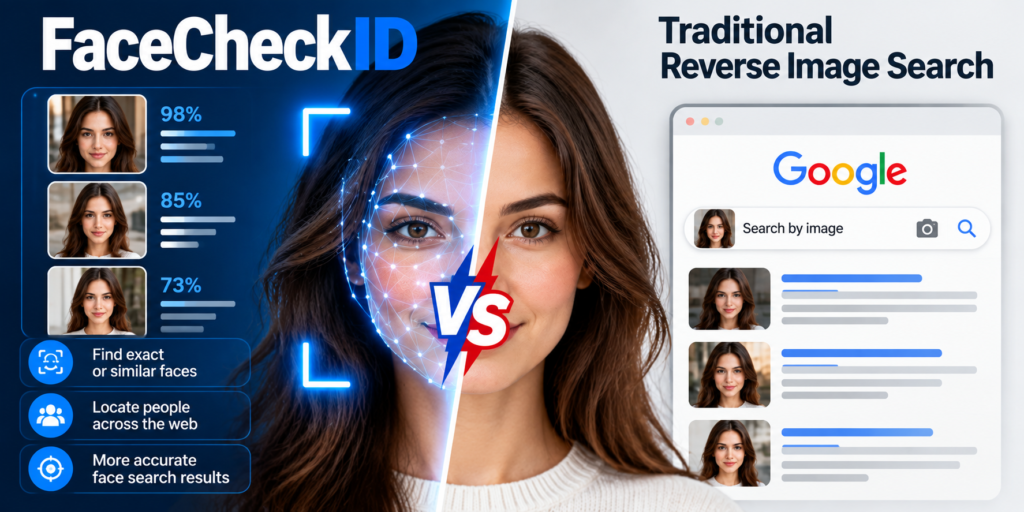
FaceCheckID vs Traditional Reverse Image Search
Traditional reverse image search generally looks for the same picture or visually related images. It can be useful when someone wants to find the original source of a photograph, locate copies, or discover similar pictures. FaceCheckID approaches the problem differently by concentrating on the face rather than the complete image. As a result, a person can potentially appear in results even when the surrounding background, clothing, image dimensions, or photographic setting have changed. This distinction makes face search particularly interesting for researching reused profile photographs or discovering additional public appearances of a similar face.
Consider a simple example. Someone uploads a photograph from a social media profile, but the same person appears elsewhere in a professional headshot. The two photographs may have completely different backgrounds and compositions. A conventional reverse image search may have difficulty connecting them because the images themselves are different. A face-search system instead compares facial characteristics. Still, this does not establish that the person owns every account where the photograph appears. Images can be copied, reposted, or used without permission. Therefore, face search should support investigation rather than replace careful verification of the surrounding evidence.
How to Get Better Face Search Results
The quality of the source photograph can strongly influence face-search results. A clear portrait with good lighting generally gives the system more useful facial information. A face that occupies a reasonable portion of the image is easier to analyze than a distant figure. Users should also avoid photographs where sunglasses, masks, hands, extreme shadows, or heavy filters cover important facial features. A front-facing photograph is often a practical starting point because both eyes and other central facial features are visible. If the first search produces weak results, trying another photograph can provide a useful comparison and may reveal additional indexed pages.
Users should also understand that more results do not necessarily mean better results. A search can return visually similar people who are not the same individual. This is why the surrounding webpage deserves careful attention. Check the page title, username, publication date, context, and other available information before drawing conclusions. Multiple independent pages showing consistent information can provide stronger context than one isolated result. The safest approach is to treat a face match as an initial clue. If the result could affect someone’s reputation, employment, safety, or personal relationships, additional evidence should always be considered before taking action.
What Can FaceCheckID Be Used For?
FaceCheckID can have several practical uses when working with publicly available photographs. One common example is checking whether a profile photograph appears elsewhere online. Someone who receives an unexpected message from an unfamiliar account may want to determine whether the profile image has been reused on other public pages. Another possible use is researching the source or context of a photograph that has circulated online. Journalists, researchers, and ordinary internet users may also use face-search technology as one research step when examining publicly available information. However, the tool should be used responsibly and with awareness of privacy concerns.
Another useful application is checking your own online image exposure. A person may want to understand where publicly posted photographs appear across the web. Face search can potentially reveal pages that a person did not know were indexed. This can help users discover old profiles, reposted photographs, or other public appearances. However, the search cannot see everything on the internet. Private accounts, restricted content, deleted pages, and material that search crawlers cannot access may not appear. Therefore, a clean search result should never be interpreted as proof that a face does not exist elsewhere online.
FaceCheckID Privacy and Data Considerations
Privacy is an important consideration whenever facial-search technology is used. FaceCheckID states that uploaded search images are not added to its searchable database and that search history is deleted within a limited period. The service also describes how it handles information connected with searches. These statements represent the company’s stated practices, so users should review its current privacy information and terms before uploading sensitive photographs. Privacy expectations can also vary between countries. A photograph that is publicly accessible does not necessarily mean every possible use of that image is appropriate or lawful.
Facial information can raise legal and ethical questions that differ between countries. Privacy laws may treat facial representations or related information differently from ordinary public photographs. The legality of using face-search technology can depend on the jurisdiction, purpose, consent requirements, and applicable privacy rules. Users should therefore avoid assuming that publicly available information can always be used without restrictions. In particular, sensitive situations involving harassment, surveillance, employment decisions, or personal disputes deserve additional care. For broader information about protecting online images, readers can also explore an online privacy guide and digital safety tips for practical security advice.
What FaceCheckID Cannot Prove
A FaceCheckID result does not automatically confirm someone’s identity. The technology compares visual characteristics, and different people can have similar facial features. A result may show that a similar-looking face appeared on a webpage, but it does not necessarily prove who operates that page or why the photograph was published there. This distinction is essential when interpreting search results. A high similarity result can be useful evidence for further research, but it should remain only one part of a broader verification process. Users should consider other information before deciding whether two online profiles actually belong to the same person.
There are also technical reasons why searches can fail. Face search depends on publicly indexed information, so private or inaccessible pages may not appear. Old photographs, major changes in appearance, poor lighting, unusual angles, and image quality can also affect matching. A person might therefore receive no results even though photographs of that person exist online. Conversely, a search can produce false positives when another individual looks similar. For reliable research, compare several independent details and consider the original source of each photograph. This approach reduces the risk of confusing visual similarity with confirmed identity.
Is FaceCheckID Safe to Use Responsibly?
Using FaceCheckID responsibly means understanding both its capabilities and limitations. Users should search only for legitimate purposes and avoid treating search results as unquestionable facts. If a result concerns another person, consider whether sharing or acting on that information could cause unnecessary harm. A photograph appearing on a public webpage does not automatically explain the circumstances behind its publication. Someone’s image may have been copied, reposted, or used by another person. Responsible research therefore requires context, independent verification, and careful judgment rather than relying entirely on a single automated result.
Users should also be cautious with unofficial applications or services claiming to represent FaceCheckID. The service has stated that it does not have an official Android or iPhone application and has warned about unauthorized applications using its name. For this reason, users should be careful when downloading unfamiliar applications. It is also sensible to avoid uploading highly sensitive photographs unless there is a clear reason to do so. When researching a result, preserve useful source information and verify important claims through independent evidence before reaching conclusions.
FaceCheckID: Practical Search Checklist
Before starting a search, choose a clear photograph containing one visible face. Crop unnecessary background when appropriate and avoid images with severe blur, strong shadows, sunglasses, or heavy filters. A front-facing photograph can be a practical starting point because important facial features are easier to see. If the first search produces unclear results, try another photograph rather than assuming the results are definitive. Comparing different source photographs may reveal additional information. The goal should be to improve the quality of available evidence, not simply to generate as many matches as possible.
After receiving results, examine each webpage carefully instead of focusing only on the similarity result. Check whether the face, context, username, date, and other details make sense together. If several unrelated pages contain consistent information, that can provide stronger support for further investigation. However, even multiple photographs do not automatically establish legal identity or ownership of an account. Keep the distinction between a visual match and verified identity clear throughout the process. A reverse image search guide can also help explain how image-based research differs from ordinary keyword searches and when each approach can be useful.
FaceCheckID for Everyday Online Research
For everyday users, FaceCheckID can be viewed as a research tool rather than an identity authority. Its main value comes from helping people discover where a face may appear across publicly indexed webpages. This can be useful when a photograph has lost its original context or when a profile picture seems familiar. The tool may also help people investigate their own online image presence. However, its usefulness depends heavily on the available public index and the quality of the submitted photograph. A result is therefore best understood as a starting point that can guide additional research rather than a final answer.
The most sensible approach is simple: search carefully, examine the source, verify important details, and respect privacy. Do not assume that every visual match represents the same person, and do not treat an absence of results as proof that someone has no online presence. Technology can make online research faster, but human review remains important. FaceCheckID is designed to identify matching websites and images rather than provide definitive personal identification. Keeping this limitation in mind helps users get useful information without overstating what the technology can actually establish.
FaceCheckID FAQs
What is FaceCheckID used for?
FaceCheckID is used to search publicly indexed webpages for images containing a face that appears visually similar to a submitted photograph. People may use it to investigate reused profile pictures, research public images, or check their own online image exposure. Results should be treated as leads rather than confirmed identity information.
Is FaceCheckID the same as Google reverse image search?
No. Traditional reverse image search generally focuses on the complete image and its visual similarity. FaceCheckID focuses specifically on facial features, allowing it to potentially connect different photographs showing a similar face. The two approaches can therefore produce different results from the same photograph.
Does FaceCheckID identify a person by name?
FaceCheckID does not provide definitive personal identification. Instead, it searches for webpages containing visually similar faces. Any name or identity information found on those webpages should be independently checked before being considered reliable or accurate.
Can FaceCheckID search private social media accounts?
No. Face-search systems depend on publicly accessible and indexed information. Private accounts, restricted pages, deleted content, and websites that prevent crawling may not appear in results. Therefore, receiving no results does not necessarily mean that a person’s photographs are absent from the internet.
Is there an official FaceCheckID mobile app?
FaceCheckID has stated that it does not have an official Android or iPhone application. Users should therefore be careful with mobile applications claiming to represent the service. Using unfamiliar applications can create unnecessary privacy and security risks, especially when they request access to personal photographs.
Conclusion
FaceCheckID provides a face-focused approach to searching publicly indexed web pages. Instead of depending on exact image copies, it analyzes facial features and looks for visually similar appearances. This can make it useful for researching reused photographs, checking public image exposure, and finding additional context around online profiles. However, its results have important limitations. Private or unindexed content cannot normally be found, and visual similarity does not prove identity. Users should therefore review sources carefully and verify important information independently. When used thoughtfully, FaceCheckID can be a practical research aid while still requiring human judgment, privacy awareness, and responsible interpretation of every search result.
[…] Gening AI: Complete Guide to AI Character Chat in 2026 FaceCheckID: Complete Guide to Face Search Swiss FADP vs EU GDPR AI Data Privacy Comparison Broken Keyboard Grok Answer: Easy Python […]