

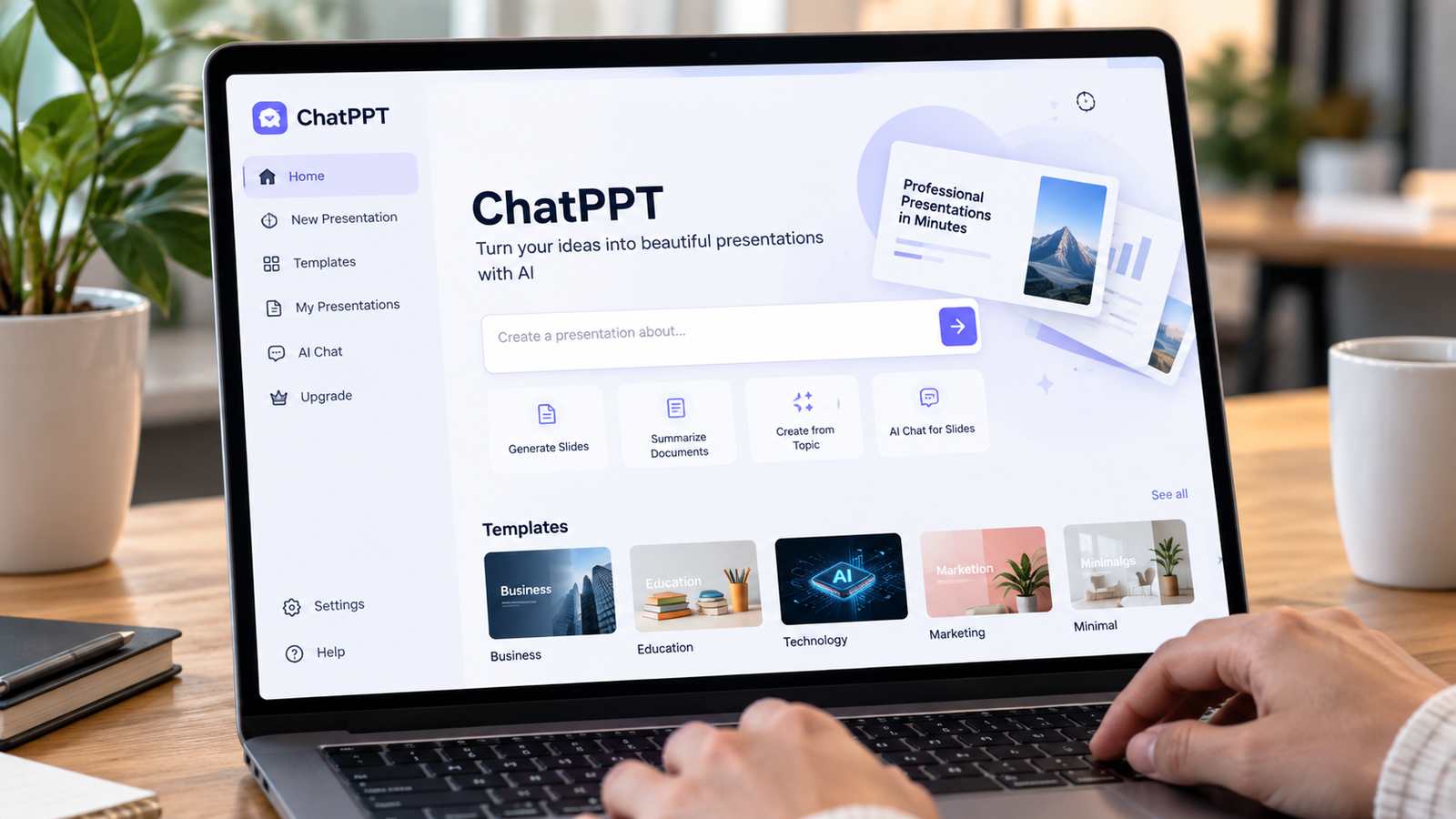
ChatPPT: AI Presentation Maker for Fast PPTs

ChatPPT is an AI-powered presentation tool designed to help users create professional slide decks faster. Instead of starting with a blank PowerPoint file, users can enter a topic or upload a document. The platform can then create an outline, develop slide content, arrange layouts, and add visual elements such as charts. This makes ChatPPT useful for students, teachers, marketers, business teams, and anyone who regularly prepares presentations. The main purpose is to reduce the time needed to move from an idea to a usable presentation. Users can then review the generated content and adjust it for their specific needs.
The main idea behind ChatPPT is simple: reduce the time needed to move from an idea to a presentation. Traditional presentation software gives users complete control, but it also requires considerable manual work. You must research information, organize slides, write text, select designs, and create visual elements. ChatPPT combines several of these tasks into one workflow. It can help users create presentations for business, education, marketing, launches, summaries, and other purposes. This makes the tool particularly useful when you need a structured presentation quickly. However, users should always review AI-generated content before sharing or presenting it.
How Does ChatPPT Work?
Using ChatPPT generally starts with a simple instruction. You can describe the presentation topic and allow the system to develop the structure. Alternatively, you can provide a document so the AI can work from existing information. This approach can be helpful when you already have research notes, reports, or other source material. After receiving the information, ChatPPT can generate an outline and create presentation content around that structure. The goal is to produce a logical deck rather than simply placing unrelated text on different slides. A clear prompt can also help the system understand the audience and purpose of your presentation.
After the initial generation, users can review the presentation and make changes before exporting it. ChatPPT focuses on presentation layouts, visual elements, and content organization to make the final deck easier to use. This workflow can be especially helpful when a presentation has a short deadline. However, AI-generated slides should still be checked carefully. Important numbers, names, claims, and sources need human review because automated content can contain mistakes or missing context. Users should also remove unnecessary information and make sure each slide supports the main topic. A final human review can make the presentation clearer and more trustworthy.
Key Features of ChatPPT
ChatPPT focuses on more than basic text generation. Its features are designed to support different stages of presentation creation, including outlines, content, templates, charts, icons, layouts, and exporting. These resources can help users avoid repeatedly designing common presentation elements from scratch. For someone who creates presentations regularly, having content generation and design tools together can make the overall process more convenient. The platform can also provide different starting points depending on the purpose of the presentation. This makes it easier for beginners to move from a blank page toward a structured slide deck.
Another useful feature is document-based presentation creation. Instead of writing every slide manually, users can provide existing material and allow AI to identify important points. This can be useful for reports, lessons, business plans, research summaries, and internal presentations. Templates can also provide a visual direction before users begin editing individual slides. However, templates should support the message rather than distract viewers with unnecessary visual effects. Users should choose layouts that make information easier to scan. A simple, well-organized presentation often communicates more effectively than a deck filled with excessive graphics, animations, or decorative elements.
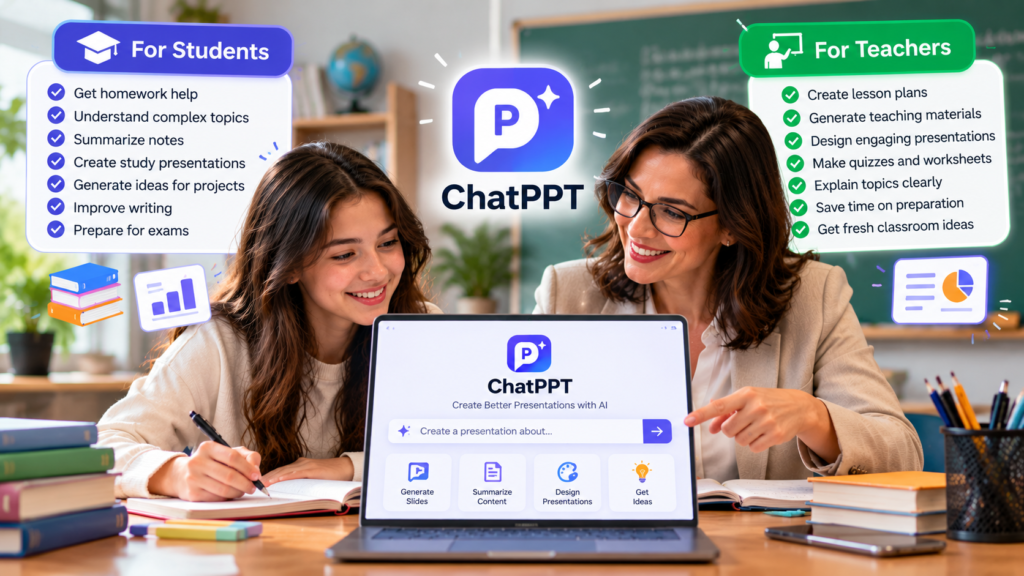
ChatPPT for Students and Teachers
Students can use ChatPPT when they need to turn research into a clear presentation. For example, a student could provide a topic such as climate change and use the generated structure as a starting point. The resulting slides can then be reviewed, simplified, and customized before submission. Teachers can also use AI presentation tools to prepare lesson materials, topic summaries, classroom activities, and visual explanations. The biggest advantage is often the reduction in preparation time. However, students should understand the subject themselves instead of depending entirely on automatically generated material. AI can help organize ideas, but learning still requires personal research and understanding.
Teachers may also benefit when they need several presentations covering related subjects. A consistent template can make lessons easier to organize, while charts and visuals can make complex information easier to understand. ChatPPT can provide useful starting points for education-related presentations. This can save time when preparing classroom material. However, educational content requires careful checking because students may rely on the information presented in class. Teachers should verify facts, statistics, references, and examples before using them. AI should support teaching preparation, not replace professional judgment or subject knowledge. Editing the final slides also allows teachers to match the content to their students’ level.
ChatPPT for Business Presentations
Business users often need presentations for meetings, sales proposals, reports, product launches, and strategy discussions. ChatPPT can help create a first draft by organizing information into slides and adding presentation-friendly layouts. This can be useful when teams need a structured presentation without spending hours designing every slide. A practical workflow is to provide accurate company information first, generate the draft, and then edit the language and visuals to match the company’s actual goals. This approach keeps the presentation focused while reducing some of the repetitive work involved in creating slides manually.
Charts can be particularly useful in business presentations because they can communicate trends faster than large blocks of text. AI presentation tools can help organize selected information into visual formats. However, a chart should only be used when it makes the information easier to understand. Users should check every value and label before presenting financial, sales, market, or performance data. A visually attractive chart can still create confusion if the underlying numbers are wrong. Human review therefore remains an important part of creating a reliable business presentation. Clear titles, accurate figures, and simple visuals can make business slides much easier to understand.
ChatPPT Features at a Glance
| Feature | What It Can Help With |
|---|---|
| AI presentation generation | Creates a starting deck from a topic |
| Document upload | Works from existing source material |
| AI outline | Organizes ideas into a presentation structure |
| Charts | Presents selected information visually |
| Templates | Provides ready-made presentation designs |
| Layout polishing | Improves slide arrangement |
| Export | Allows presentations to be saved in useful formats |
| Cloud access | Helps users work across devices |
The feature set makes ChatPPT suitable for different presentation workflows. A user can begin with a simple topic, provide source material, select a suitable design, review the generated slides, and export the result. These features are most useful when they reduce repetitive preparation work. However, they do not automatically understand every business requirement, audience expectation, or factual detail. Before presenting, users should edit wording, verify information, check charts, and remove anything that does not directly support the main message. The final deck should communicate one clear idea rather than overwhelming viewers with too much information.
ChatPPT vs Traditional PowerPoint
Traditional PowerPoint gives users detailed control over nearly every part of a presentation. You can create custom layouts, choose fonts, arrange objects manually, add animations, and build slides exactly as required. The downside is that creating everything manually can take considerable time. ChatPPT approaches the process differently by using AI to generate a starting structure and presentation content. Instead of beginning with a completely blank presentation, users can start with an automatically organized draft. This can be especially useful for people who struggle with presentation structure or need to create slides quickly.
The two approaches can also work together rather than competing directly. A user can use ChatPPT to create an initial presentation and then continue editing the exported file in familiar presentation software. This provides a faster starting point while preserving manual control over the final result. The best workflow depends on the project, deadline, and level of customization required. For a simple classroom presentation, automation may save preparation time. For an important corporate presentation, additional editing and fact-checking may be necessary. In both cases, the final presentation should reflect the user’s goals and communication style.
How to Create a Better Presentation With ChatPPT
A good AI presentation begins with a clear request. Instead of entering only a broad topic, explain the audience, purpose, approximate slide count, and important points. For example, you could specify that the presentation is for beginners and should explain a topic using simple language and three practical examples. Clear instructions give the AI more useful context and can produce a more focused starting structure. You can also provide reliable source material when the presentation needs specific facts. Always review the generated result before using it publicly, especially when the presentation contains statistics, research findings, or business information.
A simple workflow can make the process more effective:
- Define the presentation goal and audience.
- Prepare accurate source information.
- Enter the topic or provide your document.
- Review the generated outline.
- Check every slide for accuracy and clarity.
- Replace weak examples or unnecessary text.
- Review charts, numbers, and labels.
- Polish the final design.
- Export the presentation in your preferred format.
This process keeps the human in control while allowing AI to handle repetitive preparation work.
Is ChatPPT Easy to Use?
ChatPPT is designed around a relatively simple workflow, which can make it approachable for beginners. Users can start with a topic or existing material and then use AI to develop the presentation structure. This removes some of the complexity associated with starting a presentation from scratch. Beginners can therefore focus more on what they want to communicate instead of immediately worrying about slide layouts, spacing, or design choices. The simpler workflow can also help users who have good ideas but limited experience with presentation design.
Ease of use does not mean every generated presentation will be ready without editing. The quality of the final deck depends partly on the information provided and the instructions used. A vague topic can produce broad content, while a focused prompt can create a more useful structure. It is also important to inspect the visual hierarchy, spelling, statistics, and slide order. Think of ChatPPT as a presentation assistant rather than a complete replacement for human editing. The final presentation should reflect your knowledge, purpose, audience, and personal communication style.
Who Should Use ChatPPT?
ChatPPT can be useful for students, educators, business professionals, marketers, startup teams, and other users who regularly create presentations. A student may need a quick starting deck for an assignment, while a teacher may need lesson slides. A business professional could use it for an annual review, marketing plan, or business proposal. Different presentation templates and AI features can provide useful starting points for these situations. The main benefit is convenience because users can spend less time building basic structures and more time improving the information and message.
It may be less suitable when every slide requires highly specialized formatting or detailed manual control from the beginning. In those cases, traditional presentation software may still be necessary for final editing. AI-generated content should also be reviewed when presentations contain sensitive business information, academic claims, financial figures, or important statistics. The most practical approach is to use ChatPPT where automation saves meaningful time, then apply human judgment where accuracy, originality, and presentation quality matter most. This balance can produce a deck that feels efficient while still reflecting the user’s own knowledge and ideas.
ChatPPT Pricing and Access
ChatPPT offers different options for users who want to create AI-powered presentations. Pricing and available features can change over time, so users should review the current plan information before choosing a subscription. This is particularly important for people who expect to create many presentations or need additional features. A free or trial option, where available, can also help users understand the workflow before committing to a paid plan. Comparing the available options can help users choose a plan that matches their presentation needs and usage frequency.
When comparing presentation tools, price should not be the only consideration. Look at the number of presentations allowed, export formats, template access, AI generation limits, collaboration options, and editing features. Also consider how much time the tool saves during your normal workflow. Someone creating presentations occasionally may have different needs from a marketing team producing several decks every week. Checking the latest plan details is the safest way to understand what is included. This also prevents users from relying on outdated information when making a decision about presentation software.
Frequently Asked Questions
What is ChatPPT used for?
ChatPPT is used to create AI-assisted presentations from topics or source material. It can help generate outlines, slide content, layouts, and visual elements. Users can then review, edit, and improve the presentation before using it for school, business, marketing, or other purposes.
Can ChatPPT create PowerPoint files?
ChatPPT is designed to create presentations that can be exported into useful formats. Users can then continue editing their presentation or share it with others. The exact export options may depend on the current features and plan available.
Can I upload a document to ChatPPT?
Yes, document-based presentation creation is one of the useful workflows associated with ChatPPT. Users can provide existing material and use AI to organize important information into presentation slides. Always review the generated content for accuracy.
Is ChatPPT suitable for students?
Yes. Students can use ChatPPT as a starting point for assignments, research presentations, and classroom projects. However, students should understand and verify the information themselves instead of submitting AI-generated content without reviewing it.
Does ChatPPT create charts?
ChatPPT supports visual presentation elements such as charts. Charts can make data easier to understand when used correctly. Users should always verify the underlying numbers, labels, and calculations before presenting important information.
Conclusion: Is ChatPPT Worth Trying?
ChatPPT is an AI presentation platform designed to reduce the work involved in creating slide decks. It can help organize topics, develop presentation structures, create slide content, provide visual elements, and support faster presentation production. These features can be useful for students, teachers, professionals, marketers, and teams working with tight deadlines. However, automation should not replace human review. Always check important facts, numbers, charts, wording, and sources before presenting. The strongest workflow is simple: let ChatPPT handle repetitive preparation, then use your own knowledge and judgment to improve the final presentation. This approach can make presentation creation faster while keeping the final result clear, useful, and trustworthy.
[…] Get Honey AI: Complete Guide for Beginners ChatPPT: AI Presentation Maker for Fast PPTs Error Calling Moderation Service Grok: Easy Fix Guide Gening AI: Complete Guide to AI […]