

What Is the Free Model of Google Gemini in 2026?

If you are wondering what is the free model of Google Gemini in 2026, Google offers a free version of its Gemini AI assistant that lets users ask questions, write content, summarize information, generate ideas, and complete everyday tasks without paying a monthly subscription. The free plan is available with a Google Account, although the exact models, features, and usage limits depend on Google’s current policies and availability.
The important point is that Google’s free Gemini experience is not necessarily limited to one AI model. Users can receive access to different models and tools, with some advanced capabilities available only in limited amounts or through paid subscriptions. This guide explains which models are available, what you can do for free, how usage limits work, and when upgrading makes sense. It also covers the difference between using Gemini on its website and accessing Gemini models through Google’s developer API.
What Is the Free Model of Google Gemini in 2026?
The free model of Google Gemini is the no-subscription version of Google’s generative AI assistant. It uses Google’s Gemini family of large language models (LLMs) to understand prompts and produce responses in natural language.
As of October 2026, Google’s model-access arrangements distinguish between Gemini Flash-Lite, Gemini Flash, and Gemini Pro. However, free users do not have unrestricted access to all three. Automatic model selection may route prompts to different models depending on the task and the available features.
This means the free Gemini plan is not simply a permanently fixed, single-model experience.
For example, you could use Gemini to:
- Explain a difficult science concept in simple English.
- Draft an email, blog outline, or social media caption.
- Summarize a document or organize research notes.
- Help identify errors in a piece of code.
- Brainstorm business ideas and marketing strategies.
- Ask follow-up questions about an earlier answer.
The available features and usage limits can vary, so access to a particular model should not be confused with unlimited use of that model.
Which Gemini Model Can You Use for Free?
Google’s model names describe different approaches to handling AI tasks. Flash-Lite emphasizes speed and efficiency, Flash balances speed with broader problem-solving ability, and Pro is intended for more demanding work.
Here is a general overview of how these models differ.
| Model | Main purpose | Free-plan access |
|---|---|---|
| Gemini Flash-Lite | Fast answers, summaries, brainstorming | Used for many everyday prompts |
| Gemini Flash | General-purpose tasks requiring more capability | Availability depends on model selection and current limits |
| Gemini Pro | More demanding reasoning and complex tasks | Access may be limited or automatically assigned |
Gemini Flash-Lite: Fast everyday assistance
Flash-Lite is designed to handle everyday tasks efficiently. It is suitable for straightforward questions, rewriting paragraphs, generating ideas, and summarizing shorter pieces of text.
For example, a student might ask:
“Explain the difference between supervised and unsupervised machine learning using two practical examples.”
This is the kind of task an efficient general-purpose model can usually handle without requiring extensive reasoning.
Gemini Flash: A balance between speed and capability
Flash is designed to handle a broader range of tasks, including questions that require more analysis than a simple prompt.
A marketer, for instance, could ask Gemini to compare two product descriptions, identify differences in their messaging, and suggest improvements for a specific audience.
The exact model used by a free account may depend on Google’s automatic selection and current availability.
Gemini Pro: More demanding tasks
Pro models are intended for complex work that can benefit from deeper reasoning. Examples include analyzing a complicated programming problem, comparing competing explanations, or working through a multi-step research question.
Free users should not assume they can manually select Pro whenever they want. Model selection and access depend on the current plan, product settings, and usage restrictions.
What Features Does Free Google Gemini Include?
The free plan provides more than a basic text chatbot. Google’s Gemini experience includes tools for communication, research, content creation, and productivity. Individual features can have their own limits or availability restrictions.
Text generation and writing assistance
Gemini can help you produce first drafts, rewrite existing material, simplify complicated explanations, and develop outlines.
For example, a website owner could provide an article title and request a structured outline with relevant subheadings, questions readers may have, and examples to cover.
The result should still be edited for factual accuracy, originality, and suitability for the intended audience.
Image generation and editing
Google’s Gemini experience includes image generation and editing capabilities, although access to specific models, tools, and the number of permitted generations can vary.
Possible uses include creating visual concepts for a blog, exploring alternative designs, or making changes to a supported image.
Do not assume that every advanced image-generation model or premium editing feature is included without restrictions.
Gemini Live
Gemini Live supports conversational interaction, allowing users to communicate with Gemini through a more natural voice-based experience where available.
This can be useful when practicing a language, brainstorming while away from a keyboard, or asking follow-up questions without typing every message.
Device compatibility and feature availability may differ by region and account.
Canvas and Gems
Two other useful tools are Canvas and Gems.
- Canvas: Provides a workspace for developing and refining content or other supported projects.
- Gems: Allow users to configure customized versions of Gemini for particular tasks or preferred ways of working.
For example, a blogger could configure a Gem to help generate article outlines using a consistent tone and heading structure. The user would still need to check facts and review the resulting content.
Research and document assistance
Gemini can assist with organizing information, summarizing material, and developing research questions. Some research features, however, consume more usage capacity or may be restricted during periods of high demand.
The availability of advanced research tools depends on the plan and Google’s current policies. A feature appearing in the product does not guarantee unlimited access to every advanced capability.
How Much Does Google Gemini Free Cost in 2026?
The standard free Gemini plan costs $0 per month and is available to eligible users with a Google Account. Google also offers paid Google AI subscriptions that provide higher usage limits and access to additional features.
The following table summarizes the general differences.
| Plan | Cost | Best suited for |
|---|---|---|
| Gemini Free | $0 per month | Everyday questions, writing, learning, and occasional AI tasks |
| Google AI Plus | Paid subscription | Users who need higher limits and additional tools |
| Google AI Pro | Paid subscription | Frequent users with heavier research and productivity needs |
| Google AI Ultra | Higher-priced subscription | Users who need substantially expanded access to advanced features |
The exact subscription price depends on the country, billing arrangement, and current offer.
Is Gemini Free really free?
Yes. You do not need to pay a monthly subscription to use the standard free plan.
However, free access comes with restrictions. You may encounter model limits, feature restrictions, or temporary availability changes. Paid subscriptions increase usage capacity rather than removing every possible limitation.
Google may also offer promotional student subscriptions in eligible countries. These are separate from the standard free plan and may require proof of student eligibility.
What Are the Usage Limits of Free Gemini?
One of the biggest misconceptions about free Gemini is that it offers an unlimited number of prompts.
Google uses usage limits that can depend on several factors, including:
- The complexity of your questions.
- Which models and features Gemini uses.
- The length of your conversation.
- Whether you generate images, videos, or other media.
- Whether you use advanced research or extended reasoning features.
Usage allowances and reset periods can change as Google updates its products. There is no single universal number of prompts that accurately describes every free user’s experience.
Why do some prompts use more capacity?
Consider these two requests.
Simple request: “Give me five title ideas for an article about electric cars.”
More demanding request: “Compare electric vehicle battery technologies, evaluate their limitations, review recent research, and prepare a detailed report with sources.”
The second task requires more analysis and potentially multiple research steps. It may consume more usage capacity.
How to check your remaining Gemini usage
To view your current usage information:
- Open the Gemini app or website.
- Sign in with your Google Account.
- Open the settings or model-selection interface.
- Review any usage information, model limits, or notifications displayed in your account.
The interface may change as Google updates the product. If you reach a limit, Gemini may provide information about the restriction and when access could become available again.

How to Use Google Gemini Free
Getting started is straightforward, and you do not need programming knowledge.
Step 1: Open Gemini
Open the Gemini website using a supported browser or launch the mobile app where available.
Step 2: Sign in
Use your Google Account and review any eligibility or account requirements presented on the screen.
Step 3: Enter a specific prompt
Explain what you need, provide relevant background information, and describe the format you want.
For example, instead of asking “Write about solar energy,” try:
“Create an informative article outline about residential solar panels for beginners. Include installation costs as a research topic, common maintenance questions, and practical advantages and limitations.”
Step 4: Review and refine the answer
Ask follow-up questions, request corrections, and verify important claims before using the response.
Example prompts for different users
| User | Example prompt |
|---|---|
| Student | “Explain photosynthesis in simple English and give me three revision questions.” |
| Blogger | “Create an outline for an informative article about home solar panels. Include useful H2 and H3 headings.” |
| Business owner | “Draft a polite reply to a customer asking about delivery times. Do not invent a delivery date.” |
| Developer | “Explain why this Python function returns an error and suggest a corrected version.” |
| Researcher | “Summarize the following paper’s research question, method, findings, and limitations.” |
These are hypothetical examples, not documented case studies. They illustrate how to give Gemini a clear task and useful context.
Advantages and Limitations of Free Gemini
The free plan can be useful for many people, but it is important to understand where it performs well and where caution is necessary.
Main advantages
- No subscription fee: You can begin using Gemini without purchasing a paid AI plan.
- Flexible assistance: It can help with writing, explanations, brainstorming, and other everyday tasks.
- Multiple tools: The free experience includes access to selected creative and productivity features.
- Automatic model selection: Gemini can select an available model suited to the prompt without requiring users to make every technical decision.
- Beginner-friendly interface: Most everyday tasks require ordinary language rather than coding skills.
Main limitations
- Usage restrictions: Frequent or computationally demanding tasks can exhaust your available capacity.
- Variable model access: Free users cannot assume they will always receive a particular advanced model.
- Possible inaccuracies: Gemini can generate incorrect information, misleading explanations, or fabricated details.
- Feature differences: Certain tools and capabilities vary by subscription, region, account, and availability.
- Privacy considerations: You should review Google’s applicable data policies before sharing confidential or sensitive information.
These limitations do not make the free plan unsuitable. They simply mean that it works best when users understand its boundaries and verify important results.
Free Gemini vs. Gemini API: What Is the Difference?
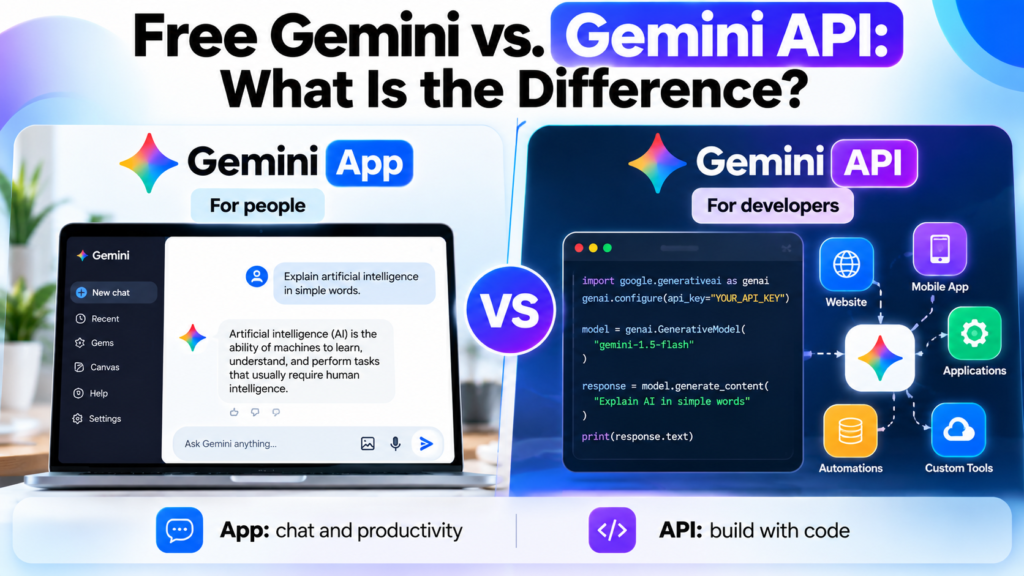
The Gemini app and the Gemini API are related but serve different purposes.
The consumer app is designed for people who want to interact with an AI assistant. The developer API allows programmers to integrate Gemini models into applications, websites, and automated workflows.
Google provides a free tier for eligible Gemini API usage, with access limited to certain models and rate limits. Paid API usage offers higher limits and access to additional capabilities. Data handling can also differ between free and paid API services, so developers should review the applicable terms before sending information.
| Attribute | Gemini app | Gemini API |
|---|---|---|
| Primary audience | Everyday users | Developers and businesses |
| How it works | Chat-based interface | Programmatic requests from code |
| Technical knowledge | Usually unnecessary | Basic programming or integration knowledge |
| Usage limits | Consumer-plan limits | API rate limits and usage quotas |
| Typical use | Writing, questions, learning | Chatbots, applications, automated workflows |
For example, a student can use the Gemini app to explain a programming concept. A developer could instead use the Gemini API to build a study application that generates practice questions from supplied course material.
Important: Free access to the Gemini app does not mean every Gemini API request is free. The two services have separate usage rules.
Is Free Google Gemini Good Enough for SEO and Content Writing?
For bloggers, website owners, and digital marketers, free Gemini can be a useful assistant for research planning and content development.
It can help with:
- Generating article outlines and related questions.
- Simplifying technical explanations.
- Brainstorming titles and meta descriptions.
- Rewriting unclear paragraphs.
- Creating content briefs.
- Reviewing a draft for missing sections or weak explanations.
For example, you could ask Gemini to review an article outline about machine learning and identify important questions that a beginner might still have after reading it.
However, generating a polished article is not the same as producing reliable, original journalism. You should independently verify statistics, quotations, product specifications, and recent developments. AI-generated text may contain errors even when it sounds confident.
For SEO, focus on providing accurate information, original insights, and a genuinely useful experience for readers. Do not rely on AI output alone to establish expertise or factual accuracy.
Also, avoid uploading private client documents or unpublished business information without first reviewing the applicable privacy and data-use terms.
Frequently Asked Questions
Is Google Gemini completely free in 2026?
Yes, the standard Gemini plan costs $0 per month. It has usage limits, and certain advanced capabilities require a paid subscription or may have restricted availability.
Which Gemini model is free in October 2026?
Free users can access the models and model-selection options included in Google’s current free experience. The available model and the amount of access depend on Google’s current policies and usage limits.
Can I use Gemini without a Google Account?
A Google Account is generally required for the standard signed-in Gemini experience. Some integrations or experiences may have different requirements.
Does free Gemini generate images?
Yes, Google’s Gemini experience includes image generation and editing capabilities. The available models, number of generations, and usage limits can vary.
Is Gemini better than ChatGPT?
Neither tool is best for every task. Their capabilities, model access, integrations, and usage limits change over time. Compare them using your own writing, research, coding, and productivity tasks.
Can I use free Gemini for commercial work?
You can use it to assist with many business tasks, subject to Google’s applicable terms and feature restrictions. Review the relevant terms and verify the output before using it commercially.
Why does Gemini sometimes give different answers?
Gemini can use different models or reasoning settings, and generative AI does not always produce identical responses to similar prompts. Different wording, context, or available features can also change the result.
Conclusion
The free model of Google Gemini in 2026 is a practical starting point for anyone who wants to explore generative AI without paying for a subscription. It can help with writing, learning, brainstorming, research planning, image creation, and many everyday tasks.
The most important consideration is that free access does not guarantee unlimited use of every Gemini model or feature. Model selection, usage limits, and advanced capabilities depend on Google’s current product policies and availability.
For casual users, students, bloggers, and small business owners, the free plan may provide enough capability for regular work. People who frequently handle complex research, extensive documents, or advanced creative tasks may benefit from a paid plan.
Start with the free version, test it against your actual needs, and upgrade only if its limits prevent you from completing your work efficiently.
[…] Amazon: How It Works, What It Sells, and What to Know What Is the Free Model of Google Gemini in 2026? Loona Robot: Features, Price, How It Works, and Is It Worth It? Sam Kirchner: Biography, […]