

Best AI Models in 2026: A Practical Comparison Guide

Choosing the best AI models in 2026 depends on what you want to accomplish. Some models excel at complex reasoning and software development, while others are better suited to everyday writing, document analysis, image understanding, or affordable automation. Leading options include OpenAI’s GPT model family, Google’s Gemini models, and Anthropic’s Claude models, alongside open-weight alternatives for developers who want greater control over deployment.
There is no single model that performs best on every task. A model that produces excellent code may not be the most economical choice for processing thousands of customer messages. Similarly, a model with a large context window may still misunderstand a document or overlook an important detail. This guide compares leading AI models by practical use case, explains their strengths and limitations, and shows how to choose the right option for your budget, technical requirements, and daily workflow.
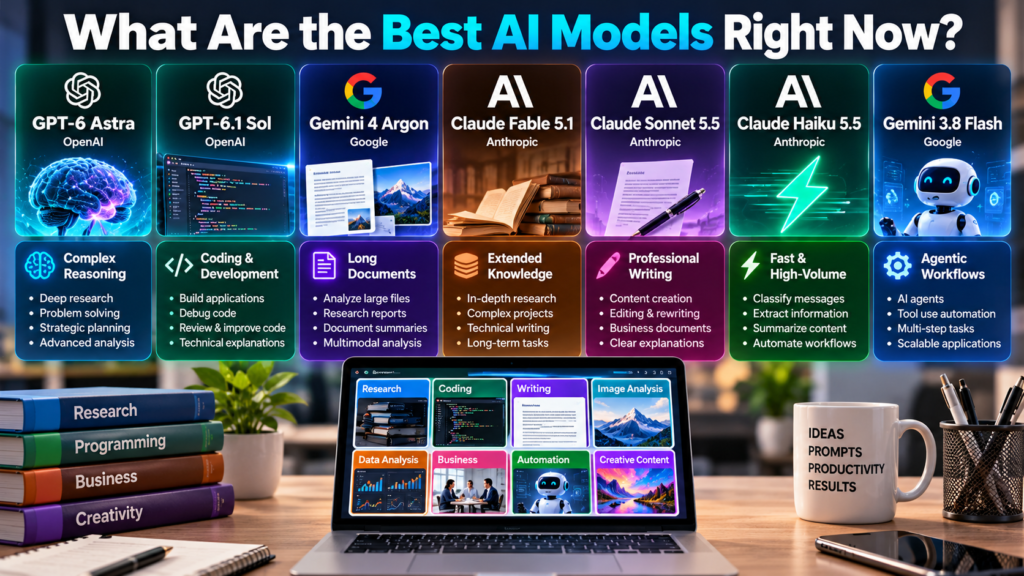
What Are the Best AI Models Right Now?
The strongest choice depends on whether you need advanced reasoning, fast responses, creative writing, coding support, or affordable API access.
The following models are useful starting points based on their intended uses and published capabilities. Availability, access tiers, and model versions can change, so check the relevant provider’s official documentation before making a long-term decision.
| AI model | Best use | Main advantage | Main consideration |
|---|---|---|---|
| GPT-6 Astra | Complex reasoning and research | Advanced problem-solving and tool use | Higher API cost |
| GPT-6.1 Sol | Coding and professional work | Strong capabilities at a lower cost than Astra | Test performance on your tasks |
| Gemini 4 Argon | Long documents and complex workflows | Large context window and reasoning | Access and pricing vary |
| Claude Fable 5.1 | Extended knowledge and coding work | Designed for demanding, lengthy tasks | Availability depends on the plan |
| Claude Sonnet 5.5 | Everyday professional work | Balance of speed and capability | Compare quality for your workload |
| Claude Haiku 5.5 | High-volume tasks | Fast, cost-conscious processing | Complex tasks may need a stronger model |
| Gemini 3.8 Flash | Automated and agentic workflows | Designed for complex workflows at scale | Check model-specific limits |
These options are starting points rather than a universal performance ranking. Actual results depend on the task, prompt, application, and model version available to you.
GPT-6 Astra: Best for Complex Reasoning
GPT-6 Astra is positioned as a flagship model for demanding tasks involving analysis, planning, coding, and tool use. Models in this category can support workflows that combine several steps, such as examining documents, comparing evidence, and preparing structured recommendations.
Where it performs well
Astra is worth considering when a task has several connected parts and a weak answer would be expensive to correct.
Examples include:
- Research: Synthesizing lengthy reports and comparing conflicting evidence.
- Software development: Investigating difficult bugs and planning code changes.
- Business analysis: Reviewing financial documents and preparing recommendations.
- Complex workflows: Combining reasoning with supported tools to complete a sequence of actions.
For example, a researcher could ask an advanced AI model to compare three technical reports, identify disagreements, and prepare a summary that distinguishes documented facts from unresolved questions. The researcher should still verify the source material and important conclusions.
Limitations and cost
Advanced reasoning models can cost more than lightweight alternatives. API pricing may also vary according to input and output tokens, caching, processing tiers, and additional tool usage.
A flagship model is not automatically the right choice for every request. A simple rewrite, short summary, or routine classification may not benefit enough from advanced reasoning to justify the additional expense.
Best for: Researchers, developers, analysts, and teams handling difficult tasks where answer quality matters more than minimum cost.
GPT-6.1 Sol: Best Balance of Capability and Cost
GPT-6.1 Sol is positioned for complex coding, computer use, and professional work at a lower cost than Astra. It is worth evaluating when you need capable reasoning without paying flagship rates for every request.
Practical uses
Sol is a candidate for tasks such as:
- Building and debugging applications.
- Reviewing code and proposing improvements.
- Turning detailed requirements into implementation plans.
- Analyzing business documents and creating reports.
- Coordinating multi-step workflows that use tools.
Consider a developer building a WordPress website. An AI model could help diagnose a PHP error, explain a proposed fix, and draft revised code. The developer should test the changes on a staging site before applying them to a live website.
Pricing and trade-offs
API expenses depend on the model’s current rates and the amount of information processed. Input tokens, generated output, repeated requests, and tool calls can all affect the final bill.
Although a cost-efficient reasoning model can be a strong candidate for professional work, compare it with a more advanced model on representative tasks before deciding which provides better value.
Best for: Developers, freelancers, small businesses, and teams that need capable reasoning without paying premium rates for every request.
Gemini 4 Argon: Best for Large Documents and Complex Workflows
Google’s Gemini family is relevant for people working with documents, images, research material, and applications that combine different types of input. Long-context models can process substantial amounts of information within a single request, depending on the version and its limits.
A context window determines how much input a model can consider, including text, conversation history, and other supported content. A large window can help when a task involves lengthy documents, although it does not guarantee that every detail will be interpreted correctly.
What makes Gemini useful?
Gemini is worth considering for:
- Reviewing long reports, manuals, and research documents.
- Analyzing supported images and other multimodal inputs.
- Developing applications through an AI API.
- Creating workflows that combine model reasoning with tools.
- Working within Google’s AI development ecosystem.
Imagine a business analyst reviewing several lengthy market reports. Gemini can help extract important themes, compare findings, and organize the information into a structured brief. The analyst should still check the original reports before relying on figures or quotations.
What should you consider?
A large context window is useful only when the model can identify and reason about the relevant information accurately. Processing long inputs may also affect response speed and cost.
Check the provider’s current documentation for access requirements, supported features, and pricing before deploying a model in a production application.
Best for: Researchers, document-heavy teams, developers, and businesses that need multimodal analysis or long-context processing.
Claude Fable 5.1: Best for Extended Knowledge Work
Anthropic’s Claude family is a major option for coding, writing, and professional knowledge work. Its different model tiers serve different needs, from demanding technical tasks to routine text processing.
Where Claude fits
Advanced Claude models are worth evaluating for:
- Analyzing complex business documents.
- Working through large software projects.
- Reviewing technical specifications.
- Producing structured drafts and reports.
- Supporting multi-step tasks that require sustained attention.
For example, a software team could use Claude to examine a codebase, identify potential causes of a bug, and suggest a series of changes. A developer should independently test the suggested changes and review security implications.
Limitations
Extended task capability does not mean every action will succeed without supervision. A model can misunderstand requirements, introduce errors, or make assumptions about a project. Tool access, execution permissions, and the surrounding application also influence what it can accomplish.
Availability and API pricing depend on the applicable product or service. Check the provider’s current model information before committing to a particular version.
Best for: Professionals, researchers, and developers handling lengthy, multi-stage assignments.
Claude Sonnet 5.5: Best for Everyday Professional Work
Claude Sonnet is positioned as a balance of speed and intelligence. It is a practical candidate for work that needs more than basic text generation but does not always require the most expensive model available.
Common applications
- Drafting and editing business content.
- Reviewing code and explaining errors.
- Summarizing documents.
- Preparing research outlines.
- Assisting with routine professional tasks.
A content editor, for instance, could use Sonnet to improve an article’s structure, flag unsupported claims, and identify repeated explanations. The editor remains responsible for factual verification and the final editorial decisions.
The important question is not whether a model can produce a polished answer. It is whether its output meets your quality requirements consistently enough to justify its cost.
Best for: Content teams, professionals, and developers seeking a capable everyday assistant.
Claude Haiku 5.5: Best for Fast, High-Volume Tasks
When an application processes hundreds or thousands of requests, a smaller model can be more practical than a flagship system. Lightweight models are generally designed to provide faster responses and lower processing costs for suitable tasks.
Potential applications
- Classifying incoming customer messages.
- Extracting names, dates, and other fields from documents.
- Producing short summaries.
- Routing requests to the appropriate department.
- Drafting routine responses for human review.
For example, an online store could use a lightweight model to categorize customer emails as delivery questions, refund requests, or product inquiries. More complicated cases could then be passed to a stronger model or a human support agent.
This approach is known as model routing: assigning different tasks to different models based on their complexity.
A smaller model may struggle with ambiguous instructions, subtle reasoning, or unusual cases. Before using one at scale, test it on realistic examples and measure how often it makes mistakes.
Best for: High-volume automation, customer support workflows, and applications where speed and operating cost matter.
Gemini Flash: Best for Scalable AI Workflows
Google’s Gemini Flash family is designed for applications that need responsive AI processing. Depending on the specific version, these models can support coding, tool-assisted tasks, and complex workflows.
An AI agent is a system that uses a model to plan or perform tasks, often by calling tools, retrieving information, or interacting with software. The model supplies reasoning and decisions; the surrounding application provides permissions, execution logic, and safeguards.
Practical applications
Flash models are worth testing for:
- Software development workflows.
- Automated document processing.
- Multi-step business tasks.
- Tool-assisted research.
- Applications that need to handle many requests.
For example, an internal company assistant could retrieve a document, summarize its relevant section, and prepare a draft response. The system would still need appropriate access controls and a way to verify that the retrieved information supports the answer.
Important limitations
An agentic model is not the same as a fully reliable autonomous employee. A workflow can fail because the model makes a poor decision, a tool returns incomplete information, or a software integration behaves unexpectedly.
Use permissions, logging, testing, and human approval for consequential actions. Confirm current model availability and API limits before implementation.
Best for: Developers and organizations building tool-assisted applications at scale.
Best AI Models by Use Case
Choosing by task is often more useful than comparing model names alone.
| Your main task | Models worth testing | What to evaluate |
|---|---|---|
| Deep research | GPT-6 Astra, Gemini models | Evidence quality and reasoning |
| Software development | GPT-6.1 Sol, Claude models | Correctness and debugging success |
| Professional writing | Claude Sonnet, GPT models | Accuracy, tone, and editing effort |
| Long-document analysis | Gemini models, advanced GPT models | Retrieval accuracy and context handling |
| High-volume classification | Lightweight Claude or GPT models | Error rate, speed, and cost |
| Tool-based automation | GPT and Gemini models | Reliable tool use and task completion |
| Cost-sensitive API workloads | Lightweight models from multiple providers | Total cost at acceptable quality |
These are starting recommendations based on general model capabilities and intended uses, not the results of a single independent benchmark. Your results may differ depending on the prompt, data, application, and evaluation method.
10. How Much Do the Best AI Models Cost?
AI model costs vary depending on whether you use a consumer chatbot subscription or access a model through an API.
A subscription typically provides access to an application with defined usage limits. An API charges according to the provider’s billing rules, which may include input tokens, output tokens, cached tokens, and additional tool usage.
Understanding API pricing
API prices are usually quoted per million tokens. Input tokens represent the information sent to the model, while output tokens represent the information it generates.
The following example uses illustrative rates to demonstrate how model costs can differ. These figures are not verified current prices for specific models.
| Example model tier | Input cost per million tokens | Output cost per million tokens |
|---|---|---|
| Premium model | $10.00 | $50.00 |
| Mid-range model | $2.00 | $10.00 |
| Lightweight model | $0.10 | $0.50 |
Example: Calculating API expenses
Suppose an application processes 100,000 requests, each using an average of 1,000 input tokens and 200 output tokens. That represents 100 million input tokens and 20 million output tokens.
Using the illustrative rates above, the estimated token charges would be:
| Model tier | Input charges | Output charges | Total |
|---|---|---|---|
| Premium | $1,000 | $1,000 | $2,000 |
| Mid-range | $200 | $200 | $400 |
| Lightweight | $10 | $10 | $20 |
These are illustrative calculations, not a quote. They exclude tools, caching adjustments, taxes, and other possible charges. They also assume the workload is suitable for all three model tiers.
The cheapest model is not necessarily the cheapest overall solution. If it produces frequent errors that require manual correction, the additional labor can outweigh the savings.
Open-Weight AI Models: An Alternative for Developers
Not every project needs a model hosted entirely by a commercial AI provider. Open-weight models allow developers to access trained model weights and, depending on the license, run or adapt the model in their own environments.
Open-weight does not automatically mean open-source. Training data, training code, and other development details may remain unavailable, and usage restrictions vary by license.
When should you consider an open-weight model?
Open-weight models can be useful when you need:
- More control over deployment and infrastructure.
- Local processing for selected privacy-sensitive workflows.
- Customization for a specialized business task.
- Greater control over model versioning.
- An alternative to per-token charges from hosted APIs.
For example, a company might run an appropriately licensed model on its own infrastructure to classify internal documents. However, local deployment still requires security controls, infrastructure maintenance, and careful handling of sensitive information.
Open-weight models are not automatically cheaper. Hardware, electricity, engineering time, and ongoing maintenance can make self-hosting expensive.
Practical advice: Compare the total cost of ownership rather than just the model’s license or download price.
How to Choose the Right AI Model
The most reliable way to select an AI model is to test it against the work you actually need done.
Step 1: Define the task
Decide whether you need writing, coding, research, image analysis, document extraction, or automation. Different tasks require different capabilities.
Step 2: Prepare representative examples
Collect 10–30 realistic tasks, including difficult cases. Use the same instructions and source material for each model.
Step 3: Score the results
Evaluate factual accuracy, completeness, instruction following, consistency, and the amount of human editing required.
Step 4: Measure total cost
Include API charges, latency, tool calls, retries, and human review. A slightly more expensive model may save money if it makes fewer mistakes.
Step 5: Check privacy and reliability
Review data retention, access controls, regional processing options, usage terms, and the provider’s policies before using confidential information.
Should you use one model or several?
For simple workflows, one dependable model may be enough. More advanced applications can use a stronger model for difficult tasks and a smaller model for routine processing.
For example, a customer support system could classify incoming messages with a lightweight model, answer straightforward questions using an approved knowledge base, and send sensitive or complicated cases to a more capable model or a human employee.
This approach can reduce costs without sacrificing quality where it matters. However, routing logic itself must be tested, because a difficult request classified as simple may receive an inadequate response.
Important Limitations and AI Safety Considerations
Even the best AI models have limitations. Understanding these problems is essential before using AI for business, research, or automated decisions.
Hallucinations and factual errors
A model can generate an answer that sounds convincing but contains incorrect information. It may invent a reference, misunderstand a statistic, or provide outdated details.
For important claims, check reliable primary sources. When working with documents, ask the model to identify the supporting passage instead of accepting an unsupported summary.
Privacy and data handling
Do not assume that every AI service handles data in the same way. Consumer applications and business APIs can have different retention, training, and administrative controls.
Before uploading confidential documents, review the applicable data policies and use the appropriate organizational settings.
Bias and inconsistent results
Models can reflect biases in their training data and may respond differently to similar prompts. A successful demonstration is not proof of reliable performance across every user group or situation.
Test edge cases, document known failure modes, and maintain human oversight for consequential decisions.
Tool use is not guaranteed success
A model may have access to web search, code execution, or other tools, but it can still choose an unsuitable action or misinterpret the result. Automated systems need permission limits, error handling, monitoring, and clear stopping conditions.
Frequently Asked Questions
Which is the best AI model overall?
The best model depends on your needs. Advanced reasoning models suit demanding research, while faster and lighter alternatives may offer better value for routine tasks.
Which AI model is best for coding?
Compare capable GPT and Claude models on your actual programming language, codebase, and debugging requirements before choosing.
Which AI model is best for writing articles?
Claude Sonnet and capable GPT models are useful candidates for drafting and editing. For factual articles, verify claims, dates, and sources independently.
Are free AI models good enough?
Yes. Free access or open-weight models can handle many everyday tasks, including summaries, basic writing, and simple coding. Usage limits and advanced capabilities vary.
What is the difference between an AI model and an AI tool?
An AI model generates or interprets information. An AI tool is the application or service that makes a model available, potentially adding search, file uploads, memory, integrations, and other features.
Are larger AI models always better?
No. Larger or more capable models may perform better on difficult tasks, but smaller models can be faster and cheaper for routine work. Real-world testing is more useful than size alone.
Can AI models replace human researchers and writers?
They can automate parts of research and writing, but they still make factual errors and can miss context. Human judgment, source verification, and editorial review remain important.
Conclusion
The best AI models are not necessarily the most expensive or the newest. They are the models that consistently produce accurate, useful results for your particular needs at a reasonable cost.
Advanced GPT models are worth considering for demanding reasoning, while other GPT options may offer a better balance for everyday professional work. Gemini is relevant for long-context and multimodal analysis, while Claude provides options for extended tasks, professional writing, and high-volume processing.
Before committing to a platform, compare at least two models using the same realistic tasks. Evaluate accuracy, speed, privacy, and total operating cost rather than relying solely on promotional claims or benchmark scores.
For most users, the smartest approach is to start with one model, identify its limitations, and introduce additional models only when they deliver a measurable improvement.
[…] Nastia AI: Features, Pricing, Privacy, and Honest Review Best AI Models in 2026: A Practical Comparison Guide Cloud AI: How It Works, Benefits, Uses, and Challenges AI Trends in 2026: The Technologies […]