


Multimodal: Meaning, Examples, Benefits, and Uses

Multimodal means using or combining different types of information. These types can include text, images, audio, video, and other data. In technology, multimodal systems understand information from several sources and use it together. For example, a multimodal AI tool can read a question, study a photograph, and explain what it sees. This makes communication more natural and useful. Instead of relying on one format, the system connects different kinds of information. Today, multimodal technology supports education, business, healthcare, and creative work. Understanding this concept helps people choose suitable tools and discover practical ways to use them.
Multimodal technology is becoming important because people communicate in many ways. We do not always explain ideas through written words alone. Sometimes, a picture, voice recording, or video provides better information. A system that understands these formats can respond more effectively to real-world questions. For example, a student might upload a science diagram and ask for a simple explanation. A business owner could share a product photograph and request a description. These examples show why multimodal systems are useful. They connect different information formats, making digital tools easier to use for everyday tasks.
What Is Multimodal AI?
Multimodal AI is artificial intelligence designed to process information from different formats. Traditional systems may focus mainly on text, numbers, or a single type of data. Multimodal AI can combine information from multiple sources to understand a situation. Depending on its design, it may work with text, images, audio, video, or other inputs. For example, a user can provide a photograph and ask a question about it. The system examines the image and uses the written question to produce an answer. This combination allows people to communicate with AI in more flexible and practical ways.
The main idea behind multimodal AI is connecting information that belongs together. A photograph may show an object, while a written sentence explains what the user wants to know. Audio can provide additional context, and video can show movement over time. The AI system processes these inputs and combines relevant details. However, its abilities depend on the model, training, and available tools. Some systems understand only selected formats, while others support several types. Therefore, users should check supported features before choosing a multimodal AI service for a particular task.
How Multimodal Systems Work
Multimodal systems generally follow several connected stages. First, the system receives information such as text, an image, or audio. Next, specialized processing methods examine the different inputs. These methods identify useful patterns, words, objects, sounds, or other details. The system then connects the information and creates a combined understanding. Finally, it produces an answer, summary, description, or other result. The exact process differs between technologies. Some systems use separate models for each format, while others use models trained to handle multiple formats together.
The following chart shows a simplified view of how a multimodal system processes information. It is a general explanation, not a technical diagram of every AI model. Different systems may combine or repeat certain stages. The goal is to show how information moves from the user to the final result. This process helps explain why multimodal tools can answer questions involving more than one type of information. It also shows why the quality of the input matters. Clear information usually makes it easier for the system to produce a useful response.
| Stage | What Happens | Example |
|---|---|---|
| 1. Input | The user provides different information formats. | Text and photograph |
| 2. Processing | The system examines each input. | Reads the question and studies the image |
| 3. Combination | Relevant information is connected. | Links the question to the photograph |
| 4. Understanding | The system identifies the user’s request. | Recognizes an object in the image |
| 5. Output | The system produces a response. | Gives a written explanation |
Common Types of Multimodal Information
Text is one of the most common information types used in multimodal systems. It includes questions, instructions, documents, captions, and written descriptions. Images provide visual information, such as objects, diagrams, locations, and photographs. Audio includes spoken words, music, and other sounds. Video combines visual information with movement and sound. Some advanced systems also work with structured data, sensor information, or other specialized formats. Each format provides different details. When these details are combined, the system may understand a request more completely than when it receives only one format.
For example, imagine a teacher sharing a written question, a photograph of a plant, and a short audio explanation. A suitable multimodal system could use all three inputs to help create a lesson. The text explains the question, the photograph shows the plant, and the audio adds context. Another example involves customer support. A customer might send a written complaint and a product photograph. The company could use both pieces of information to understand the issue. These examples demonstrate how different formats can support one shared task.
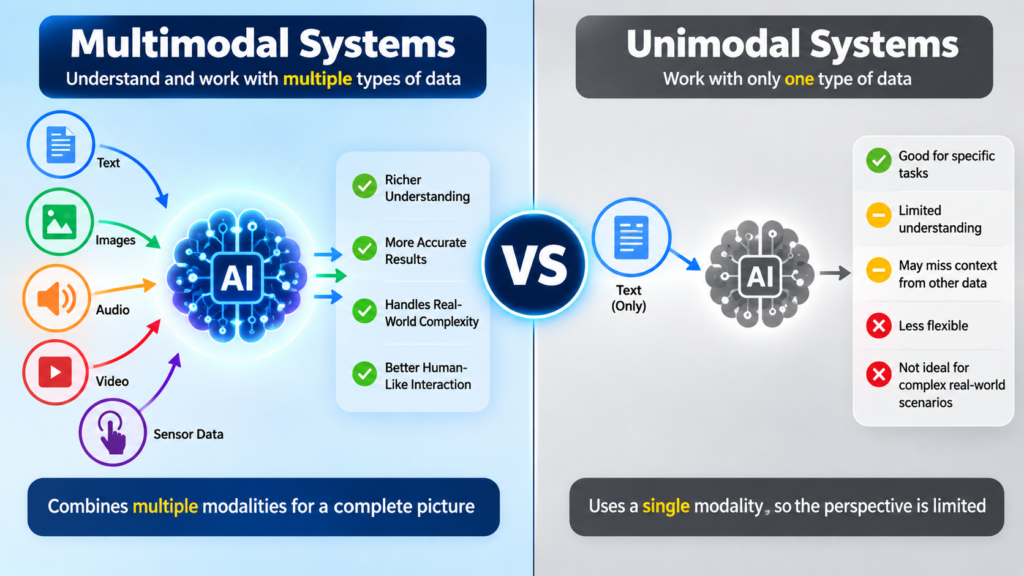
Multimodal vs. Unimodal Systems
A unimodal system mainly works with one type of information. A text-based system, for example, may receive written questions and return written answers. An image-based system may analyze photographs without accepting other formats. These systems can perform their intended tasks effectively. However, they may have limitations when a request requires information from several sources. A multimodal system is designed to combine different formats. This can make it more suitable for tasks involving visual explanations, spoken instructions, or mixed documents. The right choice depends on the user’s needs and the system’s capabilities.
| Feature | Unimodal System | Multimodal System |
|---|---|---|
| Main input | One information format | Multiple information formats |
| Example | Text-only question answering | Text and image question answering |
| Communication | Mostly one format | Several formats |
| Useful for | Focused tasks | Mixed-information tasks |
| Main consideration | Quality of one input type | Quality and combination of inputs |
Neither approach is automatically suitable for every situation. A simple text question may not require image or audio processing. Using a more complex system could add unnecessary steps. On the other hand, a photograph-based question may benefit from multimodal capabilities. For example, a user asking about a chart may need both visual understanding and written explanation. Choosing the right system means considering the task, available information, accuracy requirements, and cost. This approach helps users avoid selecting technology based only on popularity or the number of supported features.
Benefits of Multimodal Technology
One major benefit of multimodal technology is more natural communication. People can ask questions using the information they already have. They do not always need to describe an image in detail or convert audio into text first. A user can share a photograph and ask a direct question. This may save time and reduce unnecessary effort. Multimodal tools can also support different learning styles. Some people understand diagrams better than long explanations, while others prefer listening. By combining formats, technology can offer more flexible ways to access information.
Multimodal systems can also support productivity in different industries. Businesses may use them to organize documents, examine product images, or prepare content. Teachers can use them to explain diagrams and create learning materials. Designers may ask for feedback on visual ideas. Customer service teams can combine written complaints with photographs to understand problems. However, benefits depend on accuracy and proper use. A system may misunderstand an image, miss an important detail, or provide an incorrect answer. Human review remains important when decisions involve money, safety, or sensitive information.
Practical Uses of Multimodal AI
Multimodal AI has practical applications in education, marketing, customer service, and content creation. A student can upload a textbook page and ask for a simple explanation. A marketer can provide a product image and request a short description. A business team can summarize a presentation using its text and visual content. A customer can share a photograph of a damaged item and explain the problem in writing. These uses show how multimodal tools can reduce repetitive work. They also help people interact with technology without following complicated input procedures.
The following examples show how different users may apply multimodal technology. Each example involves more than one information format. The system’s actual performance will depend on the tool and the quality of the information provided. Users should also check important results before relying on them. These examples are practical starting points rather than guarantees of accuracy. They demonstrate how combining text, images, audio, or video can support everyday tasks. In many cases, the user can improve the result by providing clear instructions and explaining the desired outcome.
| User | Information Provided | Possible Task |
|---|---|---|
| Student | Text and science diagram | Explain a difficult concept |
| Teacher | Lesson notes and images | Prepare learning materials |
| Business owner | Product image and instructions | Create product content |
| Customer | Complaint and photograph | Describe a product issue |
| Content creator | Video and written notes | Prepare a summary |
| Researcher | Chart and written question | Explain visible trends |
Multimodal in Education and Learning
Education is an area where multimodal technology can support clearer explanations. Students often learn through written lessons, diagrams, spoken instructions, and demonstrations. A multimodal tool can help connect these formats. For example, a student may upload a mathematics problem and ask for a step-by-step explanation. Another student may share a historical photograph and request background information. These uses can make learning more interactive. However, students should use AI as a learning aid rather than a replacement for understanding. Checking answers and practicing independently remain important parts of education.
Teachers can also use multimodal tools when preparing classroom materials. They may combine lesson notes, diagrams, and recorded explanations to create study resources. A teacher could ask for a simple description of an image or a set of questions based on a chart. These tasks may reduce preparation time. Still, teachers should review generated material for accuracy, age suitability, and clarity. Some subjects require careful explanations and reliable sources. Multimodal technology works best when it supports the teacher’s knowledge and helps students explore ideas. It should not replace professional judgment or direct classroom support.
Multimodal in Business and Content Creation
Businesses can use multimodal tools to work with information from several sources. A company may receive a product photograph, customer message, and sales document. A suitable system could help organize these materials or prepare a draft response. Marketing teams can combine product images with written instructions to create descriptions. Content creators can use videos and notes to prepare summaries or social media ideas. These tasks may improve workflow efficiency. However, businesses should review content before publishing it. Incorrect product details, missing information, or unsuitable wording can affect customer trust.
Multimodal tools are also useful for creative planning. A writer may provide a photograph and request ideas for an article. A designer may share a draft image and ask for suggestions. A video creator may combine a script with footage to prepare a summary. These uses help people move between different formats during a project. The tool can support brainstorming, organization, and editing. It does not automatically replace creative judgment. Users should decide which suggestions fit their goals and make final changes themselves. Clear instructions usually produce more relevant results.
Limitations and Challenges of Multimodal AI
Although multimodal AI offers useful capabilities, it has limitations. A system may misunderstand an image, misread text, or fail to recognize an important detail. Audio quality can affect speech understanding, while poor lighting can make image analysis difficult. Video may contain too much information for a system to process effectively. Some models also struggle with complex charts, unusual objects, or unclear instructions. These limitations mean users should not assume that every answer is correct. Reviewing important information remains necessary, especially when the result affects health, finance, safety, or legal decisions.
Privacy is another important consideration when using multimodal tools. Images, recordings, and documents may contain personal or confidential information. Users should understand how a service handles uploaded data before sharing sensitive material. Businesses should establish clear rules for employee use. It is also important to consider copyright, permission, and ownership when working with photographs, recordings, and other content. A responsible approach includes checking the source, protecting private information, and reviewing results. Multimodal technology can be helpful, but careful use supports better outcomes and reduces avoidable risks.
How to Use Multimodal Tools Effectively
Using multimodal tools effectively begins with a clear goal. First, decide what you want the system to do. Then provide the relevant information in the formats it supports. For example, upload a clear photograph and explain the question in simple language. If the task involves a document, include the important pages rather than unrelated material. You can also explain the expected answer format, such as a short summary or step-by-step explanation. Clear instructions help the system focus on the task. They also make it easier to review the result.
After receiving an answer, check whether it matches the original request. Look for missing details, incorrect descriptions, and unsupported conclusions. If something seems unclear, ask a more specific follow-up question. You can also provide additional information when the first input was incomplete. For example, a clearer photograph may help with visual questions. A longer explanation may help when the request involves several steps. These simple practices improve the usefulness of multimodal tools. They also encourage users to remain involved instead of accepting every generated answer without review.
The Future of Multimodal Technology
The future of multimodal technology may involve more natural communication between people and digital systems. As models improve, they may become better at connecting text, images, audio, and video. This could support more flexible learning tools, business applications, and accessibility features. People may interact with technology through conversations that include several information formats. However, future capabilities will depend on technical progress, safety practices, and responsible development. It is important to distinguish current features from possible future improvements. Not every predicted application will become widely available or work as expected.
Multimodal technology may also become more common in everyday software. Writing tools, educational platforms, design applications, and customer service systems may include features that combine different inputs. This could reduce the need to switch between separate tools. At the same time, users will need to understand privacy, accuracy, and responsible use. Better technology does not remove the need for human judgment. The most useful systems will support people while making their limitations clear. Learning the basics now can help users understand new features as they become available.
Frequently Asked Questions
What is multimodal in simple words?
Multimodal means using different types of information together. These types may include text, images, audio, and video. In AI, multimodal systems process several formats to understand requests and produce useful responses. For example, a user can upload a photograph and ask a written question about it. The system combines both inputs to answer.
What is an example of multimodal AI?
A chatbot that understands written questions and photographs is an example of multimodal AI. A user might upload a picture of a plant and ask about its features. The system uses the image and written question together. Other examples include tools that process speech, video, documents, or combinations of these formats.
Why is multimodal technology important?
Multimodal technology is important because people communicate through different formats. A photograph can show details that words may not explain easily. Audio can provide spoken information, while video can show movement. Combining these formats helps digital systems handle more natural requests. It can also support education, business tasks, accessibility, and creative work.
Is multimodal AI always accurate?
No, multimodal AI is not always accurate. It may misunderstand images, misread text, or miss important information. Poor input quality can make these problems worse. Users should check important answers and provide clearer instructions when needed. Human review is especially important for medical, financial, legal, and safety-related information.
How can beginners start using multimodal tools?
Beginners can start by choosing a tool that supports the formats they need. Upload a clear image or document, then ask a simple question. Explain the desired result and review the answer carefully. Start with everyday tasks, such as describing a photograph or summarizing a document. Gradually try more complex tasks as you become comfortable.
Conclusion:
Multimodal technology combines different information formats to support more natural communication and practical tasks. Multimodal AI can process text, images, audio, video, and other inputs, depending on its design. Its uses include education, business, content creation, and customer support. However, accuracy, privacy, and responsible use remain important considerations. Users should provide clear instructions and review important results. Understanding these basics makes it easier to choose suitable tools and use them effectively. Whether you are a student, business owner, or content creator, exploring multimodal technology can help you discover new ways to work with information.
[…] Machine Learning: A Simple Guide for Beginners Multimodal: Meaning, Examples, Benefits, and Uses Decentralized AI Movement: The Future of Artificial Intelligence AI vs AGI: Key […]