

Kling AI Review: Is Kling AI Free in 2026?

If you are wondering is Kling AI free, the short answer is yes, but there are important limitations. Kling AI is an AI creative platform designed for generating and editing images and videos. It can turn text or images into video and supports advanced creative workflows. The platform offers a free option, while paid plans provide larger credit allowances and additional capabilities.
This review explains how Kling AI works, what you can do without paying, its main features, pricing, limitations, and alternatives. It also looks at whether Kling AI makes sense for beginners, creators, marketers, and professional users.
What Is Kling AI?
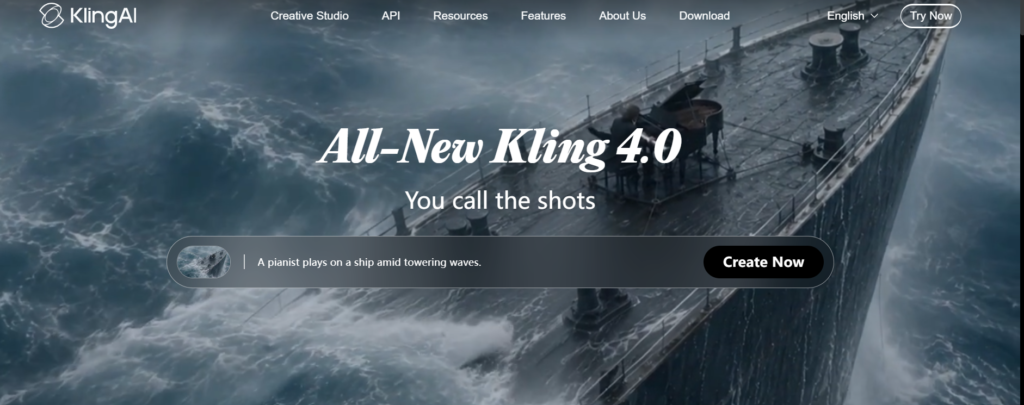
Kling AI is an artificial intelligence creative platform developed by Kuaishou, a major technology company known for its short-video ecosystem. The platform focuses heavily on AI-generated video and images.
Instead of manually creating every visual, users can describe an idea using text or provide an existing image. Kling then generates visual content based on those instructions. Its tools are aimed at creators, marketers, designers, social media users, and other people who need visual content.
Kling AI supports both image and video generation. Its tools include video creation from text and images, image generation, image-to-video workflows, and creative editing features.
How Does Kling AI Work?
The basic workflow is relatively simple:
Step 1 → Create an account → Step 2 → Select an AI tool → Step 3 → Add a prompt or image → Step 4 → Generate → Step 5 → Review and export
For example, a creator could enter a prompt describing a cinematic city scene. Kling processes the request and produces a video based on the description.
For image-to-video generation, the user can upload an image and describe the movement or scene they want. This makes Kling useful when a creator already has a character, product image, or visual concept.
The exact generation cost depends on the model, duration, resolution, and other settings. Kling uses a credit-based system, so users need to consider credits when planning regular production.
Key Features of Kling AI
AI Video Generation
Video generation is one of Kling AI’s main purposes. Users can create videos from text prompts or images.
This is useful for social media clips, concept videos, advertisements, storytelling, product visuals, and creative experiments. Kling supports high-resolution video generation and offers tools for creating and extending video content.
The important limitation is that generating individual clips is different from producing a complete edited film. Users may still need separate editing software for longer projects.
AI Image Generation
Kling also provides image-generation capabilities. Users can create images from text or work with existing images.
The platform supports multiple creative inputs, different aspect ratios, and high-resolution image generation. This can help designers explore several visual concepts quickly instead of manually creating every variation.
Image-to-Video
Image-to-video generation can turn a static visual into an animated sequence.
This feature can be useful for social media creators, marketers, storytellers, and people who want to bring existing artwork to life. The quality depends heavily on the source image and the instructions provided.
Creative Canvas
Kling’s Canvas provides a workspace for combining creative elements. Users can work with text, image, and video elements in a connected visual workspace.
This type of workflow can be useful when a project contains several related visual elements.
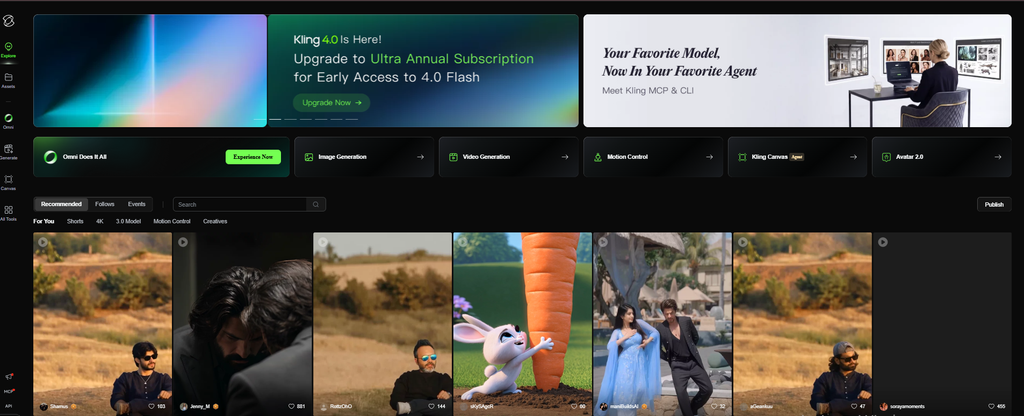
Community Features
Kling also includes community-oriented features where users can discover creations from other users. These examples can provide inspiration and help beginners understand what kinds of prompts and visual concepts are possible.
Kling AI User Experience
Kling AI is designed around a visual creation workflow rather than a complicated professional editing interface.
The general process is straightforward: select a generation tool, provide instructions, choose settings, and start generating. Beginners can understand the basic workflow without learning traditional video-editing software first.
However, AI generation itself can require experimentation. A prompt that sounds clear to a person may still produce an unexpected result. Users creating consistent characters, movements, or scenes may need multiple attempts.
The platform is therefore relatively approachable for experimentation, but advanced creative work can still involve a learning curve.
Kling AI Performance & Output Quality
Kling AI is particularly focused on visual generation, so output quality depends on the generation model, prompt, source material, and selected settings.
The platform supports high-resolution image and video generation and offers different tools for creating visual content. However, these capabilities should not be interpreted as a guarantee that every generation will look perfect.
AI-generated video can still contain unwanted movement, inconsistent details, or results that differ from the prompt.
Another practical consideration is generation cost. Higher-quality and longer outputs can consume more credits, making experimentation more expensive for frequent users.
Is Kling AI Free?
Yes, Kling AI has a free option, but “free” does not mean unlimited access.
The free option allows users to explore Kling AI without immediately paying for a subscription. However, free users have usage limitations, and the amount of available generation can change.
The free option is most useful for learning the interface, experimenting with prompts, and deciding whether Kling fits your workflow.
Users who generate content regularly may eventually need a paid plan because AI generations consume credits.
Kling AI Pricing & Plans
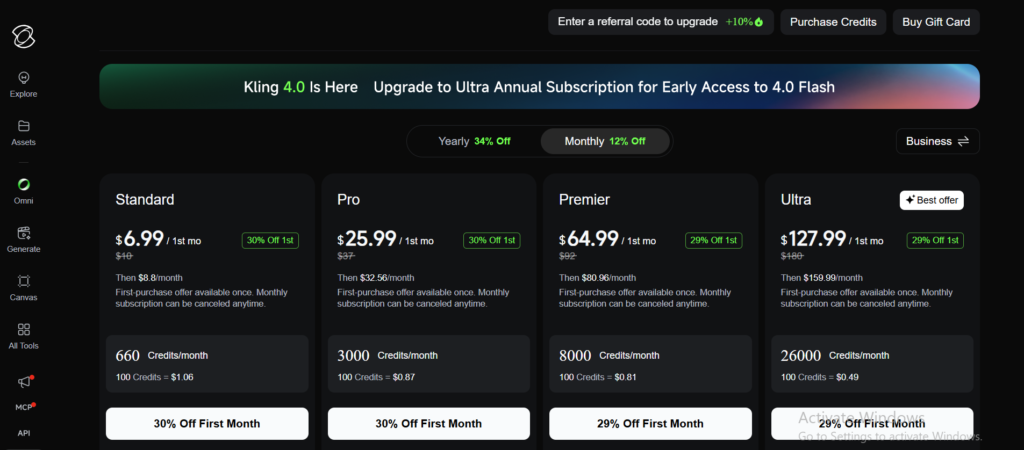
Kling uses credits for AI generation. Pricing can change, and regional prices may differ.
Reported 2026 pricing includes the following structure:
| Plan | Monthly Price | Reported Credits | Best For |
|---|---|---|---|
| Basic | $0 | Limited free access | Beginners |
| Standard | $10 | 660/month | Individual creators |
| Pro | $37 | 3,000/month | Frequent creators |
| Premier | $92 | 8,000/month | Heavy users |
| Ultra | $180 | 26,000/month | High-volume production |
These prices can change over time, and promotional offers or regional pricing may affect the final amount. Always check the current pricing shown in your Kling AI account before subscribing.
Kling AI Pricing: What Should You Watch?
The credit system is more important than the headline subscription price.
A plan may look affordable, but your actual cost depends on how quickly you consume credits. Longer videos, higher resolutions, and repeated generations can use credits more quickly.
This matters particularly for professional creators who need many variations before accepting a final result.
For occasional users, the free option may provide enough access for experimentation. Regular creators may need a paid plan once generation volume becomes important.
Kling AI Pros and Cons
Pros
- Text-to-video and image-to-video generation
- AI image-generation capabilities
- High-resolution generation options
- Creative tools for different visual workflows
- Community features for discovering ideas
- Free access is available
- Multiple paid plans for different usage levels
Cons
- Free access has usage limitations
- Generation uses a credit system
- Higher-volume creation can become expensive
- AI outputs can still require multiple attempts
- Pricing and promotional offers can change
- Professional projects may still require separate editing software
Who Should Use Kling AI?
Kling AI may be useful for several types of users.
Content creators can use it to produce short visual clips for social platforms.
Marketers can explore product concepts, promotional visuals, and advertising ideas.
Designers can generate visual concepts before developing a final design.
Video creators can use AI-generated clips as part of a larger editing workflow.
Beginners can use the free option to learn how AI video generation works before committing to a subscription.
For more options, readers can also explore our guide to best AI tools for beginners and compare Kling with other AI platforms.
Who Should Avoid or Consider Alternatives?
Kling AI may not be ideal for someone who needs unlimited video generation without usage restrictions.
It may also be less suitable for users who need a complete professional video-editing environment. Kling focuses primarily on AI generation rather than replacing every part of a traditional production workflow.
Businesses should also review current licensing and commercial-use terms before using generated material in commercial projects.
Users who need specific integrations, advanced editing, or a different pricing model may want to compare alternatives before subscribing.
Kling AI Features and Capabilities
Kling AI brings several AI-powered tools together in one platform, with a strong focus on image and video creation. Instead of switching between different tools for every visual task, users can create content from text prompts, animate images, and experiment with different creative ideas within the same workflow.
| Feature | Availability | What It Means |
|---|---|---|
| Text-to-Video | Yes | Creates video content from written prompts |
| Image-to-Video | Yes | Adds movement and animation to still images |
| AI Image Generation | Yes | Creates images from text descriptions |
| Video Extension | Yes | Helps continue generated video sequences |
| High-Resolution Output | Yes | Supports higher-quality visual generation |
| Creative Canvas | Yes | Provides a workspace for combining visual elements |
| Free Access | Yes | Allows users to try the platform without a paid subscription |
What Makes Kling AI Useful?
The main advantage of Kling AI is its focus on AI-powered visual creation. A user does not need advanced video-production skills to start experimenting with generated content.
For example, someone can describe a scene, generate a video, review the result, and adjust the prompt if the output does not match the original idea. Similarly, an existing image can be used as the starting point for an animated video.
This makes Kling AI particularly useful for content creators, marketers, designers, and beginners who want to explore AI-generated visuals without learning complicated production software first.
How Much Does Kling AI Cost?
Kling AI has a free tier, while reported paid plans currently start at around $10 per month for Standard. Higher tiers include Pro, Premier, and Ultra plans with larger credit allocations.
Prices can vary by region, promotions, and billing method. The safest approach is to check the current price shown in your account before purchasing.
Is Kling AI Good for Beginners?
Kling AI can be approachable for beginners because the basic workflow is simple.
You provide a prompt or image, select the relevant generation tool, and create an output. The harder part is learning how to write effective prompts and control results consistently.
Beginners should start with the free option and experiment before purchasing a subscription.
Frequently Asked Questions
Is Kling AI completely free?
Kling AI offers free access, but it is not unlimited. Free users have usage restrictions compared with paid memberships. The exact free-credit arrangement can change, so users should check the current balance and terms inside Kling AI before planning regular production.
Is Kling AI free for video generation?
Yes, Kling AI provides free access for experimenting with its AI generation tools. However, free usage is limited by the platform’s current credit and feature restrictions. Regular video production can require a paid plan because generation consumes credits and higher-volume workflows need more capacity.
How much does Kling AI cost?
Reported 2026 pricing starts with a free Basic tier, followed by Standard at $10, Pro at $37, Premier at $92, and Ultra at $180 per month. Pricing and promotions can change, so verify the current amount before subscribing.
What is Kling AI used for?
Kling AI is used to generate images and videos using artificial intelligence. Users can create visuals from text, animate images, explore creative concepts, and produce short video content. It can be useful for creators, marketers, designers, and others who need AI-generated visual material.
Is Kling AI worth using?
Kling AI may be useful for people who specifically need AI-generated images and videos. The free option allows experimentation before paying. However, users with high-volume production needs should compare credit consumption, pricing, licensing, and alternative platforms before choosing a subscription.
Final Verdict
Kling AI is a practical option for users interested in AI-generated images and videos. Its free access makes it possible to explore the platform without immediately purchasing a subscription. Its paid plans provide greater capacity for people who generate content regularly.
The main consideration is the credit-based system. Frequent generations can consume credits quickly, while pricing and free allowances may change over time. Kling AI may suit creators who need AI visual generation, while users seeking a complete professional editing suite or a different pricing model should compare alternatives.
Conclusion
So, is Kling AI free? Yes, Kling AI provides free access, but its free usage comes with limitations. The platform focuses on AI image and video generation, including text-to-video and image-to-video workflows. Paid plans increase available credits and provide greater capacity for regular production.
For beginners, starting with the free option is a practical way to understand the platform. If your content needs grow, compare Kling AI pricing and alternatives before upgrading. Kling AI can be particularly useful for creators, marketers, designers, and users experimenting with AI-generated visual content.