


Backyard AI: Complete Review and Guide 2026

Backyard AI is an AI platform built around interactive characters, text adventures, storytelling, and roleplay. Instead of using AI only for normal questions, users can create characters with specific personalities, backgrounds, scenarios, and speaking styles. The platform supports web and mobile access, while its desktop application can run AI models locally on compatible computers. This makes Backyard AI especially interesting for people who want more control over their AI conversations. Users can create custom characters or explore community-created ones through the Character Hub. The platform is designed for immersive conversations, creative storytelling, and experimenting with different AI models in a flexible environment for various users.
One of the main differences is its focus on customizable AI characters. Users can define a character’s personality, history, scenario, opening message, dialogue examples, and additional information through a Lorebook. These settings influence how the character responds during conversations. Backyard AI also supports different language models, allowing users to choose models based on their desired performance and available hardware. For local users, the desktop experience can operate without depending entirely on cloud services. Mobile access can also connect with models running on a home computer. This combination makes Backyard AI useful for roleplay, creative writing, interactive stories, and private AI experimentation.
How Does Backyard AI Work?
Backyard AI works by combining AI language models with detailed character instructions. When users create a character, they can describe its personality, history, behavior, scenario, and communication style. The model then uses those details alongside conversation history to generate responses. Users can further influence the character with example dialogue and a carefully written first message. This approach gives creators considerable control over how conversations develop. Clear character instructions can produce more consistent conversations and reduce confusion during longer sessions. The quality of the selected model also affects response accuracy, creativity, memory, and overall conversation quality.
The platform includes a Character Hub where users can discover characters created by the community. This means beginners do not need to build everything from scratch. They can select an existing character, start chatting, and later customize the experience. Backyard AI supports features such as Lorebooks, speech, background images, and different model choices. The exact experience depends on the model and plan selected. Local desktop users can download compatible models and run them on their own computers. Cloud users can instead access hosted models through supported platforms, providing a simpler setup for people without powerful hardware.
Its Features in 2026
Backyard AI offers several features aimed at making AI character conversations more flexible. Users can create custom characters, explore community characters, use Lorebooks, adjust model parameters, and experiment with different response styles. The platform also supports group chats, where users can interact with multiple characters. Voice features and advanced model options are available depending on the plan. The current subscription structure includes Free, Standard, and Pro options. Pro provides access to larger models and context sizes reaching up to 100,000 tokens. The platform also provides an iOS application, while Android availability may depend on the current development stage and region.
Another useful feature is local AI support. The desktop application can use a computer’s CPU or GPU to run compatible models. This gives users more control over their conversations and can reduce dependence on cloud inference. Mobile tethering can also allow users to access local models from a mobile device while the desktop computer remains connected. This approach can be useful for people who prefer keeping conversations on their own hardware. Local operation is optional, so users who do not have a powerful computer can use available cloud options instead. This flexibility makes the platform suitable for both beginners and more technical AI users.
Backyard AI Pricing and Plans
Backyard AI currently provides free access alongside paid cloud plans. The Free option provides limited weekly messages, while Standard and Pro plans offer broader access to hosted models. The current monthly pricing is approximately $12 for Standard and $35 for Pro. The Free option is useful for people who want to test the platform before subscribing. Standard is designed for users who want more regular access, while Pro provides larger models and substantially greater context capacity. Pricing can change over time, so users should check the latest information inside the platform before making a subscription decision.
The plan structure mainly separates users by model selection, message access, and context size. Standard provides access to smaller and medium-sized models, while Pro adds larger model options. Larger models can require significantly more computing resources, especially when running locally. For beginners, the free allowance can provide a practical way to understand the interface before paying. Users who need longer conversations or more advanced hosted models may consider paid access. However, the best plan depends on individual usage. Someone who chats occasionally may not need a subscription, while frequent users may benefit from expanded access.
Backyard AI Pricing Chart 2026
| Plan | Monthly Price | Messages | Context | Main Access |
|---|---|---|---|---|
| Free | $0 | Limited weekly access | Up to 16K | Free model |
| Standard | Around $12/month | Unlimited | Up to 16K | Standard models |
| Pro | Around $35/month | Unlimited | Up to 100K | Standard + Pro models |
The chart provides a simple overview of the main plan differences in 2026. The biggest differences are model selection, message limits, and context capacity. Free users can test the service without committing to a subscription, while Standard users receive broader access to standard models. Pro users receive the widest model selection and substantially larger context capacity. These differences matter because context determines how much previous information an AI model can process during a conversation. However, a larger context window does not automatically guarantee better responses. The model itself, character instructions, conversation history, and prompt quality also influence results.
For users who prefer local AI, subscription pricing tells only part of the story. The desktop application can run models using the computer’s own resources, so users can avoid paying for some cloud generations. However, local AI performance depends heavily on RAM, processor speed, GPU capability, and model size. Smaller models generally require fewer resources and can be easier for beginners. Larger models may provide more sophisticated responses but demand stronger hardware. This makes hardware an important consideration when comparing local and cloud-based Backyard AI experiences. Users should check their computer specifications before downloading large models.
Backyard AI Privacy and Local AI
Privacy is one of the important reasons some users consider Backyard AI. When models run locally through the desktop application, conversations can remain on the user’s computer rather than being processed entirely by a remote cloud service. Local operation can therefore appeal to users who want greater control over their conversations. However, users should understand which mode they are using because cloud-based models operate differently from locally running models. The privacy experience depends on the specific feature, model, and connection method. Users should review the platform’s current privacy information before entering sensitive or personal information into any AI service.
Backyard AI also provides cloud-based services, which involve different technical arrangements from local AI. Users should therefore avoid assuming that every conversation has identical privacy characteristics. It is sensible to understand where information is processed before using a particular model. Users should also avoid entering passwords, financial information, private documents, or highly sensitive personal details into AI chats unless they have verified that the service and configuration are appropriate. Local AI can provide additional control, but users remain responsible for securing their own computer, files, backups, and network. Good digital security practices remain important regardless of the AI platform.
Backyard AI Review 2026: Performance and Experience
The 2026 Backyard AI experience is strongly focused on character-based conversations and interactive storytelling. The platform provides many tools for creating personalities and scenarios, while its model selection gives users more control over response behavior. The desktop experience is particularly interesting for people who want local character chat without manually configuring multiple separate AI systems. Instead of building a complicated setup from scratch, users can install the application, select a compatible model, choose a character, and begin experimenting. This makes the platform accessible to beginners while still providing advanced options for users who enjoy experimenting with AI models.
User experiences can vary, particularly across different devices and models. Mobile performance may depend on the application version, operating system, device hardware, and connection method. Local desktop performance also depends strongly on the computer’s specifications. This means one user’s experience may differ considerably from another’s. Rather than judging the entire platform from a single review, users should consider their own requirements. The free option provides a practical opportunity to test the interface and available features. Users can then decide whether the model quality, character tools, performance, and overall experience justify moving to a paid plan.
Who Should Use Backyard AI?
Backyard AI can be useful for people interested in AI roleplay, interactive fiction, character development, creative writing, and local language models. Writers can use custom characters to test dialogue, explore fictional personalities, or develop scenes. Hobbyists can experiment with different models and prompts. People interested in local AI can also use the desktop application to learn how models behave without relying entirely on cloud services. The Character Hub provides a starting point for beginners, while advanced settings provide additional control. Users who mainly need factual questions or productivity assistance may find that other general-purpose AI tools are more directly designed for those everyday tasks.
The platform is also useful for users who value customization. A character can have a defined personality, scenario, speaking style, background, and Lorebook information. This makes conversations feel more structured than a basic chatbot session. However, results depend heavily on the selected model and prompt quality. Local models also require suitable hardware, and larger models can consume substantial memory and processing resources. Beginners should therefore start with a smaller model and a simple character before changing advanced parameters. For more practical AI guidance, readers can also explore our internal guides on AI tools for beginners and best AI writing tools before deciding which type of platform suits their workflow.
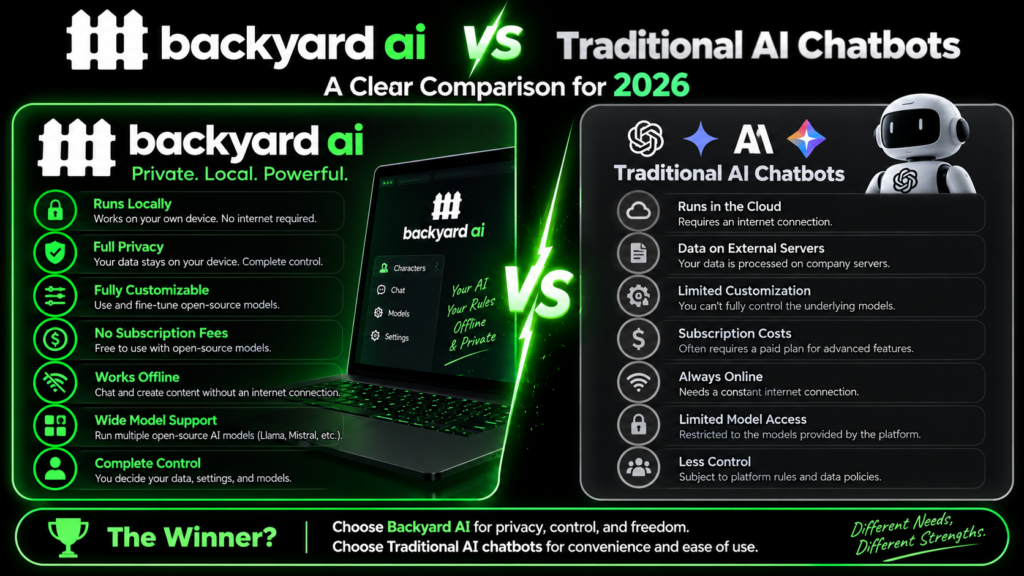
Backyard AI vs Traditional AI Chatbots
Backyard AI differs from many mainstream AI chatbots because character customization and interactive storytelling are central to its design. Traditional assistants usually focus on questions, productivity, coding, research, writing, or general conversation. Backyard AI instead gives users detailed controls for defining characters and scenarios. Its local desktop option also provides a different approach to privacy and model management. This does not mean one type is universally better. The right choice depends on what the user wants to accomplish. Someone creating an interactive story may value character controls, while someone drafting business documents may prefer a conventional productivity-focused AI assistant.
There is also a major difference in how users interact with models. Backyard AI allows users to select and manage supported models, including local models and hosted cloud models. This can be valuable for people who want to experiment with model behavior. However, model management introduces additional choices that beginners may find confusing. Hardware requirements also matter for local use. Traditional cloud chatbots generally hide these technical details because the provider manages the computing infrastructure. Backyard AI therefore sits between an easy character-chat service and a more customizable local AI environment, giving users flexibility while requiring some understanding of models, context, and computer resources.
How to Get Started With Backyard AI
Starting with Backyard AI is relatively straightforward. Beginners can use the web experience or supported mobile application, while desktop users can install the local application and select a compatible model. New users should avoid changing many advanced settings immediately. Instead, they can first understand how the selected character responds. After that, they can adjust the character persona, scenario, example dialogue, or Lorebook. This gradual approach makes it easier to identify which settings actually improve the conversation. Starting with a simple character also helps users understand how prompts affect responses before they begin creating more complex characters.
For better results, write character instructions clearly and avoid contradictory details. A useful character prompt can explain personality, background, behavior, and the situation surrounding the conversation. Example dialogue can demonstrate the desired tone and formatting. Lorebooks can store additional information that becomes useful during relevant conversations. Users should also remember that models have finite context windows. Older conversation details may eventually become less influential as the context fills. Choosing an appropriate context size and keeping character information concise can therefore improve consistency. These techniques are especially useful when building long-running characters or interactive stories that depend on continuity.
Backyard AI Pros and Limitations in 2026
Backyard AI has several practical strengths. Its character-building system provides detailed customization, while the Character Hub offers ready-made experiences. Local model support gives technically minded users more control, and cloud plans provide an easier alternative for people without suitable hardware. Lorebooks, group chats, voice features, model selection, and adjustable parameters add further flexibility. The platform also supports desktop and mobile experiences. These features make Backyard AI more than a basic chatbot. It is designed around a broader ecosystem involving characters, models, prompts, storytelling, and different ways to access AI conversations according to user preferences.
There are also limitations worth understanding before signing up. Local models require compatible computer hardware, and larger models can demand considerable resources. Cloud plans introduce recurring costs, especially for users who want larger models and longer context. Mobile experiences can also vary between devices and software versions. Another consideration is that character-based AI can produce inconsistent or incorrect information because language models generate responses rather than independently verifying every statement. Users should therefore treat generated content carefully, especially when using AI for factual, professional, legal, medical, or financial purposes. Understanding these limitations can help users make more realistic expectations about the technology.
Frequently Asked Questions
Is Backyard AI free?
Yes. Backyard AI offers a free option for cloud use with limited weekly access. The desktop application can also run compatible local models using the user’s own computer hardware. Paid plans provide broader access to hosted models and additional capabilities. The available limits and pricing can change, so users should check the current plans before subscribing.
Can Backyard AI run locally?
Yes. Backyard AI supports local AI models through its desktop application on compatible computers. Users can use available CPU or GPU resources to run supported models. Local operation can provide greater control over models and conversations. However, performance depends on computer specifications, available memory, GPU capability, and the size of the selected model.
Is Backyard AI available on mobile?
Yes. Backyard AI supports mobile access through supported platforms and its web experience. Users can also connect mobile devices with compatible desktop setups for local model access. Mobile availability and features can change over time, so users should check the current application support for their specific device and operating system.
What is Backyard AI mainly used for?
Backyard AI is mainly designed for interactive stories, AI characters, roleplay, creative conversations, and text adventures. Users can create custom personalities or explore community-made characters. The platform can also be useful for creative writing, character development, and experimenting with different AI models.
Is Backyard AI worth trying in 2026?
Backyard AI can be worth testing for users who want customizable characters, interactive storytelling, or local AI models. Its free access gives beginners a way to explore the platform before paying. The best experience depends on preferred models, hardware, mobile requirements, and desired features, so testing it first is a practical approach.
Conclusion
Backyard AI is a flexible platform focused on AI characters, interactive storytelling, roleplay, and local model experimentation. Its key features include character customization, model selection, Lorebooks, community characters, and local desktop support. The 2026 pricing structure gives users several ways to explore the service, including a free option for beginners. However, local AI requires suitable hardware, while paid cloud access may be necessary for users who want larger models and extended context. Mobile performance can also vary depending on the device and setup. If you are interested in customizable AI conversations, start with the free experience and test its models, characters, and features before choosing a paid plan.
[…] Xoul AI: Complete Guide, Features, and Review Backyard AI: Complete Review and Guide 2026 Grok Moderation: How It Works and What Users Should Know Nectar AI: Complete Guide to […]