

What Is Google’s AI Called? Meet Google Gemini

If you are wondering what Google’s AI is called, the answer is Google Gemini. It is Google’s family of artificial intelligence models and the name of its AI assistant, which can help users answer questions, write content, summarize information, understand images, and complete other everyday tasks. Gemini has become an important part of Google’s AI strategy, appearing in its standalone app and integrating with selected Google products and services.
However, Google offers more than one AI technology. Gemini powers conversational AI experiences, while other systems support tasks such as generating images, assisting with coding, and improving search results. Understanding the difference helps you choose the right tool for your needs.
This guide explains what Google Gemini is, how it works, what you can do with it, and where its limitations matter. You will also learn how Gemini compares with ChatGPT, whether it is free, and how to get started safely.
What Is Google’s AI Called?
Google’s main consumer-facing AI assistant is called Google Gemini. It replaced the Bard chatbot name in February 2024, when Google introduced Gemini as the new name for its conversational AI experience.
Gemini refers to both a family of AI models developed by Google and the assistant through which people can interact with those models. The distinction is important because the app is the user interface, while the underlying models perform the AI tasks.
For example, you can ask Gemini to explain a complicated subject, draft a professional email, brainstorm business ideas, or summarize a document. Depending on the model, available features, account, and permissions, it may also work with images, audio, video, and other types of information.
Google continues to develop its AI systems, so the available models and features can change over time.
How Does Google Gemini Work?
Google Gemini uses machine learning, particularly large language models (LLMs), to understand prompts and generate responses. These models learn patterns from large collections of training data and use those patterns to produce relevant text, analyze information, and perform other tasks.
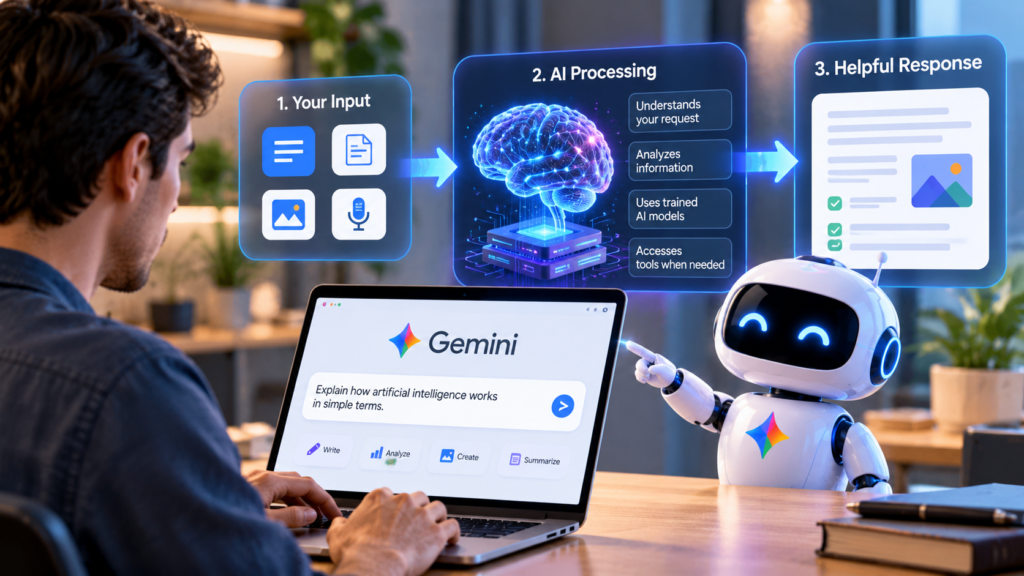
The process generally follows three steps:
- Understanding your request: Gemini processes your question, instructions, and any supported files or media you provide.
- Generating a response: The underlying model predicts and produces a suitable response based on its training and the available context.
- Using additional tools when available: Depending on the feature, Gemini may use connected Google services or other tools to retrieve information or help complete a task.
For example, suppose you ask Gemini to explain a computer networking concept. It can provide a beginner-friendly explanation, give an example, and answer follow-up questions without requiring you to start a new conversation.
Gemini is also multimodal. This means supported models can work with different types of information, including text, images, audio, and video. The exact capabilities depend on the model and feature you are using.
Does Gemini Always Give Accurate Answers?
No. Like other generative AI systems, Gemini can produce incorrect information or misunderstand a question. This is sometimes called an AI hallucination.
It may also provide an answer that sounds convincing but contains an incorrect date, an outdated fact, or a misleading explanation. For important decisions, check reliable sources and verify the information independently.
What Are the Main Features of Google Gemini?
Google Gemini offers a range of features for personal, educational, and professional use. Availability varies by region, account type, subscription, and model.
1. Writing and Content Creation
Gemini can help users create, improve, and organize written content.
Common tasks include:
- Writing emails, reports, articles, and social media captions.
- Rewriting complicated sentences in simpler language.
- Correcting grammar and improving readability.
- Generating outlines and brainstorming content ideas.
- Summarizing long passages of text.
For example, a blogger could provide a draft about artificial intelligence and ask Gemini to improve its structure, suggest clearer headings, and identify explanations that need more detail.
The output should still be reviewed for accuracy, originality, and suitability before publication.
2. Research and Information Summaries
Gemini can help organize information and explain unfamiliar subjects. Depending on the available tools, it can also assist with web-based research and provide references to relevant sources.
A student researching renewable energy, for example, could ask for a comparison of solar and wind power, including their advantages and disadvantages.
However, an AI-generated summary is not automatically a verified research result. Check the original sources, especially when the answer involves medical, legal, financial, or rapidly changing information.
3. Image Understanding and Generation
Supported Gemini experiences can analyze images and help users create or edit visual content.
You might upload a photograph and ask Gemini to identify visible objects, explain a chart, or suggest improvements to a presentation layout. Image-generation capabilities can also help create illustrations and marketing concepts where available.
These features are useful for creators and businesses, but generated images may contain visual mistakes, and image analysis may misinterpret details.
4. Voice Conversations
Gemini Live supports conversational interactions using voice in eligible experiences. Instead of typing every question, users can speak naturally and continue a conversation with follow-up questions.
This can be useful when practicing a language, brainstorming ideas while walking, or discussing a topic without repeatedly typing.
Available languages, features, and usage limits can vary by device, region, and account.
5. Integration With Google Services
One of Gemini’s main advantages is its relationship with Google’s wider product ecosystem.
Depending on eligibility, settings, and the product being used, Gemini features can work with services such as Gmail, Google Drive, Google Docs, Google Maps, and YouTube. These integrations may help users locate information, summarize material, or complete tasks across connected services.
For instance, someone preparing for a meeting might use an eligible Gemini integration to find relevant information in their documents and organize the key points.
Connected features may require permissions, and users should understand what information they are allowing Gemini to access.
What Is the Difference Between Gemini, Google AI, and Google Search?
These names are related, but they do not mean the same thing.
| Name | What it means |
|---|---|
| Google AI | A broad term for Google’s artificial intelligence research, models, and products. |
| Google Gemini | Google’s AI model family and conversational AI assistant. |
| Google Search | Google’s search engine, which helps users discover information across the web. |
| AI Overviews | AI-generated summaries that appear in eligible Google Search results. |
| Google AI Studio | A development environment for experimenting with Google’s AI models and building applications. |
Google Search can use AI to help users explore information, while Gemini provides a more direct conversational experience. AI Overviews, meanwhile, present summaries within search results rather than functioning as a separate general-purpose chatbot.
The distinction matters when choosing a tool. If you want to discover websites, Google Search is a natural starting point. If you want to discuss a topic, draft content, or work through a problem conversationally, Gemini may be more suitable.
Is Google Gemini Free to Use?
Yes. Google offers a free Gemini experience, although its features and usage limits differ from those available through paid subscriptions.
Google also offers paid Google AI plans that provide higher usage limits and access to additional capabilities. The precise models, features, storage benefits, and prices depend on the plan and market.
The following comparison explains the general distinction.
| Option | Best suited for |
|---|---|
| Free Gemini | Everyday questions, writing assistance, learning, and occasional AI tasks. |
| Paid Google AI plans | People who need higher usage limits or access to additional tools and models. |
| Gemini API | Developers building applications that use Google’s AI models. |
For most beginners, starting with the free version is a sensible choice. You can evaluate its answers and features before deciding whether a paid subscription offers enough additional value.
Pricing and availability may change, so check Google’s current subscription information before purchasing a plan.
How to Start Using Google Gemini
Getting started is straightforward. You do not need programming experience to use the standard Gemini assistant.
Step 1: Open Gemini
Visit the Gemini website or install the official Gemini mobile app where available.
Step 2: Sign In if Required
Use your Google Account and review any applicable age, regional, or account requirements.
Step 3: Enter a Clear Prompt
Explain what you need, who the response is for, and the format you prefer.
Step 4: Review and Refine the Answer
Ask follow-up questions, request examples, and verify important facts before using the result.
Example Prompts for Beginners
You can start with practical requests such as:
- For students: “Explain photosynthesis in simple English and give me three examples.”
- For bloggers: “Create an outline for an article about AI writing tools, focusing on practical uses and limitations.”
- For office workers: “Rewrite this email to make it professional, clear, and polite.”
- For developers: “Explain what this Python function does and identify possible errors.”
A specific prompt usually produces a more useful result than a vague request. If the first answer is incomplete, add context or explain what needs to change.
Google Gemini vs. ChatGPT: Which Is Better?
Google Gemini and ChatGPT are two general-purpose AI assistants. Both can help with writing, learning, research, coding, and other tasks, although their capabilities and integrations differ.
| Comparison | Gemini | ChatGPT |
|---|---|---|
| Developer | OpenAI | |
| Main purpose | Conversational AI and assistance across Google’s ecosystem | Conversational AI and assistance across supported tools and workflows |
| Writing and summarization | Available | Available |
| Image-related tasks | Supported features vary by model and plan | Supported features vary by model and plan |
| External service integrations | Includes eligible Google service integrations | Offers supported tools and integrations |
| Free access | Available, with limits | Available, with limits |
| Best choice | Depends on your workflow and preferred ecosystem | Depends on your workflow and preferred ecosystem |
Neither assistant is automatically better for every task. A user who relies heavily on Google Workspace may prefer Gemini’s integrations, while another user may prefer ChatGPT’s available tools or response style.
The most useful comparison is to test both with the same real tasks and evaluate accuracy, quality, ease of use, and cost.
What Are the Limitations and Privacy Risks of Google Gemini?
Gemini can save time, but using it responsibly requires understanding its limitations.
Accuracy and Reliability
Gemini may misunderstand instructions, omit important details, or generate unsupported claims. It should not be treated as a guaranteed source of truth.
For factual research, check source documents and confirm important claims independently.
Privacy and Data Handling
Google’s Gemini privacy policies explain that information may include prompts, uploaded files, generated content, and data from connected services. Google handles this information under its applicable policies to provide, maintain, improve, and personalize services, among other purposes. Some interactions may be reviewed by human reviewers under applicable processes and settings.
To reduce privacy risks:
- Avoid entering passwords, payment details, or confidential business information unless you have an appropriate, approved arrangement.
- Review Gemini’s activity and data controls.
- Check the permissions granted to connected apps.
- Follow your organization’s policies when handling workplace information.
Do not assume that deleting a conversation automatically removes every associated record or that all account types follow identical data-handling rules.
Dependence on Features and Access
Some capabilities require a compatible device, a supported country, an eligible account, or a paid plan. A feature shown in a demonstration may not be available to every user.
Before relying on Gemini for a particular workflow, confirm that your account supports the required capability.
Frequently Asked Questions
1. What is Google’s AI called?
Google’s main AI assistant is called Google Gemini. The name also refers to Google’s family of generative AI models.
2. Was Google’s AI previously called Bard?
Yes. Google renamed its Bard conversational AI experience to Gemini in February 2024.
3. Is Google Gemini better than ChatGPT?
Neither is best for every task. The right choice depends on your needs, preferred integrations, response quality, and available features.
4. Can I use Google Gemini for free?
Yes. A free version is available, while paid Google AI plans offer additional capabilities or higher usage limits.
5. Can Google Gemini write articles?
Yes. Gemini can draft outlines, generate text, rewrite paragraphs, and suggest headings. You should fact-check and edit its output before publishing.
6. Is Google Gemini available on mobile phones?
Yes. Google offers Gemini mobile experiences, although availability and specific features vary by operating system, region, and account.
7. Is Google Gemini safe to use?
It can be useful for everyday tasks, but you should verify important answers and avoid sharing sensitive information unnecessarily. Review Google’s privacy settings and applicable data policies.
Conclusion
Google’s AI is called Google Gemini, and it is much more than a chatbot for answering simple questions. It can support writing, learning, research, image-related tasks, voice conversations, and productivity workflows, with capabilities depending on the model and account.
For beginners, the free version is a practical starting point. Try it with everyday tasks, such as explaining a difficult concept, improving an email, or organizing research notes. As you become familiar with its strengths, you can decide whether its additional features justify a paid plan.
The key is to use Gemini as an assistant rather than an unquestionable authority. Verify important facts, protect confidential information, and choose the AI tool that best fits your workflow. Understanding these differences will help you get more value from Google’s AI without overlooking its limitations.
[…] Sam Kirchner: Biography, Background and AI Debate What Is Google’s AI Called? Meet Google Gemini Opus Clips: A Complete Guide to AI Video Clipping Poe AI: Features, Models, Pricing, and […]