


Codex: Complete Guide to OpenAI’s AI Coding Agent

Codex is an AI coding agent from OpenAI that helps developers write, review, and ship software. It can read code, make changes, run tests, and help solve technical problems. Unlike a simple code generator, it can work through larger software tasks with less step-by-step guidance. Developers can use it through ChatGPT, their editor, or the terminal. It is also useful for teams managing multiple projects and repeated engineering work. Whether you are learning programming or building professional applications, understanding Codex can help you choose the right AI development tool. This guide explains how it works, its benefits, limitations, and practical ways to get started.
What Is Codex?
Codex is an AI agent designed to support software development. It can understand programming instructions, inspect project files, edit code, and help complete engineering tasks. For example, you can ask it to add a feature, fix a bug, or explain an unfamiliar function. It can also work with tests and development tools to check whether a change behaves correctly. This makes it different from tools that only suggest a few lines of code. Codex is designed to help with larger tasks across a software project, while keeping the developer involved in important decisions.
The name Codex can also refer to historical manuscripts or collections of written texts. However, in modern technology discussions, it usually means OpenAI’s AI coding agent. The software development tool is built for practical engineering work rather than only answering programming questions. It can help developers understand an existing codebase, plan changes, and review the results. Its capabilities depend on the model, available tools, project instructions, and permissions. Therefore, Codex should be viewed as a capable coding assistant, not an independent replacement for software engineering judgment.
How Does Codex Work?
Codex begins with a task written in natural language. You might ask it to create a login page, fix a failing test, or explain why an application crashes. It then examines the available project context and determines which files and tools are relevant. Depending on the task, it can read files, edit code, run commands, and inspect test results. The agent may continue working through several steps before presenting its changes. This approach helps developers handle tasks that require more than one simple instruction.
A useful Codex workflow includes four main stages: understanding, implementation, verification, and review. First, the agent studies the request and relevant code. Next, it makes the required changes. It can then run tests or other checks to identify problems. Finally, the developer reviews the results before accepting the work. This process is important because passing tests does not guarantee that every requirement has been met. Clear instructions and careful review help improve the quality of the final result.
Main Features of Codex
Codex offers features that support different parts of the software development process. Developers can use it for routine coding tasks, complex refactoring, bug fixing, and code review. It can also help generate tests, explain project behavior, and prepare changes for review. The Codex app supports working with multiple agents and isolated worktrees, allowing different tasks to progress without directly interfering with one another. These features are especially useful for developers who manage several tasks at the same time.
Another important feature is its availability across different coding environments. Codex can be used in ChatGPT, an integrated development environment, or the terminal. Its project instructions and workflow can help it follow a team’s coding standards. Developers can also use skills and connected tools for supported tasks beyond ordinary code editing. However, available features vary by client, account, and workspace settings. Checking the current documentation is the best way to confirm which tools and permissions are available.
Benefits of Using Codex
The biggest benefit of Codex is that it can reduce the time spent on repetitive development work. Developers often need to update similar files, write routine tests, investigate errors, or explain existing code. Codex can help with these activities, leaving more time for system design and important technical decisions. It can also provide a useful starting point for people who are learning programming. However, the actual time saved depends on the task, project complexity, and quality of the instructions.
Codex can also support better collaboration within development teams. A developer can ask it to explain a change, summarize a pull request, or prepare a first version of documentation. Team instructions can help the agent follow shared conventions and project requirements. This may make routine work easier to organize and review. Still, the tool does not remove the need for communication between team members. Developers must understand the changes, check important decisions, and ensure the final software meets business and technical requirements.
Codex for Beginners
Beginners can use Codex to learn programming through practical examples. Instead of asking only for a finished application, a new developer can request an explanation of each file and function. The agent can also help identify errors, explain programming concepts, and suggest small exercises. For example, a beginner learning Python could ask for a simple calculator and then request an explanation of its functions. This creates an opportunity to learn by building. However, copying code without understanding it can slow long-term progress, so beginners should ask questions and test their own understanding.
A good beginner workflow starts with a small project. Create a simple application, describe the desired result, and ask Codex to explain its plan before making changes. Review each file and run the application yourself. When something fails, share the error and ask for an explanation rather than requesting an unexplained replacement. You can also use a beginner programming guide to learn basic concepts before starting larger projects. This method encourages active learning and helps you recognize when the agent makes a mistake or misunderstands your request.
Codex for Professional Developers
Professional developers can use Codex across many parts of the software lifecycle. It can help implement features, investigate bugs, refactor older code, and prepare changes for review. Teams may also use it for repeated engineering tasks, such as issue triage or routine maintenance. The Codex app supports multiple agents working in parallel through isolated worktrees, which can help organize independent tasks. Developers still need to decide which changes are appropriate and how they fit the wider system.
Codex is particularly useful when a project has clear instructions and reliable tests. A file such as AGENTS.md can describe naming conventions, development commands, important dependencies, and project-specific rules. These instructions give the agent useful context that may not be obvious from the code alone. Before assigning a large task, developers should explain the expected result, important constraints, and how success will be checked. This improves communication and makes the work easier to review.
Codex Features at a Glance
The following chart summarizes common Codex capabilities and their practical uses. Features and availability may change as OpenAI updates the product.
| Feature | What It Helps With | Example Use |
|---|---|---|
| Code generation | Creating new code | Build a small web page |
| Code review | Finding possible issues | Review a pull request |
| Bug fixing | Investigating errors | Fix a failing test |
| Refactoring | Improving existing code | Simplify repeated functions |
| Test generation | Creating checks | Add tests for a new feature |
| Project instructions | Following team rules | Use an AGENTS.md file |
| Multiple agents | Handling parallel tasks | Work on separate features |
| Background work | Continuing supported tasks | Run routine engineering work |
These capabilities show why Codex can be useful for both small and large projects. A beginner may use it to understand a function, while an experienced developer may use it to investigate a complex bug. The best results come from matching the task to the tool’s strengths. It is also important to check the current documentation because available models, limits, integrations, and permissions can change over time.
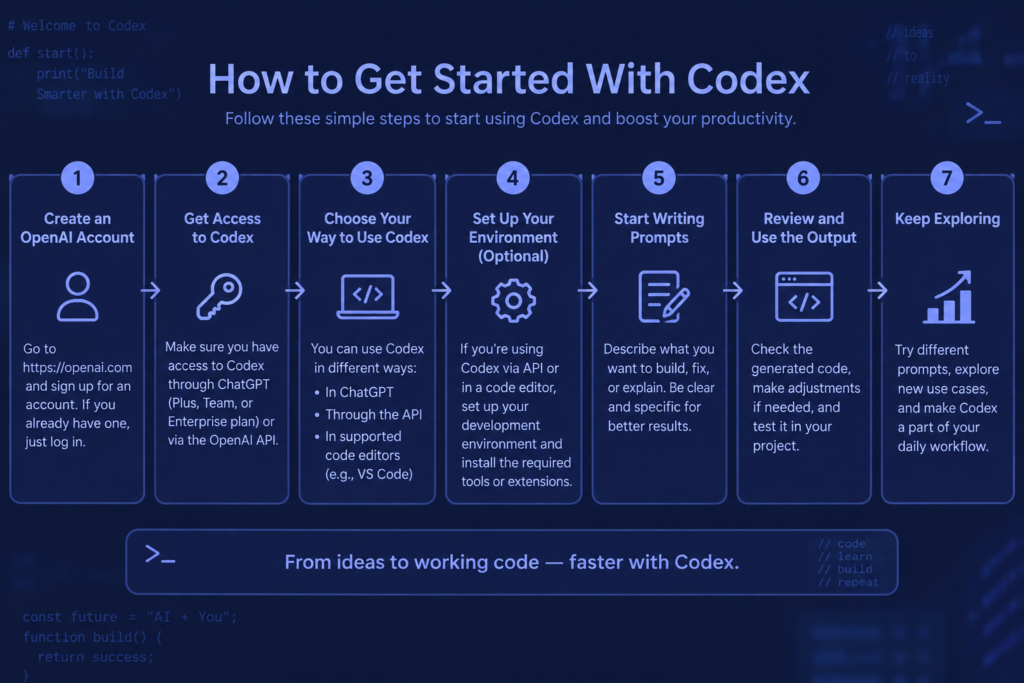
How to Get Started With Codex
Getting started with Codex is straightforward when you have a suitable project ready. First, sign in with your ChatGPT account and open Codex. Choose a folder or Git repository where the agent can work. Then describe a small task in clear language. For example, ask it to explain the project structure or add a simple feature. Start with a manageable request so you can understand the workflow. Once the task is complete, review the changes and test the result before moving to a larger assignment.
For better results, provide useful project information in your instructions. Explain what the application does, which files matter, and what the finished change should achieve. Include relevant errors, expected behavior, and testing requirements. If your project has special rules, place them in the appropriate instruction file. You can also use an AI development tools guide to compare coding assistants and understand different workflows. Clear context reduces confusion and makes it easier to evaluate the agent’s work.
Codex Pricing and Availability
Codex is included across ChatGPT plans, including Free and Go, according to OpenAI’s current help documentation. Usage limits vary by plan, and some tasks can consume more usage than others. For example, a long-running task with extensive code changes may require more resources than a short question about a programming concept. Users should check their account settings and current pricing information for the latest limits and available options.
Codex can be accessed through ChatGPT, supported IDE extensions, and the command-line interface. The desktop app also provides a workspace for managing coding agents and reviewing changes. Some features depend on the operating system, workspace configuration, and account permissions. Before starting a large project, confirm that your chosen environment supports the required tools. You can also read a software development workflow guide for practical advice on organizing coding tasks and reviewing changes.
Limitations and Safety Considerations
Codex can make mistakes, misunderstand requirements, or introduce bugs into a project. A generated solution may look correct while failing in unusual situations. It may also choose an approach that conflicts with your application’s architecture or security needs. For these reasons, developers should review important changes and run appropriate tests. Sensitive projects require additional care because permissions and connected tools can affect what the agent can access or change.
Security is especially important when an agent can execute commands or interact with external tools. Codex uses sandboxing and configurable permissions to help control its environment. However, developers should understand what access has been granted and avoid exposing secrets unnecessarily. Never assume that an AI-generated security fix is automatically safe. Review authentication, authorization, data handling, and deployment changes carefully. For critical systems, experienced developers should test and validate the final implementation before release.
Frequently Asked Questions
What is Codex used for?
Codex is used for software development tasks such as writing code, fixing bugs, reviewing changes, and creating tests. It can also help developers understand existing projects and work through larger engineering assignments. Its usefulness depends on the task, available project context, and the developer’s ability to review the result.
Is Codex free to use?
Codex is included across ChatGPT plans, including Free and Go. However, usage limits vary by plan and task complexity. Some users may need additional credits or another available plan option when they reach their limits. Check your current account settings for the most accurate information.
Can beginners use Codex?
Yes, beginners can use Codex to learn programming, understand code, and build small projects. It is helpful when users ask for explanations instead of only copying finished code. Start with simple tasks, review each change, and test the result. Basic programming knowledge will make the learning process easier.
Can Codex replace a software developer?
Codex can automate many development tasks, but it does not replace the judgment of a skilled developer. People still need to define requirements, review code, test important behavior, and make architectural decisions. The agent is best used as a coding partner that supports human expertise.
Where can I access Codex?
You can access Codex through ChatGPT, supported IDE extensions, and the command-line interface. The desktop app provides another way to manage coding tasks and agents. Availability depends on your account, operating system, and workspace settings. Check the current Codex documentation for access details.
Conclusion
Codex is a practical AI coding agent that helps people build, review, and maintain software. It can support beginners learning programming and experienced developers handling complex engineering work. Its main strengths include code generation, debugging, testing, refactoring, and support for multiple development environments. However, good results require clear instructions, suitable project context, and careful human review. Codex is most valuable when it works alongside a developer rather than replacing technical judgment. If you want to explore AI-assisted programming, start with a small project and gradually try more advanced tasks. With the right workflow, Codex can become a useful part of your development toolkit.
[…] VentureBeat: Technology News, AI, and Business Insights Codex: Complete Guide to OpenAI’s AI Coding Agent Comet Browser: A Simple Guide to AI-Powered Browsing Latest AI News: Major Updates and […]