

Kie AI: What It Is, How It Works, and What You Should Know

Kie AI is an artificial intelligence platform that gives developers access to multiple AI models through a unified API. Instead of integrating separate services for image generation, video creation, music production, speech processing, and text generation, developers can use Kie AI to manage these capabilities through a single platform. This approach can simplify the process of building AI-powered applications and creative tools.
The platform is particularly relevant for developers, startups, content creators, and businesses that want to incorporate different AI technologies into their products. However, Kie AI is more than a collection of creative tools. Its API infrastructure allows applications to submit generation requests, track processing tasks, and retrieve results programmatically.
Understanding how the platform works is important before using it for a commercial project. In this guide, we examine Kie AI’s main features, supported model categories, pricing structure, practical applications, integration process, and limitations. We also explain who can benefit from the platform and what to consider before relying on it for production workloads.
What Is Kie AI?
Kie AI, available through its official website at kie.ai, is an AI API platform that connects developers with multiple artificial intelligence models through a common integration layer.
An API, or application programming interface, allows two software systems to communicate. In this case, a developer can connect an application to Kie AI and use supported AI models without implementing an entirely separate integration for every model provider.
The platform covers several categories of AI technology, including:
- Image generation: Creating images from written descriptions and supported visual inputs.
- Video generation: Producing videos from text prompts, images, and other supported inputs.
- Audio and music generation: Accessing supported tools for music creation, speech synthesis, and audio processing.
- Language models: Using supported models for conversational responses, text processing, coding assistance, and other language-based tasks.
Kie AI maintains a model marketplace where developers can explore available models and their individual requirements.
The key distinction is that Kie AI primarily serves as an access and integration platform. It does not mean that every model available through the service was developed by Kie AI itself.
For example, a developer might use one model to generate product images, another to create promotional videos, and a language model to write product descriptions. Rather than building separate integrations for each provider, the developer can use Kie AI’s supported API infrastructure.
This can reduce integration work, although the quality, capabilities, and behavior of the underlying models still vary.
How Does Kie AI Work?
Kie AI works by connecting an application or development environment to supported AI models through its API infrastructure. The exact process depends on the model being used, but the general workflow is straightforward.
1. Choose an AI Model
The first step is selecting a model that matches the task.
For example, an application that creates marketing images needs an image-generation model. A system that produces short promotional videos needs a compatible video-generation model.
Developers should review each model’s supported inputs, output formats, parameters, and pricing before choosing one.
Different models can produce different results even when given identical instructions. Testing several options is often more useful than choosing a model based solely on its name or advertised capabilities.
2. Create an API Key
An API key authenticates requests sent to the platform. Developers can create and manage their keys through the Kie AI account interface.
The key must be handled carefully because unauthorized access could allow someone else to consume account credits or submit unwanted requests.
For security, API keys should be stored in server-side environment variables or an appropriate secrets-management system. They should never be exposed in public repositories, browser-side JavaScript, or mobile application code.
3. Submit a Request
After selecting a model and configuring the required parameters, the application sends a request to the relevant API endpoint.
Depending on the model, the request might include a text prompt, an image, audio input, generation settings, or other supported information.
Consider a hypothetical e-commerce application that generates product photography. A user uploads a picture of a handbag and requests a clean studio background. The application submits the image and instructions to a compatible image-editing model.
The resulting image depends on the selected model, the quality of the input, and the parameters supplied with the request.
4. Retrieve the Result
Image, video, and audio generation often require more processing time than a conventional text response. Kie AI’s documentation describes an asynchronous task workflow for these operations.
In practice, this means the application receives a task identifier after successfully submitting a generation request. It can then check the task status or use a configured webhook to receive a notification when processing finishes.
A successful request does not necessarily mean the generated content is already available.
Developers must handle different outcomes, including successful completion, processing delays, and failed tasks.
5. Deliver the Output to the User
Once the task finishes, the application retrieves the result and presents it to the user or processes it further.
For instance, a marketing dashboard might display a generated advertisement image, allow the user to approve it, and then save the approved file to the company’s own storage system.
This final step is important because generated media and task records have retention limits on the platform. Businesses should download and store important outputs rather than assuming they will remain available indefinitely.
Key Features of Kie AI
Kie AI’s main appeal is its unified approach to accessing different AI models. However, its usefulness depends on the specific capabilities and integration requirements of each model.
Unified API Access
One of the platform’s central features is the ability to access multiple supported models through a common API environment.
Without an integration layer, a development team may need to learn different authentication methods, request formats, response structures, and error-handling procedures for several providers.
A unified platform can reduce some of this complexity.
For example, a creative application could offer image generation and video generation in the same interface. The application would still need to implement the appropriate model-specific parameters, but the shared infrastructure could make the overall integration easier to manage.
It is important to understand that a unified API does not make every model technically identical. Certain models require specialized endpoints, inputs, or processing steps.
Image Generation and Editing
Kie AI provides access to supported image-generation and image-editing models.
Depending on the selected model, these tools can help users create illustrations, product visuals, marketing graphics, concept images, and other visual assets.
A small online store, for example, could build a tool that generates alternative product backgrounds for its catalogue. A designer might use a different model to develop visual concepts before creating the final artwork.
However, image quality and editing accuracy vary by model. Fine details, text inside images, product proportions, and consistency between multiple images may require additional testing or manual correction.
AI Video Generation
Video generation is another important category within the platform.
Supported models may allow developers to generate video from text descriptions, reference images, or other inputs. Their individual capabilities determine the available duration, resolution, editing controls, and output format.
A business could use this functionality to build a system that creates short promotional videos from product descriptions and reference photographs.
The practical value depends on the intended use. AI-generated video may be suitable for concept development and certain marketing workflows, but professional projects can still require editing, quality checks, and adjustments to motion or visual continuity.
Audio, Music, and Speech Processing
Kie AI also provides access to supported audio-related models.
Depending on the model, developers may be able to incorporate music generation, text-to-speech, speech recognition, or other audio-processing functions into their applications.
For example, an educational platform could use a supported speech model to turn written learning material into audio lessons.
A developer building an accessibility feature might use speech recognition to convert spoken input into text.
These examples illustrate possible applications rather than guaranteed results from every model. Language support, voice options, input limits, and commercial usage conditions must be checked individually.
Language Models and Text Processing
Language models are designed to process and generate text. They can support tasks such as summarization, question answering, structured data extraction, and coding assistance.
Through supported language-model integrations, developers can build conversational interfaces or automate parts of document-processing workflows.
Imagine a company that receives hundreds of customer enquiries. Its application could use a language model to categorize incoming messages, summarize the customer’s problem, and prepare a suggested response for a support agent.
The model would still need suitable instructions, error handling, and human review where mistakes could affect customers.
Language models can also produce inaccurate statements, misunderstand instructions, or generate information that sounds convincing but is incorrect. Access to a capable model does not eliminate these risks.
Task Tracking and Webhook Support
Kie AI’s API documentation describes task-status checking and webhook callbacks for supported asynchronous operations.
Task tracking helps developers determine whether a generation request is still processing, has completed, or has failed.
Webhooks provide another option. Instead of repeatedly checking for an update, an application can receive a notification when a task reaches a relevant status.
These features are particularly useful when generating media takes considerable time or when an application handles many requests simultaneously.
Developers should still implement appropriate timeouts, retry logic, error handling, and verification of incoming webhook requests.
What Can You Use Kie AI For?
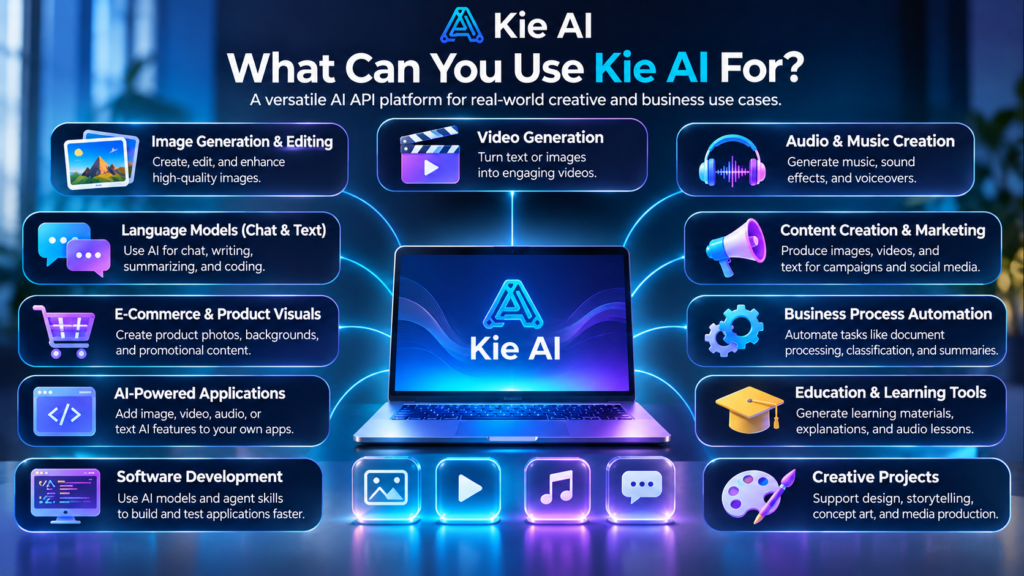
Kie AI is most useful when an application needs access to one or more supported AI models. Its practical applications extend across creative work, business automation, software development, and digital services.
Content Creation and Digital Marketing
Marketing teams regularly need product images, promotional graphics, campaign concepts, and short videos.
A developer could use Kie AI to create an internal tool that accepts a campaign brief and generates draft visual assets using compatible models.
The workflow might look like this:
- A marketer enters the campaign objective.
- A language model helps prepare a creative brief.
- An image model generates initial visual concepts.
- A video model creates a suitable motion-based variation.
- The marketing team reviews the results before publication.
This approach can help reduce repetitive production work. However, generated assets should be checked for brand consistency, factual accuracy, copyright concerns, and any unintended visual errors.
E-Commerce Product Photography
Online retailers often need multiple images of the same product for different campaigns or promotional placements.
An application using a compatible image-editing model could help create alternative backgrounds, lifestyle scenes, or advertising concepts from approved product photographs.
For example, a store selling watches could generate draft visuals showing a product against a minimalist studio background.
The original product’s design must remain accurate. Changes to the dial, logo, strap, or other identifying details could misrepresent the item being sold.
For this reason, product images intended for actual listings should undergo careful visual inspection before publication.
AI-Powered Applications
Developers can use supported APIs to add AI features to their own software.
Potential applications include:
- Creative design platforms.
- Image-generation dashboards.
- Video production tools.
- Conversational assistants.
- Document-processing systems.
- Automated content workflows.
- Educational applications.
The benefit is that developers can focus on the application itself rather than building every AI capability from scratch.
However, API access alone does not create a complete product. Developers must also build the user interface, manage authentication, control usage, protect customer data, and handle failures.
Business Process Automation
AI can help automate specific tasks within larger business workflows.
For example, a company could develop an internal system that extracts information from submitted documents, summarizes the contents, and sends the extracted fields to a review queue.
A language model might handle the summarization, while conventional application code validates required fields and determines where the results should go.
This distinction matters. AI is often useful for interpreting unstructured information, but ordinary software rules remain better suited to deterministic operations such as checking totals, validating identifiers, or enforcing required fields.
A reliable workflow combines both approaches rather than allowing an AI model to make every decision independently.
Software Development
Developers can use AI APIs to add intelligent features to websites and applications.
Kie AI also documents support for coding-agent workflows through its available agent skills. These integrations can help compatible coding agents discover supported models, read their parameters, submit tasks, and retrieve generated results.
This can be helpful when building a prototype or experimenting with different AI capabilities.
Nevertheless, generated code and automated development actions require testing. Developers should review security, dependencies, error handling, and production readiness before deploying an application.
Kie AI Pricing: How Much Does It Cost?
Kie AI uses a credit-based payment system for its supported models. The amount charged depends on the model and the type of operation being performed.
The platform’s pricing information describes different billing units, which can include charges per image, per second of generated video, per request, or per million language-model tokens.
Consequently, there is no single price that accurately represents every use of Kie AI.
Understanding the Credit System
A credit-based system allows users to access different models through a shared account balance.
However, individual models may consume credits at different rates. A short text operation and a high-resolution video generation task should not be expected to cost the same amount.
Before selecting a model, examine its current pricing and determine how the charges apply to your intended workflow.
The following factors can affect total spending:
- The model selected.
- The number of generation requests.
- The amount of text processed by language models.
- The duration or complexity of media generation.
- The frequency of failed or repeated requests.
- The number of users accessing your application.
Kie AI states that failed generation tasks are not charged under its billing policy. Developers should still inspect their account logs and the applicable terms when investigating unexpected charges.
Is Kie AI Cheaper Than Direct API Access?
Kie AI promotes its unified pricing as a potentially cost-effective alternative to using certain models directly through their providers.
However, savings vary by model and can change as prices are updated. A lower advertised rate does not automatically mean that every workload will be cheaper.
For a fair comparison, calculate the cost of completing the same task through both services. Include the relevant billing unit, output requirements, and any additional infrastructure or operational expenses.
It is also worth considering whether the integration savings justify using an intermediary service for a particular application.
Where Can You Check Current Prices?
The official Kie AI pricing page provides the current model-specific rates and billing information.
Check that page before purchasing credits or committing to a production budget. Avoid relying on old screenshots, third-party pricing summaries, or figures copied from outdated articles.
For business use, estimate the expected monthly number of requests and test representative workloads before committing significant resources.
How to Get Started With Kie AI
Getting started involves choosing a suitable model, configuring access, and testing the complete workflow.
Step 1: Identify Your Requirements
Begin by defining the exact task you want to perform.
Do you need image generation, video creation, speech processing, or text analysis? Are you building a personal experiment, an internal business tool, or a commercial application?
Your answers will determine which models and integration options are appropriate.
Step 2: Explore the Model Marketplace
Review the available models through the Kie AI marketplace.
Pay attention to supported inputs, output formats, model-specific parameters, pricing, and any usage restrictions.
If two models appear suitable, test both with the same representative inputs. This provides a more useful comparison than relying on marketing descriptions alone.
Step 3: Generate an API Key
Create an API key through your account and store it securely.
For a development project, an environment variable is generally preferable to placing the key directly in application source code.
If the key becomes exposed, revoke or rotate it promptly and investigate any unexpected usage.
Step 4: Test the API
Use the platform’s playground and documentation to understand how the selected model behaves.
Start with a small number of requests. Confirm that authentication works, the expected parameters are accepted, and the returned results meet your requirements.
For asynchronous media generation, test both successful and unsuccessful task outcomes.
Step 5: Integrate the Model Into Your Application
Once the basic request works, connect it to your application through a backend service.
A production-ready integration should account for:
- Authentication and API-key protection.
- Input validation.
- Request limits and timeouts.
- Task-status tracking.
- Error handling and retry policies.
- Usage monitoring and budget controls.
- Secure storage of generated files.
These safeguards are important even for a small project. They become more critical when multiple customers can trigger AI requests.
Step 6: Evaluate the Results Before Launch
Test the application with realistic inputs rather than only ideal examples.
Measure whether the outputs are accurate, useful, and consistent enough for the intended purpose. Check how the system behaves when inputs are unclear, requests fail, or the selected model returns an unexpected result.
Only move to production when the quality, cost, and reliability meet your requirements.
Advantages of Kie AI
Kie AI can offer several practical advantages, particularly for developers working with multiple types of AI models.
Simplified integration: A unified API can reduce the effort required to connect different model categories to an application.
Access to multiple model types: Developers can explore supported image, video, audio, and language models through a common platform.
Flexible model selection: Projects can evaluate different models for different tasks without necessarily rebuilding every integration from the beginning.
Usage-based spending: Credit-based billing allows developers to pay according to usage rather than automatically committing to a fixed monthly subscription for the API itself.
Development and testing tools: The marketplace, playground, documentation, and task logs help developers evaluate models and troubleshoot their integrations.
Automation support: Task tracking and webhook callbacks can help applications manage generation jobs without requiring constant manual intervention.
These advantages are most valuable when the time saved through integration is meaningful. A project using only one simple AI capability may have less need for a multi-model platform than a product that combines image, video, and language processing.
Limitations and Risks to Consider
Kie AI can simplify access to AI models, but it does not remove the technical and operational challenges associated with using them.
Model Availability and Reliability
A unified API depends on the availability of the platform and the underlying model services.
An individual model may experience delays, temporary outages, or changes in its supported parameters. Even when the integration remains functional, model updates can affect output quality or behavior.
Applications that depend on AI for important business operations should include appropriate monitoring and failure-handling procedures.
Do not assume that every model offers identical uptime, response times, or production guarantees.
Data Privacy and Security
When using an AI API, developers must understand what information is sent to the service and how that information is handled.
This is particularly important for customer records, confidential business documents, personal photographs, and other sensitive material.
Kie AI’s documentation states that generated media files are retained for 14 days and log records are retained for two months. These stated retention periods should be reviewed alongside the current privacy policy and any other applicable data-handling terms.
Before using the platform for sensitive workloads, investigate the relevant data-processing arrangements, access controls, and contractual requirements.
Avoid uploading confidential information unless its use is permitted and appropriate safeguards are in place.
Different Models Produce Different Results
The quality of the final output depends heavily on the selected model and the task.
An image model may produce an attractive scene while changing a product’s details. A language model may summarize a document but omit an important qualification. A video model may create convincing motion while introducing visual inconsistencies.
These are general limitations of generative AI, not problems unique to Kie AI.
Applications should include human review whenever an incorrect output could mislead customers, damage a brand, or create financial or legal consequences.
API Costs Can Increase With Usage
Pay-as-you-go pricing can be useful during development, but high usage can still produce significant costs.
For example, a video-generation application that repeatedly regenerates long clips may consume considerably more credits than a tool that produces occasional text responses.
Developers should set appropriate usage limits, monitor spending, and estimate costs under realistic workloads.
They should also consider how repeated requests, failed workflows, and unexpected traffic could affect the budget.
Platform Dependency
Using a unified API can simplify development, but it can also introduce dependence on an intermediary.
Changes in model availability, pricing, supported parameters, or platform policies may require adjustments to your application.
A sensible architecture separates the application’s business logic from model-specific integration details wherever practical. This can make it easier to replace a model or provider if requirements change.
Kie AI vs. Direct AI APIs
Kie AI and direct model-provider APIs serve related but different integration needs.
| Factor | Kie AI | Direct AI API |
|---|---|---|
| Integration approach | Unified access to supported models | Separate integration with each provider |
| Model selection | Choose from models available on the platform | Choose from models offered directly by the provider |
| Billing | Kie AI credit system | Provider-specific billing system |
| Documentation | Platform and model-specific documentation | Documentation maintained by each provider |
| Model updates | Depends on platform support and availability | Depends on the provider’s release and API policies |
| Operational dependency | Platform and underlying model services | Direct provider and its infrastructure |
| Best suited for | Projects needing access to multiple supported models | Projects requiring direct provider integration or specific provider features |
Neither approach is automatically better for every project.
Kie AI may be attractive when a developer wants to experiment with several models or combine different media-generation capabilities in one application.
Direct API access may be preferable when a business requires a particular provider’s features, contractual arrangements, enterprise controls, or more direct control over its integration.
The right decision depends on the project’s technical requirements, budget, security needs, and expected workload.
Is Kie AI Suitable for Beginners?
Kie AI can be useful for beginners who want to explore AI APIs, but the learning curve depends on what they intend to build.
Someone who wants to experiment with supported models through the platform’s playground can begin without developing a complete application.
Building a working integration requires additional knowledge of API requests, authentication, data formats, and error handling.
Beginners should start with a small project rather than attempting to build a complex AI application immediately.
A practical learning path is:
- Explore the marketplace and identify one suitable model.
- Test different inputs in the playground.
- Learn how API keys and authentication work.
- Follow the model’s documentation to submit a request.
- Build a basic application that displays the result.
- Add error handling, security controls, and usage monitoring.
For example, a beginner could build a simple application that accepts a text prompt and generates an image. After that works reliably, they could add additional models or introduce more complex automation.
This gradual approach makes it easier to understand where problems originate and how to resolve them.
Frequently Asked Questions About Kie AI
1. What is Kie AI used for?
Kie AI provides API access to supported image, video, audio, and language models. Developers can use these capabilities to build creative tools, automated workflows, and AI-powered applications.
2. Is Kie AI free to use?
Kie AI uses a credit-based system. The platform may provide trial credits or testing options, but availability and conditions should be confirmed through the current official account and pricing pages.
3. Does Kie AI support image generation?
Yes. The platform offers access to supported image-generation and editing models. Specific capabilities depend on the model selected.
4. Can developers use Kie AI in commercial applications?
Developers can build applications around supported APIs, but they should review the current platform terms and the relevant model’s licensing and usage conditions before commercial deployment.
5. Does Kie AI require coding knowledge?
Using the playground requires less technical knowledge than building an application. API integration generally requires familiarity with programming, authentication, and request handling, although compatible development tools can simplify parts of the process.
6. Is Kie AI better than using an AI provider directly?
It depends on the project. Kie AI can simplify access to multiple supported models, while direct integration may offer more suitable provider-specific features or contractual arrangements.
7. Are AI-generated results always accurate?
No. Generated images, videos, audio, and text can contain errors or inconsistencies. Important outputs should be reviewed before they are published or used in business decisions.
Conclusion
Kie AI is worth exploring if you want to build an application that uses several types of artificial intelligence without managing every model integration separately. Its unified API approach can simplify access to supported image, video, audio, and language models, while its documentation and task-management features provide a foundation for automated workflows.
However, choosing a platform should involve more than comparing advertised features or prices. Developers need to evaluate model quality, integration requirements, data privacy, usage costs, and operational reliability against their actual needs.
For beginners, the best starting point is a small project with one clearly defined task. For businesses, testing realistic workloads and reviewing the applicable terms should come before a full production rollout. Ultimately, Kie AI’s value depends on whether its integration benefits outweigh the costs and dependencies for your particular application.